Spring Boot in Production: Expert Level
Part 3 of 3 of the series "Spring, from Beginner to Expert". It comes after Part 1: Spring Framework, the container that builds your app and Part 2: Spring Boot, from your first app to a complete API.
An API that passes its tests isn't ready for production. It still needs to know who's calling it, hold up when two clients edit the same order at once, not send emails about payments that never happened, run a scheduled job only once even with three instances, say when it's ready to take traffic, and shut down without cutting anyone off.
Almost all of those failures show up in the first week of production, and they share a root cause: something Spring does for you through a proxy, a transaction or an auto-configuration, and that nobody looked at closely. We'll keep working on the order store from Part 2, and every trap gets its before and after. As in the rest of the series, the code keeps the Spanish names I tested it with: a Pedido is an order and pagar means to pay.
I compiled and tested all the code with Spring Boot 4.1.2 against a real Postgres: I checked every behavior I describe with a test, and the outputs you see are the ones I got.
What Parts 1 and 2 cover
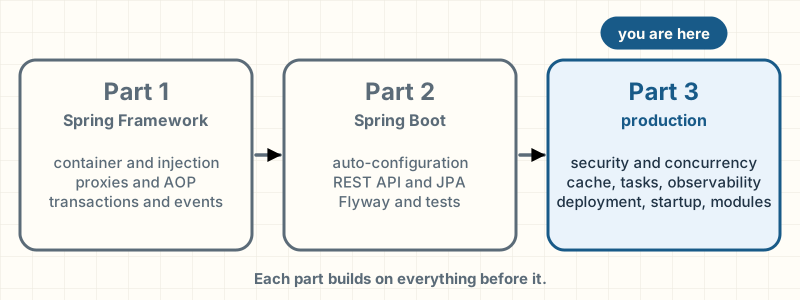
You'll need three ideas from Part 1:
- What the container hands you may be a proxy, and a call from inside the same class doesn't go through it (proxies and AOP). Method security, caching,
@Asyncand transactions all work this way. @Transactional: what a transaction is, theREQUIREDandREQUIRES_NEWpropagation levels, and when a rollback happens (transactions).- Events with
ApplicationEventPublisherand@EventListener(events).
And from Part 2:
- how Boot decides what to configure and how to replace one of its beans (auto-configuration);
- profiles and
@ConfigurationProperties(properties and profiles); - the REST controller and errors with
ProblemDetail(errors); - the
Pedidoentity with Spring Data JPA and the Flyway migrations (data, Flyway); - tests with Testcontainers and
@ServiceConnection(tests).
I use all of that here without explaining it again.
Spring Security: who you are and what you can do
Right now, anyone who knows the API's URL can create orders, read other people's and cancel them. Every request needs two answers, and it pays to keep them apart:
- Authentication: who are you? Checking an identity: a password, a certificate, a signed token.
- Authorization: what can you do? Given an identity that's already been checked, deciding whether it can create, read or cancel.
If the first one fails, the response is 401 Unauthorized, which despite its name means "I don't know who you are". If the second one fails, it's 403 Forbidden: "I know who you are, and you can't".
What happens when you add the starter
Spring Security handles both. If you add only spring-boot-starter-security and configure nothing, Boot protects every route, creates a user called user and writes its password to the log at startup, at WARN level (Spring Boot Reference, 4.1):
Using generated security password: 6c3a1f0e-…

This generated password is for development use only. Your security configuration must be updated before running your application in production.
That's there so you can see security is on, not for production. One detail I checked with a test: if the classpath also has OAuth2 resource server support, which is what we're going to use, Boot does not create that user, because identities will arrive in a token.
The filter chain
Spring Security doesn't live in your controller: it lives before it, in the servlet filter chain. A filter is an object that gets the request before your code does and decides whether to let it through, modify it or stop it.
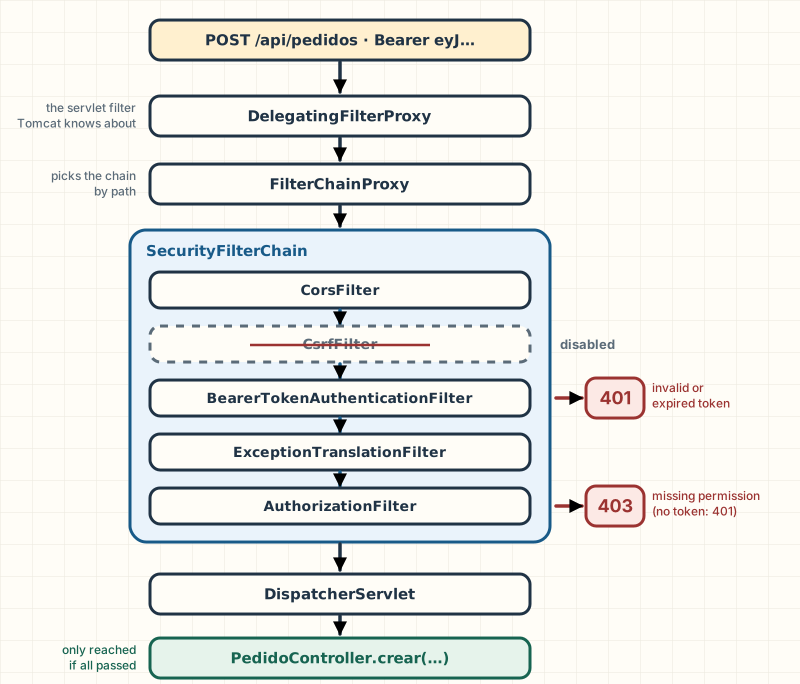
The servlet container (Tomcat) knows nothing about Spring. Spring Security hooks in through a standard filter, DelegatingFilterProxy, which hands the request to a bean, FilterChainProxy. That bean picks the SecurityFilterChain that matches the path and runs it: an ordered list of security filters (Spring Security Reference, 7.1). Spring Security sets the order; you decide which filters are there and with what rules, in a bean:
@Bean
SecurityFilterChain api(HttpSecurity http) throws Exception {
    http.authorizeHttpRequests(peticiones -> peticiones
                    .requestMatchers("/actuator/health/**", "/livez", "/readyz").permitAll()
                    .requestMatchers("/actuator/**").hasAuthority("SCOPE_pedidos:admin")
                    .requestMatchers(HttpMethod.GET, "/api/pedidos/**").hasAuthority("SCOPE_pedidos:leer")
                    .requestMatchers("/api/pedidos/**").hasAuthority("SCOPE_pedidos:escribir")
                    .anyRequest().denyAll())
            .oauth2ResourceServer(servidor -> servidor.jwt(withDefaults()))
            .sessionManagement(sesion -> sesion.sessionCreationPolicy(SessionCreationPolicy.STATELESS))
            .csrf(AbstractHttpConfigurer::disable)
            .cors(withDefaults());
    return http.build();
}authorizeHttpRequestsholds the authorization rules, in order: the first one that matches decides. Anything not named is denied:denyAll()at the end turns an oversight into a rejection (401 without a token, 403 with one) instead of an open door. The health probes are public because the orchestrator sends no token;/livezand/readyzare their paths in production (you'll see them when we deploy).oauth2ResourceServer(...jwt...)turns on authentication with a JWT.STATELESS: the app doesn't create HTTP sessions; every request brings its own token.csrfandcorsget their own section further down.
A request to create an order, filter by filter:
- Client calls FilterChainProxy: POST /api/pedidos · Authorization: Bearer eyJ…
- FilterChainProxy calls BearerTokenAuthenticationFilter: doFilter(request)
- BearerTokenAuthenticationFilter calls JwtDecoder: decode(token)
- JwtDecoder replies to BearerTokenAuthenticationFilter: valid Jwt
- BearerTokenAuthenticationFilter calls itself: SecurityContext ← SCOPE_pedidos:escribir
- BearerTokenAuthenticationFilter calls AuthorizationFilter: doFilter(request)
- AuthorizationFilter calls itself: hasAuthority('SCOPE_pedidos:escribir')?
- AuthorizationFilter calls PedidoController: crear(nuevo)
- PedidoController replies to Client: 201 Created
Step 9 of 9: The controller never saw the token or the rules. It just got a request that someone had already let through.
- Tomcat receives the request and runs it through its filters. Spring Security's is DelegatingFilterProxy, which hands it to the FilterChainProxy bean. That bean picks the SecurityFilterChain that matches /api/pedidos.
- Other filters in the chain already ran, like the CORS one and the one that writes security headers. The CSRF filter isn't there: we disabled it. Now it's the turn of the filter that looks for a Bearer token in the Authorization header.
- It found the token and passes it to the JwtDecoder. The decoder checks the signature with the issuer's public key and validates the expiry.
- The signature is good and the token hasn't expired. If anything had failed, the filter would respond 401 with the WWW-Authenticate: Bearer header, and the request would end here.
- The JwtAuthenticationConverter, used by the authentication provider the filter handed the token to, turns each scope in the scope claim into an authority with the SCOPE_ prefix. The filter stores the authentication in the SecurityContext: from here on, the rest of the request knows who the client is.
- Authenticated. On to the last filter that matters: authorization.
- It goes through the authorizeHttpRequests rules in order. The first one that matches POST /api/pedidos requires SCOPE_pedidos:escribir, and the token has it. If it didn't, the filter would throw AccessDeniedException, and the ExceptionTranslationFilter, which catches it, would respond 403.
- Only now does the request reach the DispatcherServlet and your controller. I'm simplifying: between the two sits the whole Spring MVC path from Part 2.
- The controller never saw the token or the rules. It just got a request that someone had already let through.
JWT tokens with a resource server
The store doesn't keep passwords. Identities are handled by an identity provider, a separate service such as Keycloak, Auth0 or your cloud's, which authenticates the user and gives them a token. The API only checks that token: in OAuth2 terms, it's a resource server.
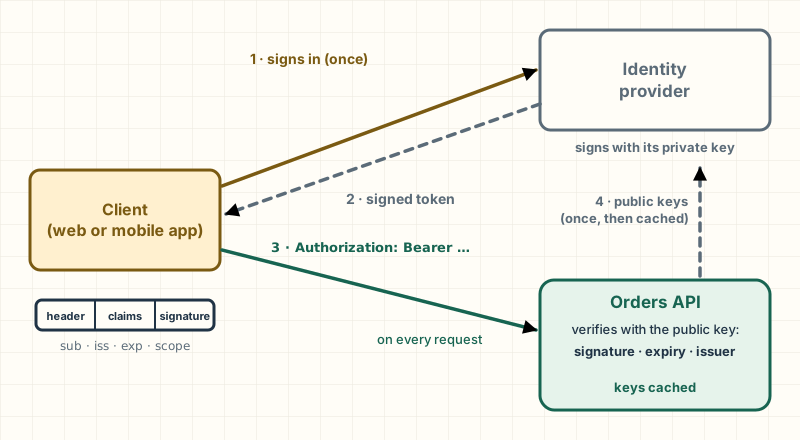
A JWT (JSON Web Token) is a string in three parts: a header, a body with data (claims: who it is, who issued it, when it expires, what scopes it has) and a signature. The provider signs with its private key; the API verifies with the public key. If someone changes a single comma in the body, the signature no longer matches.
With the spring-boot-starter-security-oauth2-resource-server starter, one property is enough:
spring:
  security:
    oauth2:
      resourceserver:
        jwt:
          issuer-uri: ${JWT_ISSUER_URI:http://localhost:9000/realms/tienda}
With issuer-uri, Boot builds a JwtDecoder that discovers the issuer's public keys and checks that every token names that same issuer (Spring Security Reference, 7.1). It creates it lazily: the app starts even if the provider doesn't respond, and contacts it on the first request.
Authorities come from the token's scope (or scp) claim: each scope becomes an authority with the SCOPE_ prefix. That's why the rules say hasAuthority("SCOPE_pedidos:escribir").
How to test without a provider. The tests generate an RSA key pair, sign tokens with the private key and give the app a JwtDecoder that trusts the public one. Boot only creates its own decoder if there isn't one already, so the test one wins:
@Bean
JwtDecoder jwtDecoder() {
    return NimbusJwtDecoder.withPublicKey((RSAPublicKey) CLAVES.getPublic()).build();
}
With that, the tests send real tokens through the real chain:
@Test
void sinTokenLaRespuestaEs401YDiceComoAutenticarse() throws Exception {
    mvc.perform(get("/api/pedidos/1"))
            .andExpect(status().isUnauthorized())
            .andExpect(header().string("WWW-Authenticate", containsString("Bearer")));
}

@Test
void conUnTokenValidoPasa() throws Exception {
    mvc.perform(crearPedido(tokens.token("ana", "pedidos:escribir")))
            .andExpect(status().isCreated());
}
Other tests check that an expired token, or one signed with a different key, gets a 401, and that one without the required scope gets a 403.
CSRF and CORS: when they apply
They have similar names and solve opposite problems.
CSRF (Cross-Site Request Forgery) is an attack through the browser: a malicious page makes your browser send a request to another site, and the browser attaches that site's cookies on its own. If the session lives in a cookie, the forged request arrives authenticated. Spring Security's protection requires an extra token that the malicious page can't know.
This API doesn't use cookies: the token travels in the Authorization header, which the browser never adds on its own. A malicious page has no way to make the forged request arrive authenticated, so here it's disabled, even though the client is JavaScript in a browser.
Watch out: "my API is stateless" isn't enough to disable CSRF. The Spring Security documentation warns that a sessionless app can still be vulnerable if it authenticates with cookies or with Basic authentication, because the browser sends those on its own too (Spring Security Reference, 7.1). The valid reason is that the credential doesn't travel in anything the browser attaches automatically.
CORS (Cross-Origin Resource Sharing) works the other way around: it doesn't protect the API, it opens it. The browser won't let JavaScript on https://tienda.example read responses from https://api.tienda.example, because they're different origins; with CORS, the API tells the browser which origins are allowed. Before the real request, the browser sends a preflight request: an OPTIONS that asks whether it may.
@Bean
UrlBasedCorsConfigurationSource corsConfigurationSource(@Value("${app.cors.origenes}") List<String> origenes) {
    var cors = new CorsConfiguration();
    cors.setAllowedOrigins(origenes);
    cors.setAllowedMethods(List.of("GET", "POST"));
    cors.setAllowedHeaders(List.of("Authorization", "Content-Type"));
    var porRuta = new UrlBasedCorsConfigurationSource();
    porRuta.registerCorsConfiguration("/api/**", cors);
    return porRuta;
}
The preflight carries no credentials, so CORS has to be handled before security: otherwise the preflight gets a 401 and the browser blocks everything. Spring Security does that on its own when it finds a UrlBasedCorsConfigurationSource bean and the chain says cors(withDefaults()) (Spring Security Reference, 7.1). I checked that a preflight from the allowed origin gets Access-Control-Allow-Origin and one from any other origin is rejected.
The usual mistake: "fixing" a CORS error with
allowedOrigins("*"). The error goes away, and so does the control. In this API the damage is limited: the token travels in a header the browser doesn't attach on its own, so another site could only read what's served without authentication. The same shortcut is serious in an API that's only reachable from the internal network, because the employee's browser becomes the bridge, or with the credential in cookies: there Spring rejects*together withallowCredentials(true), and the easy way out,allowedOriginPatterns("*"), opens everything (Spring Framework API,CorsConfiguration). The list of origins belongs in configuration, per environment.
Method authorization with @PreAuthorize
URL rules are enough for "read" and "write", but canceling an order is a business decision that shouldn't depend on the name of a route. @PreAuthorize puts the rule on the service method:
@PreAuthorize("hasAuthority('SCOPE_pedidos:admin')")
@Transactional
public PedidoRespuesta cancelar(Long id, long versionLeida) {
    var pedido = cargarEnVersion(id, versionLeida);
    pedido.cambiarA(EstadoPedido.CANCELADO);
    return PedidoRespuesta.de(repositorio.saveAndFlush(pedido));
}
It works because PedidoService is a proxy (Part 1): it evaluates the expression before entering the method and, if it doesn't hold, throws AccessDeniedException, which the filter chain turns into a 403. You turn it on with @EnableMethodSecurity; the starter doesn't do it by default (Spring Security Reference, 7.1).
@Test
void cancelarExigeElAlcanceDeAdministrador() throws Exception {
    var escritor = tokens.token("ana", "pedidos:escribir");
    long id = idDelPedidoCreado(mvc, escritor);

    mvc.perform(conVersion("/api/pedidos/" + id + "/cancelacion", escritor, 0))
            .andExpect(status().isForbidden());

    var admin = tokens.token("soporte", "pedidos:escribir", "pedidos:admin");
    mvc.perform(conVersion("/api/pedidos/" + id + "/cancelacion", admin, 0))
            .andExpect(status().isOk())
            .andExpect(jsonPath("$.estado").value("CANCELADO"));
}
What to take with you:
- Security lives in a filter chain in front of your controller, declared with a
SecurityFilterChainbean; its rules are evaluated in order.- With JWT, the provider signs and the API verifies; scopes arrive as
SCOPE_…authorities.- CSRF is disabled when the credential doesn't travel in cookies; CORS opens the API to specific origins, never to
*.@PreAuthorizeneeds@EnableMethodSecurityand, like any proxy, does nothing on a call from the same class.
Going deeper
a custom filter is placed relative to a known one with addFilterBefore or addFilterAfter; you don't need to know the full order (Spring Security Reference, 7.1).
Boot 4.1 added authorities-claim-expressions, to read authorities from other claims in the token; together with authority-prefix, which already existed and changes the prefix, it helps when your provider puts roles in a claim of its own.
If the app is both an API and a website with sessions, the right setup is two SecurityFilterChains, each with its own securityMatcher: a stateless one for /api/** and one with sessions and CSRF for everything else.
Concurrency: two requests on the same order
Ana pays for her order from her phone. In the same second, someone in support cancels it from the admin panel, because an hour earlier Ana had written asking to cancel it. Both requests read the order in the CREADO state, both say "great, I can change it" and both write. The last one to write wins. The order ends up CANCELADO, the charge went through, and nobody got an error.
That's a lost update: it happens whenever two transactions do read-modify-write on the same row and nobody checks that the row is still the way they read it.
Payment request
- read CREADO · v0 (done)
Cancellation request
- UPDATE … version = 0 → 0 rows (discarded)
Order row in the database
- PAGADO · version 1 (done)
Step 6 of 6: The same scene with @Version: the cancellation writes UPDATE … WHERE id = 7 AND version = 0. No row has version 0 anymore, so the UPDATE changes nothing, Hibernate notices and the transaction fails. The payment stays.
- The order is CREADO. With @Version, the row also has a version column, which starts at 0.
- Support opens the order to cancel it: its request reads CREADO, version 0, and keeps that copy in memory.
- Before support confirms, Ana's payment arrives. It reads the same thing: CREADO, version 0.
- The payment writes first and commits. The row is now PAGADO, and Hibernate bumps the version to 1 in the same UPDATE.
- Without @Version, the cancellation writes its copy on top: UPDATE pedidos SET estado = 'CANCELADO' WHERE id = 7. The row ends up CANCELADO, the payment is lost, and both requests responded 200.
- The same scene with @Version: the cancellation writes UPDATE … WHERE id = 7 AND version = 0. No row has version 0 anymore, so the UPDATE changes nothing, Hibernate notices and the transaction fails. The payment stays.
Optimistic locking with @Version
Pessimistic locking locks the row when it's read, and the second request waits. Optimistic locking locks nothing: when it writes, it checks that nobody wrote in between. In a web API, where a minute can go by between reading and writing while someone looks at the screen, optimistic is the one that fits: nobody wants a row locked for a minute.
In JPA you turn it on with a column, which migration V2 adds to the Part 2 table, and an annotation:
ALTER TABLE pedidos ADD COLUMN version BIGINT NOT NULL DEFAULT 0;The entity, before and after:
Before
@Entity
@Table(name = "pedidos")
public class PedidoSinVersion {

    @Id
    private Long id;

    private String cliente;
    private String correo;

    @Enumerated(EnumType.STRING)
    private EstadoPedido estado;

    private Instant creadoEn;

    // …
After
@Entity
@Table(name = "pedidos")
public class Pedido {

    @Id
    @GeneratedValue(strategy = GenerationType.IDENTITY)
    private Long id;

    private String cliente;
    private String correo;

    @Enumerated(EnumType.STRING)
    private EstadoPedido estado;

    private Instant creadoEn;

    @Version
    private long version;

    // …
With @Version, Hibernate adds AND version = ? to every UPDATE and increments the version. If the UPDATE doesn't find the row with the version it read, someone wrote first, and it throws an exception that Spring translates to ObjectOptimisticLockingFailureException (Spring Framework API, 7.0).
This test reproduces the scene from the board with two real transactions. To make the order the same every time, I use REQUIRES_NEW (Part 1): the payment transaction runs to completion in the middle of the cancellation one, on the same thread.
@Test
void sinVersionLaCancelacionBorraElPagoSinQueNadieSeEntere() {
    long id = pedidoNuevo();

    pagoYCancelacionALaVez(PedidoSinVersion.class, id, PedidoSinVersion::cambiarA);

    assertThat(estadoEnLaBase(id)).isEqualTo("CANCELADO"); // y el pago se perdió
}

@Test
void conVersionLaSegundaEscrituraFallaYElPagoQueda() {
    long id = pedidoNuevo();

    assertThatThrownBy(() -> pagoYCancelacionALaVez(Pedido.class, id, Pedido::cambiarA))
            .isInstanceOf(ObjectOptimisticLockingFailureException.class);

    assertThat(estadoEnLaBase(id)).isEqualTo("PAGADO");
}

private <T> void pagoYCancelacionALaVez(Class<T> entidad, long id, BiConsumer<T, EstadoPedido> cambiar) {
    enTransaccion(TransactionDefinition.PROPAGATION_REQUIRED).executeWithoutResult(cancelacion -> {
        T leidoPorLaCancelacion = em.find(entidad, id); // lee CREADO

        enTransaccion(TransactionDefinition.PROPAGATION_REQUIRES_NEW).executeWithoutResult(pago ->
                cambiar.accept(em.find(entidad, id), EstadoPedido.PAGADO)); // lee CREADO, escribe PAGADO, confirma

        cambiar.accept(leidoPorLaCancelacion, EstadoPedido.CANCELADO); // escribe sobre lo que leyó
    });
}
PedidoSinVersion maps the same table and exists only in the tests, as the "before".
The version has to travel to the client
@Version protects two transactions that overlap. But between "support opens the order" and "support clicks cancel" there are two HTTP requests, not one transaction: if the cancellation reads the order again, it reads version 1 and the write goes through. The version has to travel: the API returns it on read, the client sends it on write, and the service compares:
private Pedido cargarEnVersion(Long id, long versionLeida) {
    var pedido = cargar(id);
    if (pedido.getVersion() != versionLeida) {
        throw new ObjectOptimisticLockingFailureException(Pedido.class, id);
    }
    return pedido;
}@Transactional
public PedidoRespuesta pagar(Long id, long versionLeida) {
var pedido = cargarEnVersion(id, versionLeida);
pedido.cambiarA(EstadoPedido.PAGADO);
eventos.publishEvent(new PedidoPagado(pedido.getId(), pedido.getCorreo()));
return PedidoRespuesta.de(repositorio.saveAndFlush(pedido));
}saveAndFlush forces the UPDATE before building the response, so the client gets the new version and not the one it read.
What to return to the client: 409
A conflict isn't a server error: it's telling the client "someone else got there first, read it again". The HTTP status is 409 Conflict:
@ExceptionHandler(ObjectOptimisticLockingFailureException.class)
ProblemDetail conflicto(ObjectOptimisticLockingFailureException e) {
    var problema = ProblemDetail.forStatusAndDetail(
            HttpStatus.CONFLICT, "Otro cambio llegó antes que el tuyo. Vuelve a leer el pedido y reintenta.");
    problema.setTitle("El pedido cambió mientras lo editabas");
    return problema;
}@Test
void quienEscribeConUnaVersionViejaRecibe409() throws Exception {
var cliente = tokens.token("ana", "pedidos:escribir");
var soporte = tokens.token("soporte", "pedidos:escribir", "pedidos:admin");
long id = idDelPedidoCreado(mvc, cliente); // los dos leen la versión 0
mvc.perform(conVersion("/api/pedidos/" + id + "/pago", cliente, 0))
.andExpect(status().isOk())
.andExpect(jsonPath("$.version").value(1));
mvc.perform(conVersion("/api/pedidos/" + id + "/cancelacion", soporte, 0))
.andExpect(status().isConflict())
.andExpect(jsonPath("$.title").value("El pedido cambió mientras lo editabas"));
}The usual mistake: retrying automatically when you get the conflict. If the server retries the cancellation with the new version, you're back where you started: you cancel a paid order without anyone seeing that it was paid. The retry is decided by a person who has seen the new state.
What to take with you: unchecked read-modify-write loses updates silently.
@Versiondetects it in theUPDATE; across HTTP requests, the version makes a round trip with the client, and the conflict is answered with 409.
Going deeper
the standard HTTP mechanism is for the response to carry the version in the ETag header, the client to send it back in If-Match, and the server to respond 412 Precondition Failed if it doesn't match (RFC 9110). It's the protocol's own mechanism, and it asks more of the client; sending the version in the body is the clearest way to start.
Pessimistic locking exists in Spring Data with @Lock(LockModeType.PESSIMISTIC_WRITE) on a repository method. It makes sense when collisions are frequent and the transaction is short, like reserving stock for a very popular product: there, waiting an instant is cheaper than retrying every conflict.
Events after the commit
When an order moves to PAGADO, the store sends Ana an email. As in Part 1, that's decoupled with an event: the service publishes PedidoPagado and a listener sends the email.
Now the payment is recorded inside a larger operation: pay, reserve stock, invoice. The stock reservation fails, the whole transaction rolls back and the order goes back to CREADO. But the "We received the payment for your order" email already went out: @EventListener runs at the moment the event is published, inside a transaction that may or may not end up committing.
@TransactionalEventListener
@TransactionalEventListener registers the listener with the current transaction and runs it in one of its phases; the default phase is AFTER_COMMIT, only if it committed (Spring Framework Reference, 7.0).
Before
static class AvisoInmediato {

    private final NotificadorEnLog notificador = new NotificadorEnLog();

    @EventListener
    void alPagar(PedidoPagado evento) {
        notificador.enviar(evento.correo(), "Recibimos el pago de tu pedido " + evento.pedidoId());
    }
}
After
@Component
class AvisoDePago {

    private final Notificador notificador;

    AvisoDePago(Notificador notificador) {
        this.notificador = notificador;
    }

    @TransactionalEventListener
    void alPagar(PedidoPagado evento) {
        notificador.enviar(evento.correo(), "Recibimos el pago de tu pedido " + evento.pedidoId());
    }
}
One annotation changes, and with it the order of the messages:
- Payer calls Transaction: begin
- Payer calls PedidoService: pagar(7, version 0)
- PedidoService calls ApplicationEventPublisher: publishEvent(PedidoPagado)
- ApplicationEventPublisher calls Transaction: register AvisoDePago for AFTER_COMMIT
- PedidoService replies to Payer: PedidoRespuesta
- Payer calls Transaction: commit
- Transaction calls AvisoDePago: alPagar(PedidoPagado)
- AvisoDePago calls Notificador: enviar(ana@…, "Recibimos el pago…")
Step 8 of 8: The email goes out only once the payment is a fact in the database.
- The transaction for the whole operation begins: pay, reserve stock, invoice.
- The service changes the order to PAGADO. Nothing is committed to the database yet.
- It publishes the event, just like in Part 1.
- Here's the difference. With @EventListener, the publisher would call the listener right now. With @TransactionalEventListener, it notes it down on the current transaction for later.
- pagar() finishes without anyone having sent a single email.
- The stock reservation and the invoice went fine: the transaction commits. If they had failed, there would be a rollback here, and the next two steps would never happen.
- With the commit done, the transaction runs what it had noted down for AFTER_COMMIT.
- The email goes out only once the payment is a fact in the database.
I checked it with both listeners at once, against a transaction that rolls back:
@Test
void siLaTransaccionSeDeshaceSoloElAvisoInmediatoSale() {
    long id = pedidoNuevo();

    assertThatThrownBy(() -> transaccion.executeWithoutResult(t -> {
                pedidos.pagar(id, 0);
                throw new IllegalStateException("el cobro con la tarjeta falló");
            }))
            .hasMessage("el cobro con la tarjeta falló");

    assertThat(pedidos.buscar(id).estado()).isEqualTo(EstadoPedido.CREADO); // no se pagó
    assertThat(inmediato.notificador.enviados()).anyMatch(m -> m.endsWith("pedido " + id)); // y avisó igual
    assertThat(notificador.enviados()).noneMatch(m -> m.endsWith("pedido " + id)); // este, no
}
The usual mistake: writing to the database from an
AFTER_COMMITlistener and expecting it to be saved. The original transaction has already committed, but its resources may still be active: whatever you write "participates" in it and never commits. Spring's documentation asks you to useREQUIRES_NEWfor any transactional operation called from there (Spring Framework API, 7.0).
What to take with you: whatever leaves your system (emails, messages to other services) goes in a
@TransactionalEventListener, which by default runs after the commit and doesn't run if there was a rollback.
Going deeper
if the event is published with no transaction in progress, a @TransactionalEventListener doesn't run, unless you set fallbackExecution = true (Spring Framework Reference, 7.0). It's easy to forget on a method without @Transactional.
AFTER_COMMIT isn't a delivery guarantee either: if the app goes down between the commit and the send, the email never goes out. When that matters, the pattern is the outbox: save the event to a table in the same transaction and publish it from there afterwards. Spring Modulith ships an event publication registry built on that idea: it stores each event in the original transaction and keeps the ones that didn't complete as pending, so they can be retried (Spring Modulith Reference, 2.1).
Caching
Each line of an order asks FuenteDePrecios (the price source) for its price, which in a real store would be another service or an expensive query. Prices change rarely and get requested a lot: the textbook case for a cache, which stores the result of a call and returns it the next time without repeating it.
In Spring you annotate the method, and Spring decides whether to call it or return what it stored. With spring-boot-starter-cache and Caffeine on the classpath, Boot configures an in-memory CacheManager (Spring Boot Reference, 4.1):
<dependency>
    <groupId>org.springframework.boot</groupId>
    <artifactId>spring-boot-starter-cache</artifactId>
</dependency>
<dependency>
    <groupId>com.github.ben-manes.caffeine</groupId>
    <artifactId>caffeine</artifactId>
</dependency>spring:
cache:
cache-names: precios
caffeine:
spec: maximumSize=1000,expireAfterWrite=10mPlus @EnableCaching on a configuration class:
@Cacheable("precios")
public BigDecimal precioDe(String producto) {
    return fuente.consultar(producto);
}

@CacheEvict(cacheNames = "precios", key = "#producto")
public void actualizarPrecio(String producto, BigDecimal precio) {
    fuente.fijar(producto, precio);
}
@Cacheable("precios") uses the argument as the key. @CacheEvict removes the entry when the price changes; without it, the cache would serve the old price until it expires. Invalidation is the hard part of caching.
The cache is a proxy too
How does Spring know it has to check the cache before running precioDe? Because Catalogo is a proxy, and the cache lives in the proxy.
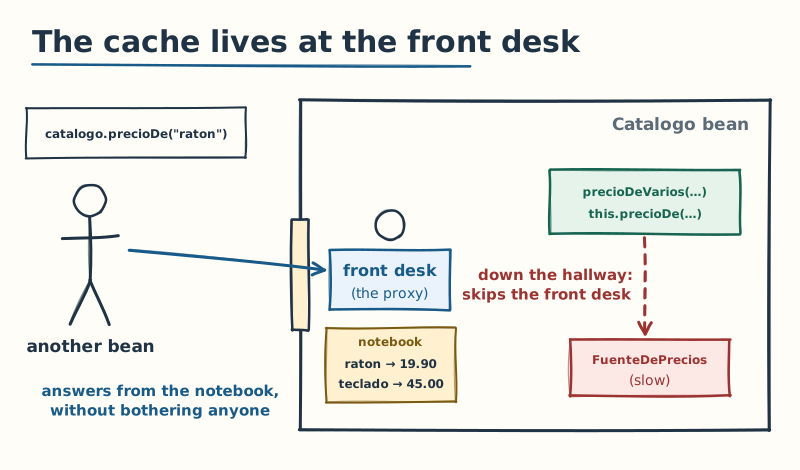
This method adds up the prices of several products:
public BigDecimal precioDeVarios(List<String> productos) {
    return productos.stream()
            .map(this::precioDe)
            .reduce(BigDecimal.ZERO, BigDecimal::add);
}
this::precioDe is a call from the class to itself: it doesn't go through the proxy, and there's no cache. In proxy mode, the default, only external calls are intercepted (Spring Framework Reference, 7.0). The tests count the queries to the source:
@Test
void laSegundaConsultaNoLlegaALaFuente() {
    int antes = catalogo.consultasALaFuente();

    catalogo.precioDe("raton");
    catalogo.precioDe("raton");

    assertThat(catalogo.consultasALaFuente() - antes).isEqualTo(1);
}

@Test
void desdeDentroDeLaClaseLaCacheNoExiste() {
    catalogo.precioDe("raton"); // queda en la caché
    int antes = catalogo.consultasALaFuente();

    catalogo.precioDeVarios(List.of("raton", "raton"));

    assertThat(catalogo.consultasALaFuente() - antes).isEqualTo(2);
}
The usual mistake: putting
@Cacheableon a private method or calling it from the same class, and concluding that "the cache doesn't work". The cache works; the call just doesn't go through it. The way out is to have another bean call the cached method, or to move the logic that uses it to another class.
What to take with you: the cache lives in the proxy, so self-invocation doesn't use it. And Caffeine stores data in the memory of each instance: with three instances there are three caches, and a
@CacheEvictonly clears the cache of the instance that ran it.
Going deeper
if you need a cache shared across instances, Boot configures a RedisCacheManager when Redis is available and configured (Spring Boot Reference, 4.1). You gain consistency across instances, and you pay a network call on every read, plus another service to operate.
expireAfterWrite puts a ceiling on how stale a value can get even if invalidation fails. Choosing it is a business decision: how long a customer can see a price that has already changed.
Background work
Some work doesn't need to happen while the client waits, like exporting a report, and some work nobody asks for and runs on its own at a set time, like canceling orders that have gone unpaid for two days.
@Async and its executor
@Async makes a method run on another thread: the caller immediately gets a CompletableFuture back and moves on.
@Async
public CompletableFuture<Exportacion> exportar() {
    long cuantos = repositorio.count();
    return CompletableFuture.completedFuture(new Exportacion(cuantos, Thread.currentThread()));
}
It works through a proxy and is turned on with @EnableAsync. It runs on the executor Boot configures, applicationTaskExecutor, a thread pool (Spring Boot Reference, 4.1); a test showed me its thread names start with task-.
The usual mistake: an
@Asyncmethod that returnsvoidand throws an exception. The caller has already moved on and never finds out: at best, the exception ends up in the log. Return aCompletableFutureand handle the error, or configure anAsyncUncaughtExceptionHandler.
@Scheduled with several instances
Cleaning up unpaid orders is a scheduled job. @EnableScheduling and a cron expression are enough:
@Scheduled(cron = "${app.limpieza.cron:0 0 3 * * *}")
@SchedulerLock(name = "cancelar-pedidos-sin-pagar", lockAtLeastFor = "PT1M", lockAtMostFor = "PT10M")
@Transactional
public void cancelarSinPagar() {
    ejecuciones.incrementAndGet();
    int cancelados = repositorio.cancelarSinPagarAntesDe(reloj.instant().minus(Duration.ofDays(2)));
    log.info("Pedidos sin pagar cancelados: {}", cancelados);
}
Ignore the second annotation for a moment. With @Scheduled alone, the cron fires on every instance: with three instances behind a load balancer, the job runs three times at 3:00. If it sends a daily summary email, customers get three.
@Scheduled doesn't know other instances exist. The most common solution is ShedLock, a separate library that keeps a lock in a table all of them share; version 7 is the one compatible with Spring Framework 7 and Spring Boot 4 (ShedLock, README).
<dependency>
    <groupId>net.javacrumbs.shedlock</groupId>
    <artifactId>shedlock-spring</artifactId>
    <version>${shedlock.version}</version>
</dependency>
<dependency>
    <groupId>net.javacrumbs.shedlock</groupId>
    <artifactId>shedlock-provider-jdbc-template</artifactId>
    <version>${shedlock.version}</version>
</dependency>CREATE TABLE shedlock (
name VARCHAR(64) NOT NULL,
lock_until TIMESTAMP NOT NULL,
locked_at TIMESTAMP NOT NULL,
locked_by VARCHAR(255) NOT NULL,
PRIMARY KEY (name)
);@Configuration(proxyBeanMethods = false)
@EnableScheduling
@EnableSchedulerLock(defaultLockAtMostFor = "PT10M")
class ConfiguracionTareas {
@Bean
LockProvider candados(DataSource dataSource) {
return new JdbcTemplateLockProvider(JdbcTemplateLockProvider.Configuration.builder()
.withJdbcTemplate(new JdbcTemplate(dataSource))
.usingDbTime()
.build());
}
}usingDbTime() uses the database's clock instead of each instance's, as the README recommends. Here's how it works:
Instance A
Instance B
shedlock table
- A · until 03:10 (waiting)
Step 6 of 6: If A had crashed in the middle of the job, nobody would release the lock. That's why lockAtMostFor exists: at 03:10 it expires on its own, and the next run can take it.
- At 3:00 the cron fires on both instances, one second apart. The lock is free.
- A tries to take the lock: an UPDATE (or an INSERT the first time) that only works if the lock is free. It takes it until 03:10, which is lockAtMostFor.
- B tries the same thing a second later. The UPDATE doesn't find a free lock and changes no rows. B doesn't wait: it skips this run.
- A finishes in two seconds. It doesn't release the lock completely: it keeps it until 03:01, which is lockAtLeastFor. A job this fast would leave the lock free before an instance with a slightly slow clock got there.
- Exactly that: a third instance, or B with its clock running behind, fires its cron at 03:00:40. The lock is still taken, so it skips the run too.
- If A had crashed in the middle of the job, nobody would release the lock. That's why lockAtMostFor exists: at 03:10 it expires on its own, and the next run can take it.
The test simulates the two instances with two calls in a row: the lock lives in the database, so it doesn't matter which machine each call comes from.
@Test
void conCandadoLaSegundaInstanciaSeSaltaLaEjecucion() {
    jdbc.update("delete from shedlock");
    int antes = limpieza.ejecuciones();

    limpieza.cancelarSinPagar(); // la instancia A toma el candado
    limpieza.cancelarSinPagar(); // la B llega segundos después: sigue tomado (lockAtLeastFor)

    assertThat(limpieza.ejecuciones() - antes).isEqualTo(1);
    assertThat(jdbc.queryForObject(
                    "select count(*) from shedlock where name = 'cancelar-pedidos-sin-pagar' and lock_until > now()",
                    Integer.class))
            .isEqualTo(1);
}
Watch out: ShedLock guarantees that the job doesn't run twice at the same time, not that it runs: a skipped run is lost. And
lockAtMostForhas to be longer than the job takes in the worst case, or the lock expires while it's still running and another instance starts its own.
Virtual threads
Tomcat handles each request on a thread. Operating system threads are expensive, so the pool is limited, and when every request is waiting on the database, it fills up with threads doing nothing.
Java 21's virtual threads are cheap threads managed by the JVM: when one blocks, the JVM uses the real thread for another one. In Boot you turn them on with spring.threads.virtual.enabled=true, and then Tomcat, @Async and @Scheduled use virtual threads (Spring Boot Reference, 4.1); I checked the @Async part with a test. The reference strongly recommends Java 24 or later, because before that a virtual thread can get pinned to its real thread and lose performance. And since they're daemon threads, an app that only has scheduled jobs can exit on its own: that's what spring.main.keep-alive=true is for.
What the property doesn't solve: virtual threads remove the thread limit, not the connection limit. Boot's pool, HikariCP, has 10 connections by default (HikariCP, README), and thousands of virtual threads end up queuing for those 10.
@Test
void veinteHilosVirtualesYDosConexionesSoloTrabajanDosALaVez() throws Exception {
    var adentro = new AtomicInteger();
    var maximo = new AtomicInteger();
    long inicio = System.nanoTime();

    try (var hilos = Executors.newVirtualThreadPerTaskExecutor()) {
        for (int i = 0; i < 20; i++) {
            hilos.submit(() -> jdbc.execute((Connection conexion) -> {
                maximo.accumulateAndGet(adentro.incrementAndGet(), Math::max);
                try (var consulta = conexion.createStatement()) {
                    consulta.execute("select pg_sleep(0.2)"); // 200 ms de "trabajo" en la base
                } finally {
                    adentro.decrementAndGet();
                }
                return null;
            }));
        }
    }

    var duracion = Duration.ofNanos(System.nanoTime() - inicio);
    assertThat(maximo.get()).isEqualTo(2); // el pool, no los hilos, pone el límite
    assertThat(duracion).isGreaterThanOrEqualTo(Duration.ofMillis(1900)); // 20 / 2 × 200 ms
}
Twenty threads, two connections, 200 ms per query: there are never more than two queries at once, and the whole thing takes ten rounds. The bottleneck is the pool, and behind the pool, the database.
MVC, WebFlux or virtual threads
Spring MVC, the one used throughout the series, is imperative: if the method waits, the thread waits. WebFlux is reactive: the code is a chain of operations over data streams, and no thread waits. Virtual threads give MVC part of what WebFlux promised.
The Spring Framework documentation is more cautious than many articles: if your Spring MVC application works fine, there's no need to change; with blocking persistence, such as JPA or JDBC, Spring MVC is the best choice for common architectures; and reactive, in general, doesn't make applications run faster (Spring Framework Reference, 7.0). This app uses JPA, so WebFlux wouldn't give it anything without also changing the data access.
What to take with you:
@Scheduledruns on every instance; ShedLock puts a lock in the database so it runs on one. Virtual threads remove the thread limit, not the connection limit.
Going deeper
@Scheduled and @Async use different executors. The @Scheduled one has a single thread by default: one slow job delays all the others. You adjust it with spring.task.scheduling.pool.size; with virtual threads, the pool size properties no longer have any effect (Spring Boot Reference, 4.1).
Making the Hikari pool bigger isn't the automatic answer to the bottleneck: each connection is a process in Postgres (PostgreSQL Documentation), and the database has its own connection limit. Multiply the pool size by the number of instances before you raise it.
Observability
An app in production has to answer, without anyone logging into the server: are you alive? are you ready for traffic? what's going on inside? For that, Boot has Actuator: operational endpoints under /actuator.
What to expose and what not to
Some endpoints show things that should never leave the company: env lists the configuration, heapdump downloads the JVM's entire memory. That's why Boot exposes only health over HTTP (Spring Boot Reference, 4.1), and you add the rest yourself:
management:
  endpoints:
    web:
      exposure:
        include: health,info,metrics
  endpoint:
    health:
      group:
        readiness:
          include: readinessState,calentamiento
The security chain leaves only health public; metrics require an admin token:
@Test
void laSaludYLasSondasSonPublicas() throws Exception {
    mvc.perform(get("/actuator/health")).andExpect(status().isOk());
    mvc.perform(get("/actuator/health/liveness")).andExpect(status().isOk());
    mvc.perform(get("/actuator/health/readiness")).andExpect(status().isOk());
}

@Test
void lasMetricasPidenToken() throws Exception {
    mvc.perform(get("/actuator/metrics")).andExpect(status().isUnauthorized());
    mvc.perform(leer("/actuator/metrics", tokens.token("ops", "pedidos:admin"))).andExpect(status().isOk());
}

@Test
void envYHeapdumpNoExistenNiParaElAdministrador() throws Exception {
    var admin = tokens.token("ops", "pedidos:admin");
    mvc.perform(leer("/actuator/env", admin)).andExpect(status().isNotFound());
    mvc.perform(leer("/actuator/heapdump", admin)).andExpect(status().isNotFound());
}
env and heapdump return 404 even with the most powerful token: they're not protected, they don't exist. That's the best security for an endpoint you don't need.
Note: On this site, the backend exposes only
healthandinfo, andinfoincludes the exact commit of the jar that's running. The deployment relies on it: its last step polls/actuator/healthand/actuator/infountil health saysUPand the commit being served is the release's.
Alive isn't the same as ready
An orchestrator like Kubernetes asks each instance two different questions:
- Liveness (are you alive?): if the answer is no, the instance is broken beyond repair and has to be restarted.
- Readiness (are you ready?): if it's no, the instance is fine, but it shouldn't get traffic yet, or anymore.
Boot exposes both as health groups, at /actuator/health/liveness and /actuator/health/readiness. In Boot 4 they're on by default in any environment; up to Boot 3.5, only when the app detected it was running on Kubernetes (Spring Boot Reference, 4.1; Boot 4.0 migration guide).
At startup, the store preloads the price cache so the first customer doesn't pay for the cold start. For that, an ApplicationRunner is enough, or, as Calentamiento does, an ApplicationReadyEvent listener: Boot publishes the ACCEPTING_TRAFFIC state right after that event, so while it preloads, readiness already says no (Spring Boot Reference, 4.1).
A custom health indicator is needed when whatever decides if the instance is ready doesn't line up with startup: a warm-up that runs in the background, or something that can stop being ready at runtime. I show it with the preload because it's the simplest case, and because it puts the reason in the health response:
@Component
class CalentamientoHealthIndicator implements HealthIndicator {

    private final Calentamiento calentamiento;

    CalentamientoHealthIndicator(Calentamiento calentamiento) {
        this.calentamiento = calentamiento;
    }

    @Override
    public Health health() {
        return calentamiento.terminado()
                ? Health.up().build()
                : Health.down().withDetail("motivo", "precargando la caché de precios").build();
    }
}
A HealthIndicator is a bean that responds UP or DOWN; Boot names it after the bean name, without the HealthIndicator suffix: calentamiento (warm-up). The readiness group in the application.yml above includes it. The test turns off the automatic preload and calls it by hand, to see the before and after:
@Test
void vivaPeroNoListaHastaTerminarDeCalentar() throws Exception {
    mvc.perform(get("/actuator/health/liveness")).andExpect(status().isOk());
    mvc.perform(get("/actuator/health/readiness"))
            .andExpect(status().isServiceUnavailable())
            .andExpect(jsonPath("$.status").value("DOWN"));

    calentamiento.ejecutar();

    mvc.perform(get("/actuator/health/readiness")).andExpect(status().isOk());
}
While it's preloading, readiness responds 503 and the load balancer sends it no traffic; liveness responds 200 and nobody restarts it.
The usual mistake: putting the database in the liveness check. If the database has a bad moment, every instance says "I'm broken" at the same time, the orchestrator restarts all of them, and a database problem becomes a total outage. Boot's documentation warns about it: liveness shouldn't depend on external systems (Spring Boot Reference, 4.1). If the app can't serve without the database, that's readiness.
Metrics with Micrometer
Micrometer is Boot's metrics library: a facade over Prometheus, Datadog and the like, the way SLF4J is for logs. Actuator already ships metrics for the JVM, Tomcat, Hikari and every endpoint. A business metric is a counter that PedidoService registers with the MeterRegistry:
this.creados = Counter.builder("pedidos.creados")
        .description("Pedidos registrados desde que arrancó la instancia")
        .register(metricas);
Every crear() calls creados.increment(), and /actuator/metrics/pedidos.creados shows the value. To send metrics to a monitoring system, you add its registry (for example, Prometheus's) and Boot configures it.
Structured logs with a correlation ID
With three instances and thousands of requests per minute, logs are read with a tool that searches and filters, and that tool needs fields, not sentences. Boot 4.1 writes structured logs in JSON with logging.structured.format.console, in ecs, gelf or logstash format (Spring Boot Reference, 4.1).
To follow a request, you give it a correlation ID that goes on every log line it produces. A filter puts it in the MDC (Mapped Diagnostic Context), a per-thread map that the logging library reads when it writes:
@Component
@Order(Ordered.HIGHEST_PRECEDENCE)
class IdDeCorrelacion extends OncePerRequestFilter {

    static final String CABECERA = "X-Correlation-Id";

    @Override
    protected void doFilterInternal(HttpServletRequest peticion, HttpServletResponse respuesta, FilterChain cadena)
            throws ServletException, IOException {
        var recibido = peticion.getHeader(CABECERA);
        var id = recibido != null && recibido.matches("[A-Za-z0-9-]{1,64}") ? recibido : UUID.randomUUID().toString();
        MDC.put("correlacion", id);
        respuesta.setHeader(CABECERA, id);
        try {
            cadena.doFilter(peticion, respuesta);
        } finally {
            MDC.remove("correlacion");
        }
    }
}
Boot adds every MDC value to the JSON (Spring Boot Reference, 4.1):
@Test
void cadaLineaDelLogLlevaElIdDeCorrelacionDeSuPeticion(CapturedOutput salida) throws Exception {
    mvc.perform(crearPedido(tokens.token("ana", "pedidos:escribir")).header("X-Correlation-Id", "compra-7f3a"))
            .andExpect(status().isCreated())
            .andExpect(header().string("X-Correlation-Id", "compra-7f3a"));

    assertThat(salida.getOut().lines().filter(l -> l.contains("creado con 1 líneas")))
            .singleElement()
            .satisfies(linea -> assertThat(linea)
                    .startsWith("{")
                    .contains("\"correlacion\":\"compra-7f3a\"")
                    .contains("\"level\":\"INFO\""));
}
And this is the line that test wrote:
{"@timestamp":"2026-11-04T18:36:41.652616-06:00","@version":"1","message":"Pedido 1 creado con 1 líneas","logger_name":"com.ejemplo.pedidos.pedidos.PedidoService","thread_name":"main","level":"INFO","level_value":20000,"correlacion":"compra-7f3a"}Going deeper
if you use Micrometer Tracing, Boot already adds a correlation ID built from the trace's traceId and spanId to every line, and it also travels between services in the headers of each call (Spring Boot Reference, 4.1). The filter in this example is the minimal version, so you can see the mechanism; in a system with several services, tracing is the complete solution.
The filter validates the ID it receives before using it. A value that comes from the client and ends up in your logs is user input: without validating it, someone can inject line breaks or text that misleads whoever reads the logs.
What to take with you: expose only what you need. Liveness decides restarts and readiness decides traffic; anything external goes in readiness.
Packaging and deploying
The image: a layered Dockerfile or buildpacks
A container image is a stack of layers, and Docker reuses the ones that didn't change. A Boot jar weighs tens of megabytes: if you copy it whole, every commit creates a new layer that size, even if you only changed one line.
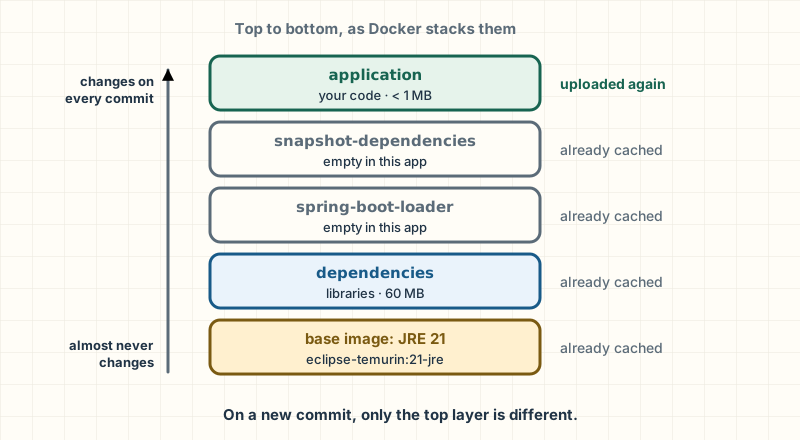
Boot knows how to split the jar into layers, from what changes least to what changes most: dependencies, spring-boot-loader, snapshot-dependencies and application (Spring Boot Reference, 4.1). A two-stage Dockerfile extracts them and copies them in that order. I didn't build this one: it follows the official Boot 4.1 example, with the JRE 21 image this site uses:
# illustrative: follows the official Spring Boot 4.1 example
FROM eclipse-temurin:21-jre AS capas
WORKDIR /app
COPY target/*.jar application.jar
RUN java -Djarmode=tools -jar application.jar extract --layers --destination extraido

FROM eclipse-temurin:21-jre
WORKDIR /app
COPY --from=capas /app/extraido/dependencies/ ./
COPY --from=capas /app/extraido/spring-boot-loader/ ./
COPY --from=capas /app/extraido/snapshot-dependencies/ ./
COPY --from=capas /app/extraido/application/ ./
ENTRYPOINT ["java", "-jar", "application.jar"]
The alternative is not to write the Dockerfile at all: ./mvnw spring-boot:build-image builds the image with Paketo buildpacks, which pick the JRE and assemble the image for you; all it needs is a Docker daemon (Spring Boot Maven Plugin, 4.1). You get a correct image without maintaining anything; you lose fine-grained control over the base image.
The JVM inside a container
On Linux, the JVM reads the container's memory and CPUs, not the machine's (java command documentation, JDK 21). What surprises people is the heap: by default, 25% of what's available (-XX:MaxRAMPercentage). In a 1 GB container, that's 256 MB, and the rest goes mostly unused. That's why it's common to raise -XX:MaxRAMPercentage, leaving room for what the JVM uses outside the heap (threads, compiled code, buffers); the value comes from measuring your app's memory with Actuator.
Profiles per environment
The production profile holds what only changes there:
server:
  shutdown: graceful
spring:
  lifecycle:
    timeout-per-shutdown-phase: 20s
management:
  server:
    port: 8081
  endpoint:
    health:
      probes:
        add-additional-paths: true
logging:
  structured:
    format:
      console: logstash
management.server.port moves Actuator to another port: the public load balancer only knows about 8080, and 8081 stays on the internal network for monitoring. The probes, on the other hand, are better answered on the app's port: on the management port they can succeed even when the main app isn't serving. add-additional-paths also publishes them on 8080, as /livez and /readyz, and that's where the orchestrator checks them (Spring Boot Reference, 4.1). A test starts this profile with real servers and checks it.
Graceful shutdown
If the app exits as soon as it gets the shutdown signal, requests that are halfway through get an error. With graceful shutdown, Tomcat stops accepting new requests and waits for the in-flight ones to finish, up to a maximum time.
It's the default behavior since Boot 3.4: server.shutdown is graceful, with 30 s per phase in spring.lifecycle.timeout-per-shutdown-phase (Spring Boot Reference, 4.1); I checked it with a test. The profile above writes it out anyway, so it's visible, and lowers the wait to 20 s.
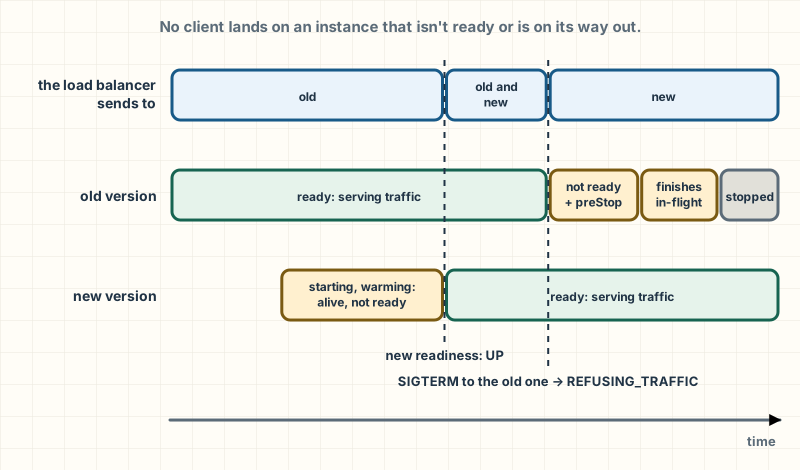
During shutdown, readiness switches to REFUSING_TRAFFIC, but the load balancer takes a few seconds to notice and keeps sending requests. That's why Boot's deployment guide recommends a pause before shutdown, a preStop hook in Kubernetes, rather than relying on graceful shutdown alone (Spring Boot Reference, 4.1).
Migrations without downtime: expand and contract
During a zero-downtime deployment, the old and new versions run at the same time against the same database. If the new version's migration changes something the old one uses, the old one starts failing. To rename the cliente column to nombre_cliente, the direct way is this:
ALTER TABLE pedidos RENAME COLUMN cliente TO nombre_cliente;As soon as it runs, every INSERT from the old version, which is still serving traffic, fails because the cliente column no longer exists. The alternative is to split the change across two deployments: expand and contract.
-- Release N: se agrega la columna nueva; la vieja sigue ahí.
ALTER TABLE pedidos ADD COLUMN nombre_cliente VARCHAR(120);
UPDATE pedidos SET nombre_cliente = cliente;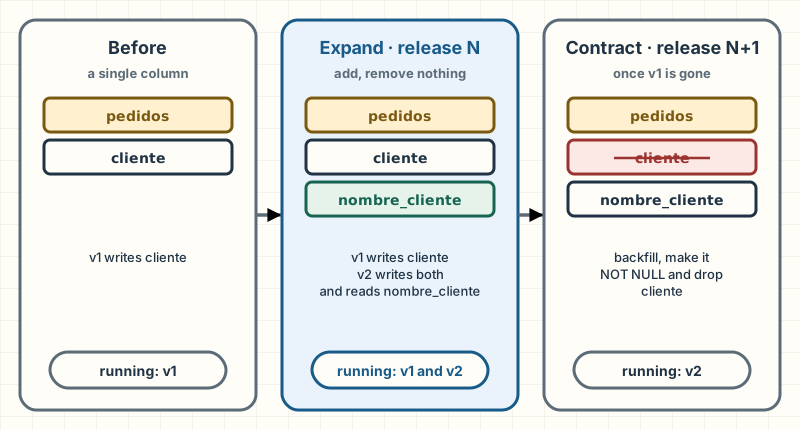
In release N, the migration only adds. The new version writes to both columns and reads the new one; the old one carries on with its own column without noticing. In release N+1, once no old instance is running, you contract:
-- Release N+1, cuando ya no corre ninguna instancia de la versión vieja.
UPDATE pedidos SET nombre_cliente = cliente WHERE nombre_cliente IS NULL;
ALTER TABLE pedidos ALTER COLUMN nombre_cliente SET NOT NULL;
ALTER TABLE pedidos DROP COLUMN cliente;
The first UPDATE rescues the rows the old version wrote while both were running. I tested all three situations: renaming in one go breaks the old version, with the expansion both versions coexist, and contracting too early breaks it too.
Note: On this site, the production deployment doesn't rebuild anything: it takes the jar that CI already tested for that commit, wraps it in a minimal image (
eclipse-temurin:21-jre, which just copies the jar and runs it withjava -jar, no layers), pushes it to Railway and waits until production serves that commit. What runs in production has to be exactly what passed the tests.
What to take with you: graceful shutdown already comes turned on; add a pause before shutdown. And in a zero-downtime deployment, migrations expand first and contract in the next release.
Startup and memory
A few seconds of startup almost never matter. They matter when you scale on demand and every new instance has to start serving as soon as possible, or when you pay per second of compute. There are four techniques, and each one charges you something different:
- Lazy initialization (
spring.main.lazy-initialization=true): beans are created when someone asks for them, not at startup. - CDS (Class Data Sharing): a training run saves the already loaded and verified classes to a file, and later runs start from that file. It's a JVM feature, not a Spring one.
- Spring AOT (ahead-of-time): at build time, Spring analyzes your configuration and generates Java code that registers the beans directly, without scanning or evaluating conditions at startup.
- Native image with GraalVM: compiles the whole app into an operating system executable, with no JVM.
What I measured
I measured the first three on this part's app. Each variant started 10 times in a container with JDK 21 (Eclipse Temurin), 2 CPUs and 2 GB, against a Postgres in another container, on a MacBook Pro with an Apple M3 Pro. The value is the "process running for" that Boot logs when it finishes starting: from JVM start until the app is ready, including Flyway, Hibernate and Tomcat. I show the median.
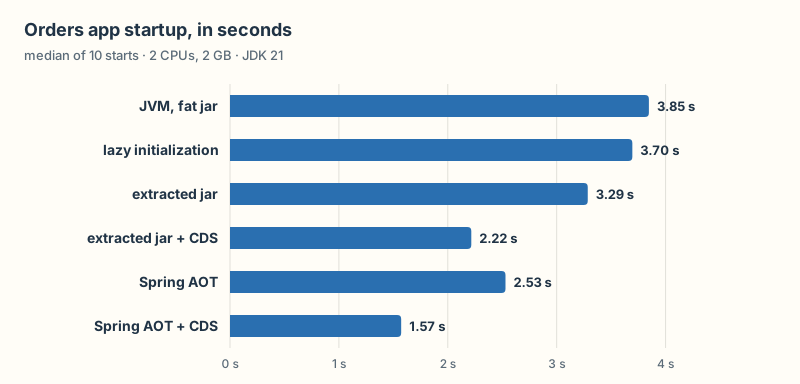
| Variant | Median | Minimum | Maximum |
|---|---|---|---|
JVM, fat jar (java -jar) | 3.85 s | 3.81 s | 4.42 s |
| Lazy initialization | 3.70 s | 3.58 s | 3.78 s |
| Extracted jar | 3.29 s | 3.23 s | 3.39 s |
| Extracted jar + CDS | 2.22 s | 2.19 s | 2.70 s |
| Spring AOT | 2.53 s | 2.47 s | 3.00 s |
| Spring AOT + CDS | 1.57 s | 1.51 s | 2.15 s |
Three things to read in those numbers:
- Lazy initialization barely moves the needle in this app: from 3.85 to 3.70 s. Almost all of startup is Flyway, Hibernate and Tomcat, which get set up the same way regardless. It helps more in apps with many beans that nobody uses at startup.
- Extracting the jar and adding CDS brings it down to 2.22 s, 42% less, without touching the code: only how the image is built and how the process is launched change.
- Spring AOT and CDS add up, because they attack different things: AOT saves Spring's work deciding which beans to create; CDS saves the JVM's work loading classes. Together, 1.57 s, 59% less. The Spring team measured the same with their sample app: AOT plus CDS, about twice as fast (Spring blog, 2024).
Native image isn't in the chart. Spring Boot 4.1 compiles it with GraalVM 25 or later (Spring Boot Reference, 4.1). I tried with GraalVM CE 25.0.2 in a container with 6 CPUs and 7 GB, the most Docker allows on this machine, and the build ran out of memory. That says something about the cost of the technique, but it isn't a startup time, and I don't show a number I didn't measure.
What each one costs you
- Lazy: a configuration error no longer shows up at startup, but when someone uses the broken bean, maybe at three in the morning (Spring Boot Reference, 4.1). I checked it with a test:
@Test
void sinPerezaElErrorApareceAlArrancar() {
    assertThatThrownBy(() -> app(false).run()).isInstanceOf(BeanCreationException.class);
}

@Test
void conPerezaArrancaYElErrorEsperaAlPrimerUso() {
    try (var contexto = app(true).run()) {
        assertThat(contexto.isRunning()).isTrue();
        assertThatThrownBy(() -> contexto.getBean(ClienteDePagos.class)).isInstanceOf(BeanCreationException.class);
    }
}- CDS: you need a training run during the build and you have to use the extracted jar; the archive doesn't work with the fat jar (Spring Boot Reference, 4.1). With Java 25 or later, Boot also supports the JVM's AOT cache, the successor to CDS; with Java 21, like this app, what you get is CDS.
- Spring AOT: the classpath and the beans are fixed at build time. A
@Profileor a@ConditionalOnPropertyis evaluated at build time, not at startup, so you can't activate a profile that changes which beans exist at deploy time (Spring Boot Reference, 4.1). - Native image: everything AOT costs and more. GraalVM assumes a closed world: everything dynamic (reflection, proxies, resources) has to be declared at build time (Spring Boot Reference, 4.1), and, as you saw, the build needs a lot of memory. You pay in flexibility and in build time.
What to take with you: measure before you choose. CDS is the cheapest win if you already build an image, and no technique fixes an app that does too much at startup.
Your own auto-configuration
In Part 2 you saw that Boot's auto-configuration is a list of @Configuration classes with conditions. Writing one yourself is the proof that there's no magic.
The case: several services in the company want to record audit actions. Instead of copying the class into each one, you build a module that, just by being on the classpath, gives every app a ready-to-use Auditor, and steps aside if the app already has its own. First, its properties:
@ConfigurationProperties("auditoria")
public record AuditoriaProperties(@DefaultValue("[auditoria]") String prefijo) {}
Then, the auto-configuration:
@AutoConfiguration
@ConditionalOnBooleanProperty(name = "auditoria.habilitada", matchIfMissing = true)
@EnableConfigurationProperties(AuditoriaProperties.class)
public class AuditoriaAutoConfiguration {

    @Bean
    @ConditionalOnMissingBean
    Auditor auditor(AuditoriaProperties propiedades) {
        return new AuditorEnLog(propiedades.prefijo());
    }
}@AutoConfigurationis a@Configurationthat Boot loads as an auto-configuration, after your app's configuration.@ConditionalOnBooleanPropertyswitches the whole thing off withauditoria.habilitada=false.@ConditionalOnMissingBeanis the courtesy every auto-configuration owes: if the app already defined anAuditor, this one isn't created.
The piece people usually miss: Boot doesn't scan your dependencies' packages. An auto-configuration is registered in a text file with an exact name, META-INF/spring/org.springframework.boot.autoconfigure.AutoConfiguration.imports, one class per line (Spring Boot Reference, 4.1):
com.ejemplo.auditoria.AuditoriaAutoConfigurationIn my example, the auto-configuration lives in com.ejemplo.auditoria, outside the app's package (com.ejemplo.pedidos), so component scanning doesn't see it: if the Auditor shows up in the context, it's because Boot read the imports file, and a test checks that. In a real project, that package would be a separate Maven module, the one you publish as a library.
Testing it without starting the app
ApplicationContextRunner builds a minimal context with whatever auto-configuration you ask for, in milliseconds, and tests each condition:
private final ApplicationContextRunner contexto = new ApplicationContextRunner()
        .withConfiguration(AutoConfigurations.of(AuditoriaAutoConfiguration.class));

@Test
void sinNadaConfiguradoTraeUnAuditorEnElLog() {
    contexto.run(app -> assertThat(app)
            .getBean(Auditor.class)
            .isInstanceOfSatisfying(AuditorEnLog.class, a -> assertThat(a.prefijo()).isEqualTo("[auditoria]")));
}

@Test
void elPrefijoSeCambiaConUnaPropiedad() {
    contexto.withPropertyValues("auditoria.prefijo=[tienda]")
            .run(app -> assertThat(app.getBean(AuditorEnLog.class).prefijo()).isEqualTo("[tienda]"));
}

@Test
void siLaAppDefineSuAuditorLaAutoconfiguracionSeHaceAUnLado() {
    contexto.withUserConfiguration(AuditorPropio.class)
            .run(app -> assertThat(app).hasSingleBean(Auditor.class).getBean(Auditor.class).isSameAs(AuditorPropio.UNICO));
}

@Test
void conLaPropiedadEnFalseNoHayAuditor() {
    contexto.withPropertyValues("auditoria.habilitada=false")
            .run(app -> assertThat(app).doesNotHaveBean(Auditor.class));
}
That's everything behind "Boot configures it for you". Every starter in the series is the same thing with more conditions: DataSourceAutoConfiguration, SecurityAutoConfiguration, the Caffeine one.
The usual mistake: leaving the auto-configuration inside the package the app scans. Scanning loads it as regular configuration, and
@ConditionalOnMissingBeanmay be evaluated before the beans it should respect exist. An auto-configuration is loaded only from the imports file and must never be within reach of component scanning (Spring Boot Reference, 4.1).
Going deeper
the name of your own starter shouldn't start with spring-boot, even if you use a different groupId. The reference's example is acme-spring-boot for the auto-configuration module and acme-spring-boot-starter for the starter (Spring Boot Reference, 4.1). The order between auto-configurations is controlled with @AutoConfiguration(before = …, after = …).
Architecture: packages and modules
An app's classes are split into packages by layer (controllers, services, repositories) or by feature (pedidos, catalogo, notificaciones, each with its own controller, service and repository). By layer looks tidy at first, but everything ends up public and nothing stops notifications from using the orders repository. By feature, everything about orders lives together, and what doesn't need to be shown stays package-private. That's how the store is organized.
But Java has no way to say "this package is private to this module". Spring Modulith adds that: it treats each direct subpackage of the main package as a module, and a module's subpackages as internal, so other modules can't use them (Spring Modulith Reference, 2.1). The 2.1 line is the one that matches Spring Boot 4.1 (spring.io).
<dependency>
    <groupId>org.springframework.modulith</groupId>
    <artifactId>spring-modulith-bom</artifactId>
    <version>${spring-modulith.version}</version>
    <type>pom</type>
    <scope>import</scope>
</dependency><dependency>
<groupId>org.springframework.modulith</groupId>
<artifactId>spring-modulith-starter-test</artifactId>
<scope>test</scope>
</dependency>With that, a test verifies the boundaries:
@Test
void losModulosDeLaTiendaRespetanSusLimites() {
    ApplicationModules.of(PedidosApplication.class).verify();
}
verify() fails if there's a cycle between modules or if a module uses something internal to another. In the store, notificaciones depends on pedidos and not the other way around: the PedidoPagado event is what lets the dependency go in a single direction. The "before" is a tangled store, where each module reaches into the other:
public class ServicioDePedidos {

    public String confirmar(long id) {
        return new PlantillaDeCorreo().pagoRecibido(id); // entra a un paquete interno de otro módulo
    }
}public class AvisoDePedido {
private final ServicioDePedidos pedidos = new ServicioDePedidos(); // y notificaciones depende de pedidos
public String avisar(long id) {
return pedidos.confirmar(id);
}
}@Test
void unaTiendaEnredadaNoPasaLaVerificacion() {
var violaciones = ApplicationModules.of(TiendaEnredada.class, new ImportOption.OnlyIncludeTests())
.detectViolations();
assertThat(violaciones.getMessage())
.contains("Cycle detected")
.contains("non-exposed type com.ejemplo.enredado.notificaciones.internal.PlantillaDeCorreo");
}The verification finds both problems:
- Cycle detected: Slice notificaciones ->
                Slice pedidos ->
                Slice notificaciones
- Module 'pedidos' depends on non-exposed type com.ejemplo.enredado.notificaciones.internal.PlantillaDeCorreo within module 'notificaciones'!
What to take with you: organize by feature and let a test guard the boundaries: a boundary that only lives in the team's heads lasts until the first rushed release.
Going deeper
a well-verified modular monolith is the cheapest step before splitting into services: if a module ever has to leave, its dependencies are already visible and go in a single direction. Modulith can also generate documentation for the modules and test a single one, with @ApplicationModuleTest.
Spring Boot 4 today and how to migrate
Spring Boot 4.0 came out on November 20, 2025, and 4.1 on June 10, 2026 (Spring blog; GitHub releases). Compared with 3.x, what stands out most, according to the migration guide and the announcement:
- Modularization. Small modules per technology, with matching starters:
spring-boot-starter-webmvcinstead ofspring-boot-starter-web, which is deprecated;spring-boot-starter-flyway; and test starters such asspring-boot-starter-webmvc-test. - JSpecify. Spring's APIs declare what can be
null, and your IDE can warn you. - API versioning. Spring Framework 7 can resolve an API's version from a header, a parameter or the path, and Boot configures it with
spring.mvc.apiversion.*. - Jackson 3. It's the default JSON library, and its packages moved from
com.fasterxml.jacksontotools.jackson(except the annotations). Jackson 2 is still supported, but deprecated. - The baseline: Java 17 at minimum (4.1.2 is compatible up to Java 27), Jakarta EE 11 and Servlet 6.1. Undertow is no longer supported.
How long each version is supported
As of November 4, 2026, according to spring.io:
| Line | Released | Free support until | Commercial support until |
|---|---|---|---|
| 3.5.x | 2025-05 | 2026-06 (already ended) | 2032-06 |
| 4.0.x | 2025-11 | 2026-12 | 2027-12 |
| 4.1.x | 2026-06 | 2027-07 | 2028-07 |
Spring's policy gives every minor version at least 13 months of free support, and the last minor of each major, like 3.5, gets five additional years of commercial support (spring.io, support policy). If your app is still on 3.5, it no longer gets free patches.
How to migrate
- First, to the latest 3.5.x, as the migration guide asks.
- One minor version at a time: each one can remove what was deprecated in earlier ones, and one at a time, every error has a single possible source.
spring-boot-properties-migrator. Added as aruntimedependency, it tells you at startup which properties were renamed and translates them temporarily. When you're done, you remove it (Boot 4.0 migration guide).- OpenRewrite, to automate code changes: the
org.openrewrite.java.spring.boot4.UpgradeSpringBoot_4_0recipe is under the Moderne Source Available license, which lets you run it on your own code; the 4.1 one is Moderne's and proprietary. Review the diff as if someone else had written it.
When not to choose Spring Boot
Spring does much of its work at runtime: scanning, evaluating conditions, creating proxies. Boot's own documentation says that typical Spring Boot applications are quite dynamic and configured at runtime (Spring Boot Reference, 4.1). That's the source of its flexibility, and of its startup cost.
Two alternatives start from the opposite decision. Quarkus says its core idea is to do at build time what traditional frameworks do at runtime, and that its dependency injection resolves the graph at build time, without reflection (quarkus.io). Micronaut presents itself with compile-time dependency injection, with no runtime reflection (micronaut.io). If your main problem is startup or memory, for example in serverless functions, it's worth measuring them against Boot with AOT or native image. If it's building and maintaining an app with a large ecosystem around it, Spring's is hard to match. The honest answer is to measure.
What only experience teaches
- A
@Cacheable, an@Asyncor a@PreAuthorizethat "doesn't work" is almost always a call from the same class: the proxy from Part 1, wearing a different hat. - A lost update doesn't throw an error, and neither does the email for a payment that never happened. Both show up in production, never in a demo with a single user.
- The job that runs three times shows up the day you scale to three instances: ShedLock, or a single instance dedicated to scheduled jobs.
- The database in the liveness check turns a database problem into a total outage.
- The migration that renames a column breaks the old version in the middle of a deployment.
Closing the series
We started with a new that tied a class to its notifier, and we're ending with an app that authenticates with signed tokens, withstands concurrent writes, runs on several instances and deploys without downtime. These are the three ideas I'd keep:
- Core before Boot. Every trap in this part is a proxy, a transaction or a bean that does or doesn't get created. Whoever understands the container from Part 1 diagnoses in minutes what takes others days.
- Read the auto-configuration code. You've already written one. When Boot does something you didn't expect, open the matching
…AutoConfigurationclass and read its conditions: the answer is there. - Don't fight the framework. If you find yourself disabling half of an auto-configuration to force it to do something else, there's probably a property or a bean that Boot expects you to define. Boot is built to step aside: let it.
Which of the traps in this part have you already run into in production? And the more useful question: which one do you think is waiting in your project, and what test would you write today to check?
References
- Spring Boot Reference, 4.1.2: Spring Security, Caching, Task Execution and Scheduling, SpringApplication (virtual threads and lazy initialization), Actuator Endpoints, Logging, Tracing, Graceful Shutdown, Deploying to the Cloud, Dockerfiles, AOT Cache and CDS, AOT with the JVM, GraalVM Native Images, Creating Your Own Auto-configuration, System Requirements.
- Spring Boot Maven Plugin, 4.1.2: Packaging OCI Images.
- Spring Boot on GitHub: 4.0 Migration Guide, 4.0 Release Notes, 4.1 Release Notes.
- spring.io: Spring Boot 4.0.0 available now (2025), Spring Boot CDS support and Project Leyden anticipation (2024), Spring Boot, support by version, Support Policy.
- Spring Security Reference, 7.1.2: Architecture, CSRF, CORS, OAuth 2.0 Resource Server JWT, Method Security.
- Spring Framework Reference, 7.0.10: Transaction-bound Events, Declarative Annotation-based Caching, Spring WebFlux, Overview.
- Spring Framework API, 7.0.10:
ObjectOptimisticLockingFailureException,TransactionSynchronization. - Spring Modulith Reference, 2.1: Fundamentals, Working with Application Events.
- PostgreSQL Documentation: How Connections Are Established.
- RFC 9110: HTTP Semantics (
If-Match, 409 and 412). - JDK 21: The java Command.
- ShedLock and HikariCP, their READMEs.
- OpenRewrite: the Spring Boot 4.0 recipe and its license.
- Quarkus: Container First and Micronaut, their own descriptions.