In Part 1 we built the order shop with Spring Framework alone, without a single line of HTTP. To expose it as an API we would have had to install a server, configure the database, pick a JSON library and find versions of all of that that work together.
In this part we walk that road with Spring Boot: from an empty project to a REST API that validates what it receives, returns errors a client understands, stores data in Postgres without the N+1 problem, versions its schema and has tests at three levels.
I compiled and tested all the code with Spring Boot 4.1.2: every behavior I claim, I checked with a test against a real Postgres, and the console outputs you see are the ones I got.
What Spring was missing
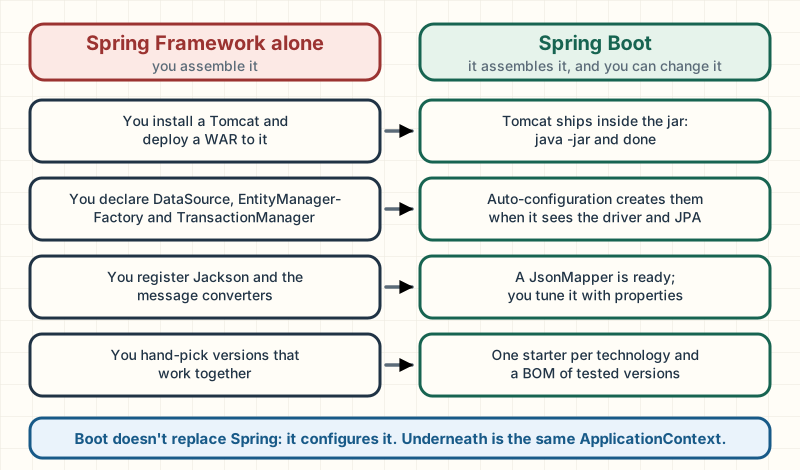
Spring Framework solved the problem of assembling objects. But a web application needs more, and before Boot you configured all of it yourself:
The server. You installed a Tomcat, packaged the app as a WAR and deployed it there.
The database. You declared by hand the DataSource (the object that hands out connections), the pool, JPA's EntityManagerFactory and the transaction manager.
JSON. You registered Jackson and the converters between objects and JSON.
Versions. You picked one version of Spring, one of Hibernate, one of Jackson, one of the driver… and found out at runtime which ones didn't get along.
None of that was hard on its own. All of it together, in every new project, was work unrelated to your business that failed in murky ways: configuration hell.
Boot doesn't replace Spring: it configures it. Underneath is the same ApplicationContext.
You need…
With Spring Framework alone
With Spring Boot
a server
you install one and deploy a WAR
the server is embedded in your jar: java -jar and done
the usual beans
you declare them (DataSource, JPA, Jackson…)
auto-configuration creates them if it finds the library
compatible dependencies
you pick every version
one starter per technology and a BOM of tested versions
tuning values
code or XML
properties in application.yml, environment variables or arguments
Boot doesn't replace Spring. Underneath a Boot app is the same ApplicationContext from Part 1, with the same beans, proxies and transactions. Boot is a set of ready-made configurations plus a mechanism to decide which ones apply. When something in Boot surprises you, the answer is almost always in the container.
Note: this part assumes Part 1: constructor injection, beans, @Configuration and @Bean, the Environment and @Value, proxies, @Transactional and DataAccessException. On the Java side, records and lambdas.
Your first app in 10 minutes
You need a JDK 21 and an IDE, as in Part 1; you don't have to install Maven.
Generating the project on start.spring.io
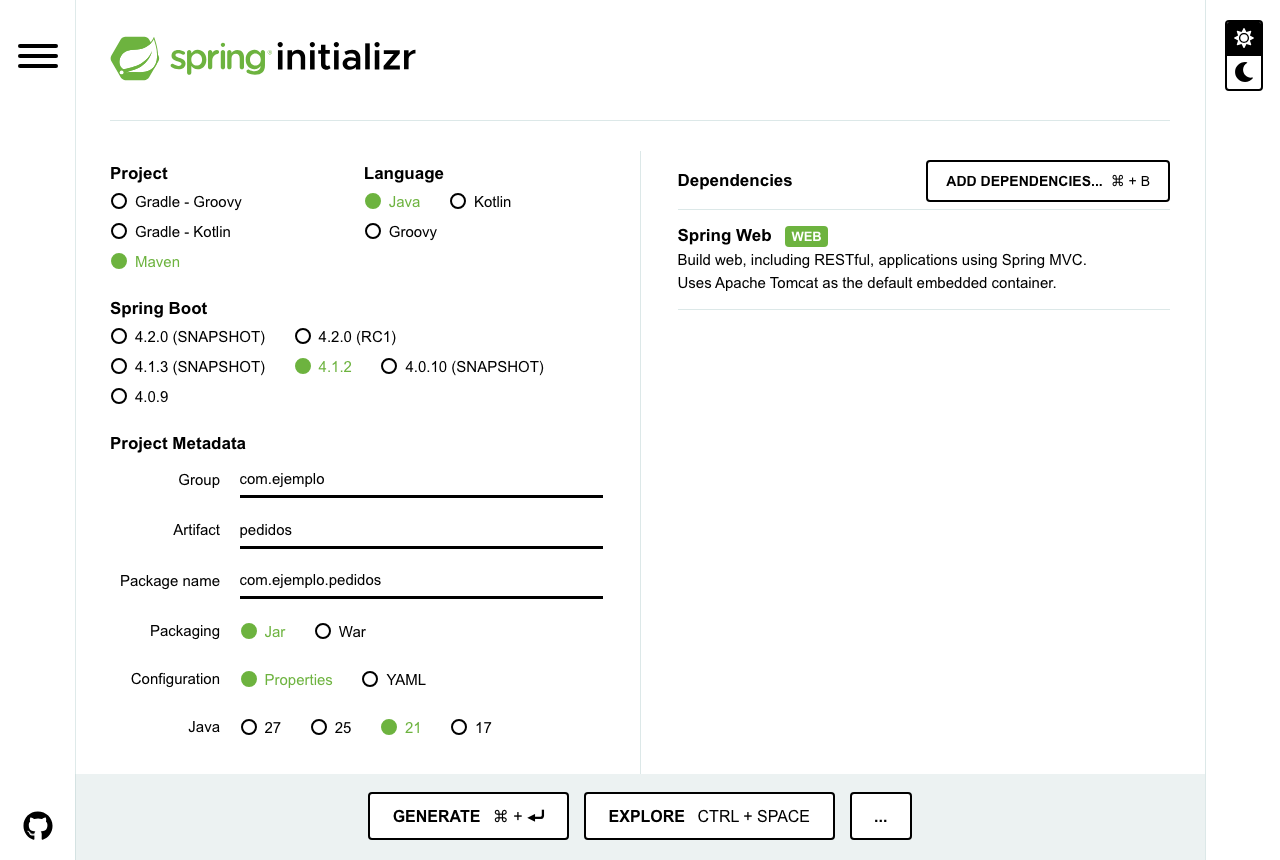
start.spring.io, the Spring Initializr, is the official page that generates the skeleton of a Boot project: you choose options, download a zip and unzip it. This URL opens it with everything already selected:
https://start.spring.io/#!type=maven-project&language=java&platformVersion=4.1.2&packaging=jar&jvmVersion=21&groupId=com.ejemplo&artifactId=pedidos&dependencies=web.
What start.spring.io looked like on November 4, 2026 with the options in this guide.
Project: Maven. The build tool: it downloads dependencies, compiles, tests and packages. The page suggests Gradle; we use Maven, as in the whole series.
Spring Boot: 4.1.2. The latest stable release that day, the same one this site's backend runs. SNAPSHOT and RC are versions still in development.
Group and Artifact. The group identifies your organization, as a reversed domain (com.ejemplo); the artifact is the project name (pedidos, Spanish for orders: as in the whole series, the code keeps the Spanish names I tested it with). Together they form the root package, com.ejemplo.pedidos, which matters more than it seems.
Packaging: Jar. An executable jar with the server inside. War is for deploying to a server that already exists.
Configuration: Properties or YAML. The format of the configuration file.
Java: 21. The page suggests 17; Boot 4 requires 17 or later (Spring Boot 4.0 Migration Guide).
Dependencies: Spring Web. The only thing we need for an API.
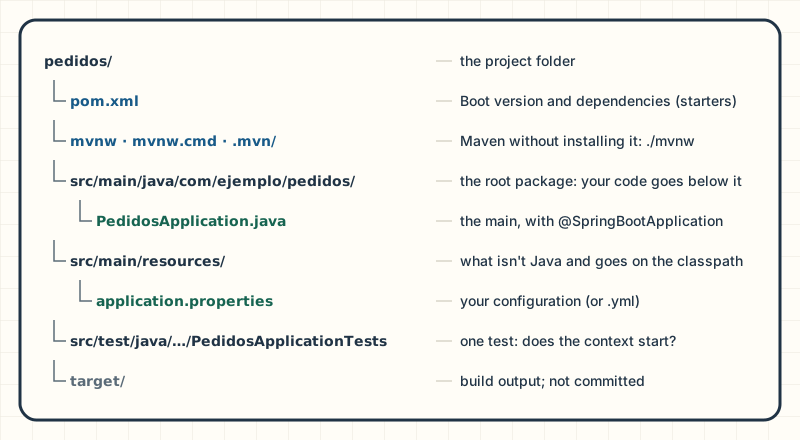
Click Generate, unzip the file and open the folder in your IDE as a Maven project:
Five things matter at the start: the pom, the Maven wrapper, the root package, the main and the configuration.
The main is one annotation and a call to SpringApplication.run. I added @ConfigurationPropertiesScan, which we'll see in the properties section:
PedidosApplication.java
@SpringBootApplication@ConfigurationPropertiesScanpublic class PedidosApplication { public static void main(String[] args) { SpringApplication.run(PedidosApplication.class, args); }}
Running it three ways
1. From the IDE, with the Run button next to the main. It's what you'll do while developing.
2. With the Maven plugin (on Windows, mvnw.cmd):
./mvnw spring-boot:run
3. Packaged, as in production, with no Maven or IDE involved:
The third one is what runs on a server: a single file with your code, its dependencies and the web server inside.
Reading the startup log
This is my output, without the date, the thread or the long logger names. I ran it on port 18083 because 8080 was taken; you'll see 8080:
INFO … PedidosApplication : Starting PedidosApplication v0.0.1-SNAPSHOT using Java 25.0.4 with PID 15769INFO … PedidosApplication : No active profile set, falling back to 1 default profile: "default"INFO … TomcatWebServer : Tomcat initialized with port 18083 (http)INFO … TomcatWebServer : Tomcat started on port 18083 (http) with context path '/'INFO … PedidosApplication : Started PedidosApplication in 0.622 seconds (process running for 0.797)
using Java 25.0.4: which Java it runs on. If it isn't the one you expect, look here first. (A newer JDK runs code compiled for Java 21 without any problem.)
No active profile set: you didn't activate any profile; default is used.
Tomcat initialized / started: Boot created a Tomcat inside your process and it's already accepting connections. Nobody installed it.
Started PedidosApplication: the app is ready. If this line doesn't show up, the reason is further up.
The Whitelabel error page
Open http://localhost:8080 in your browser:
Whitelabel Error PageThis application has no explicit mapping for /error, so you are seeing this as a fallback.There was an unexpected error (type=Not Found, status=404).
That's expected: the app has no endpoints, so everything is a 404. Boot registers a handler for /error that answers a browser, which asks for HTML, with this generic page (the whitelabel page), and any other client with JSON (Spring Boot Reference, 4.1):
Spring creates the HolaController through the component scanning from Part 1: @RestController is a specialized @Component, and @SpringBootApplication scans its own package and the ones below it.
You can test an endpoint without starting the server. @WebMvcTest builds only the web layer and MockMvc sends it fake requests (we cover it in depth in the tests section):
The port comes from server.port, 8080 by default (Spring Boot Reference, 4.1). You change it in src/main/resources/application.properties:
server.port=8081
or at startup: java -jar target/pedidos-0.0.1-SNAPSHOT.jar --server.port=8081. Which one wins if both are set is something we'll see in the properties section.
DevTools is an optional dependency that restarts the app on its own when the classpath changes. It uses two classloaders: one for the libraries and another for your code, the only one it throws away and reloads. The restart is triggered when the classpath changes: in Eclipse when you save, in IntelliJ IDEA when you build (Build Project). DevTools turns itself off under java -jar (Spring Boot Reference, 4.1):
The usual mistake: the port is taken. Another process is already listening on 8080 (another copy of your app, for example). The actual output:
APPLICATION FAILED TO STARTDescription:Web server failed to start. Port 8080 was already in use.Action:Identify and stop the process that's listening on port 8080 or configure this application to listen on another port.
On macOS and Linux, lsof -i :8080 tells you who has it.
The usual mistake: the wrong JDK. The jar was compiled for Java 21 and you ran it with an older one. The actual output with a JDK 17:
Exception in thread "main" java.lang.UnsupportedClassVersionError: com/ejemplo/pedidos/PedidosApplication has been compiled by a more recent version of the Java Runtime (class file version 65.0), this version of the Java Runtime only recognizes class file versions up to 61.0
65 is the class file version for Java 21 and 61 the one for Java 17. The java -version in your terminal and the IDE's JDK are often different: check both.
The usual mistake: the main outside the root package. It shows no error at all, and that's what makes it the worst. If you move PedidosApplication to com.ejemplo.pedidos.arranque, the app starts without complaint and /hola answers 404: @SpringBootApplication scans its own package and the ones below it, and com.ejemplo.pedidos.hola is left out. I checked it with a test: like that it gives 404 and, with the scan reaching the controller, 200. The reference recommends putting the main class in the root package, because it also defines where JPA entities are looked up (Spring Boot Reference, 4.1).
What happens between java -jar and "Started"
This is what goes on behind those lines with this guide's complete app, the one with a database:
From java -jar to Started PedidosApplication
Not yet
Getting ready
Ready
MANIFEST.MF (done)
your main (done)
Environment (properties) (done)
bean definitions (done)
Tomcat (done)
DataSource, Flyway, JPA (done)
controllers and services (done)
Step 8 of 8
Step 8 of 8: "Started PedidosApplication in 2.931 seconds". run returns the context and your main ends, but the process stays alive: Tomcat's threads keep it listening.
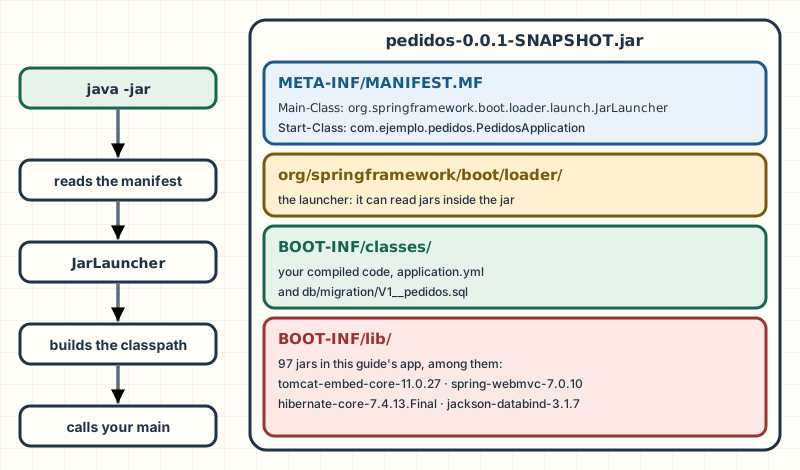
You type java -jar pedidos.jar. The JVM knows nothing about Spring: it opens the jar and reads META-INF/MANIFEST.MF to find out which class to run.
The manifest says Main-Class: JarLauncher, Boot's launcher. JarLauncher builds the classpath from BOOT-INF/classes and the jars in BOOT-INF/lib, and calls the Start-Class: your PedidosApplication.main.
SpringApplication.run prepares the Environment: it reads application.yml, the environment variables and the arguments, and decides the active profiles. That's the "No active profile set" line.
It creates the ApplicationContext and registers the bean definitions: the ones from your code, found by scanning from PedidosApplication's package, and the ones from the auto-configurations whose conditions are met. No object exists yet.
Before creating your beans, it creates the web server: "Tomcat initialized with port 8080". It exists, but it doesn't accept connections yet.
It creates the singletons, as in Part 1: the connection pool (HikariPool-1 - Start completed), Flyway applies the pending migrations, Hibernate builds the EntityManagerFactory and validates the schema. If anything fails here, the app doesn't start.
With every bean created, Tomcat starts: "Tomcat started on port 8080". Only now does the first request get in, and it can no longer find a half-built bean.
"Started PedidosApplication in 2.931 seconds". run returns the context and your main ends, but the process stays alive: Tomcat's threads keep it listening.
What travels inside the jar, as listed by unzip -l:
A jar with jars inside: your code in BOOT-INF/classes, the dependencies in BOOT-INF/lib and a launcher that knows how to read them.
A regular jar can't carry other jars on its classpath; that's why Boot brings its own launcher. Your classes go in BOOT-INF/classes and the dependencies in BOOT-INF/lib (Spring Boot, The Executable Jar Format).
@SpringBootApplication, taken apart
It's three annotations (Spring Boot Reference, 4.1):
@SpringBootConfiguration: the class is a @Configuration and can declare @Bean methods; tests use it to find the app's configuration.
@EnableAutoConfiguration: turns on auto-configuration, the next section.
@ComponentScan: scans the class's package and the ones below it. It's the reason behind the third usual mistake.
spring-boot-starter-parent is the project's parent: the project inherits plugin configuration and dependency management from it. Boot publishes a curated list of libraries with versions tested together, a BOM (bill of materials) called spring-boot-dependencies; that's why the dependencies carry no <version>, and when you upgrade Boot they all move up together (Spring Boot Reference, 4.1).
A starter is a dependency with no code of its own that brings everything a technology needs. These are the ones in the complete app:
If you're coming from Boot 3: Boot 4 was reorganized into modules and renamed starters. The web one is spring-boot-starter-webmvc; spring-boot-starter-web still exists, marked as deprecated (Spring Boot Reference, 4.1). Flyway now needs spring-boot-starter-flyway, and tests use one test starter per technology, such as spring-boot-starter-webmvc-test (Spring Boot 4.0 Migration Guide). That's what start.spring.io generated when you picked "Spring Web".
The embedded server comes with the starter: spring-boot-starter-webmvc brings Tomcat as just another dependency (tomcat-embed-core-11.0.27.jar, in BOOT-INF/lib). The server is no longer a place you deploy to: it's a library your app uses.
The usual mistake: overriding the version of a library the BOM manages "because a newer one came out". Sometimes you need to, for a security patch, but that combination is no longer the one Boot tested. For Spring Framework, the reference strongly recommends not pinning its version (Spring Boot Reference, 4.1). The normal move is to upgrade Boot.
What to take with you:
One jar, one command:java -jar starts your code, its dependencies and the server.
The main goes in the root package, or the scan doesn't find your classes and nothing warns you.
Starters and the BOM: you choose technologies, not versions.
Going deeper
the jar carries two indexes: BOOT-INF/classpath.idx, which fixes the classpath order under java -jar, and BOOT-INF/layers.idx, which splits it into layers for building container images (Spring Boot, The Executable Jar Format). We use the layers in Part 3. In the complete app's log, "Tomcat initialized" shows up before the connection pool opens and "Tomcat started" after Flyway migrated and Hibernate validated: the server is created early, but it doesn't take traffic until every bean exists.
Auto-configuration without the magic
Boot creating a DataSource without you writing a line looks like magic. The day it configures something you didn't want, you'll need to know where it came from.
An auto-configuration is an ordinary @Configuration class with two differences: it ships in a Boot jar, registered in META-INF/spring/org.springframework.boot.autoconfigure.AutoConfiguration.imports, and it's full of conditions that say when to apply it (Spring Boot Reference, 4.1). The two you'll see most:
@ConditionalOnClass: applies only if a certain class is on the classpath, meaning you added that library.
@ConditionalOnMissingBean: creates the bean only if you didn't declare one of the same type. There's a default, but yours wins.
There are more (@ConditionalOnProperty, @ConditionalOnBean…), but those two are enough to understand the mechanism:
Boot decides which auto-configurations to apply in the first app
Candidates
Evaluating conditions
Applied
DispatcherServletAutoConfiguration (done)
JacksonAutoConfiguration (done)
Discarded
jacksonJsonMapper (a @Bean) (discarded)
GsonHttpMessageConverters… (discarded)
JmxAutoConfiguration (discarded)
Step 7 of 7
Step 7 of 7: If tomorrow you declare your own JsonMapper, the Jackson class still applies, but Boot's @Bean steps aside: @ConditionalOnMissingBean finds yours. That's how you replace an auto-configured bean.
At startup, Boot reads the list of candidates from the jars on your classpath. There are dozens; we take five from the real report of the first app, the one that only has Spring Web.
DispatcherServletAutoConfiguration asks for @ConditionalOnClass DispatcherServlet and a web application. The webmvc starter brought both: it applies.
JacksonAutoConfiguration asks for @ConditionalOnClass tools.jackson.databind.json.JsonMapper. Jackson 3 comes with the starter: it applies.
Inside it, the jacksonJsonMapper @Bean has @ConditionalOnMissingBean JsonMapper. Your code didn't declare one: the report says "did not find any beans" and Boot creates its own.
The Gson configuration asks for @ConditionalOnClass com.google.gson.Gson. It isn't on the classpath: it's discarded without creating anything.
JmxAutoConfiguration finds its class, but it also asks for the property spring.jmx.enabled=true, which nobody set. One failing condition is enough to discard it.
If tomorrow you declare your own JsonMapper, the Jackson class still applies, but Boot's @Bean steps aside: @ConditionalOnMissingBean finds yours. That's how you replace an auto-configured bean.
Seeing what was applied and why
Start the app with --debug and Boot prints the conditions report: every auto-configuration, whether it was applied and which condition decided it (Spring Boot Reference, 4.1). An excerpt of my output with the first app:
Positive matches:----------------- JacksonAutoConfiguration#jacksonJsonMapper matched: - @ConditionalOnMissingBean (types: tools.jackson.databind.json.JsonMapper; SearchStrategy: all) did not find any beans (OnBeanCondition)Negative matches:----------------- GsonHttpMessageConvertersConfiguration: Did not match: - @ConditionalOnClass did not find required class 'com.google.gson.Gson' (OnClassCondition)
With the app running, the same thing is at /actuator/conditions, as JSON. It requires spring-boot-starter-actuator and exposing it, because it isn't published by default; in this app it's exposed only in the dev profile:
Two ways: tune it with properties (spring.jackson.*, for example) or declare your own bean of the same type, and @ConditionalOnMissingBean withdraws Boot's (Spring Boot Reference, 4.1). You can test it without starting the app using ApplicationContextRunner, which builds a minimal context with the auto-configurations you ask for, here the real Jackson one. FilteredClassLoader hides a class from the classpath so you can test what happens when a library is missing:
The usual mistake: declaring your own bean to "tweak one detail" and losing everything else Boot configured. Defining your own JsonMapper turns off its whole auto-configuration (Spring Boot How-to, 4.1): if you build it from scratch, the spring.jackson.* properties stop applying. For a detail, use the property or a customizer (JsonMapperBuilderCustomizer).
Going deeper
in Boot 4 each technology's auto-configuration ships in its own module (DataSourceAutoConfiguration lives in spring-boot-jdbc). Without the starter it isn't even a candidate: the first app's report has no line about DataSource. To exclude one, use @SpringBootApplication(exclude = …) or spring.autoconfigure.exclude. Of those classes, the only thing the reference treats as API is their name, so you can exclude them: don't import them or extend them.
Properties and profiles
In Part 1 you saw the Environment, which gathers properties from several sources. Boot adds configuration files it reads on its own and a defined priority order between those sources. That order answers the server.port question: if the value is in the file and on the command line, which one wins?
.properties or .yml
Boot reads application.properties or application.yml from src/main/resources. The same thing in both forms:
pedidos.limite-lineas=20pedidos.moneda=EUR
pedidos:
  limite-lineas: 20
  moneda: EUR
YAML avoids repeating prefixes and allows several documents in one file, separated by ---, which is how profiles are written. Pick one: if both live in the same place, .properties wins (Spring Boot Reference, 4.1). The app's full configuration:
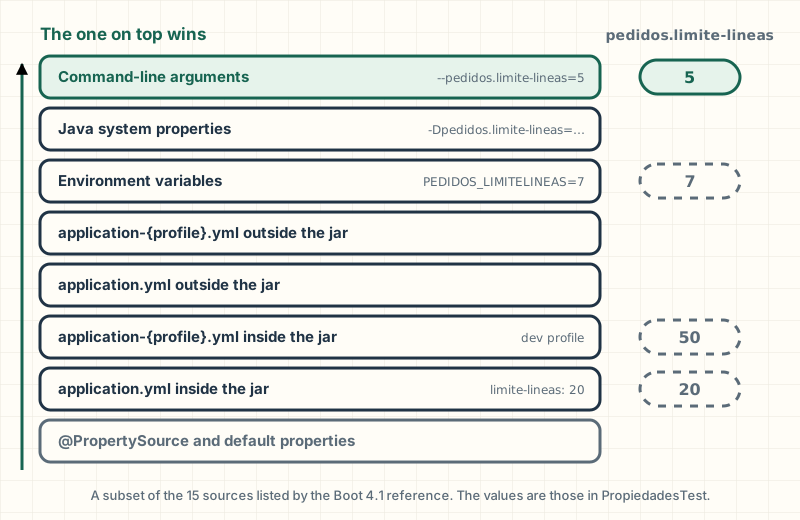
The Boot 4.1 reference lists fifteen sources in order, and later ones override earlier ones (Spring Boot Reference, 4.1). These are the everyday ones:
The closer to the moment of running, the higher the priority: the packaged file sets the defaults and the environment adjusts them.
The packaged application.yml brings defaults, the server adjusts them with environment variables and whoever starts the app can override them with an argument. That way the same jar runs on your machine, in staging and in production without being recompiled. I checked the values in the diagram with a test: 20 with the file alone, 50 with the dev profile, 7 with the variable PEDIDOS_LIMITELINEAS=7 and 5 with --pedidos.limite-lineas=5.
Profiles: one file, several environments
A profile is a name (dev, prod…) that activates extra configuration, with --spring.profiles.active=dev for example. In Part 1 profiles switched beans on with @Profile; here they switch properties on too. A YAML document that only applies under one profile is marked with spring.config.activate.on-profile:
spring.config.import loads another file. With optional:, the app starts even if the file doesn't exist; without it, it doesn't start (Spring Boot Reference, 4.1). It's useful for personal settings that live outside the repository.
Profile groups. With spring.profiles.group.produccion and the list proddb, prodmq, activating produccion activates all three (Spring Boot Reference, 4.1).
spring.profiles.active doesn't go inside a profile document: it's invalid there (Spring Boot Reference, 4.1).
@Value or @ConfigurationProperties
With @Value("${…}"), each property is a string nobody checks, injected separately. With @ConfigurationProperties, a group of properties sharing a prefix is poured into a typed object:
Before
LimitesConValue.java
class LimitesConValue { final int limiteLineas; final String moneda; final Duration ventanaCancelacion; LimitesConValue( @Value("${pedidos.limite-lineas}") int limiteLineas, @Value("${pedidos.moneda}") String moneda, @Value("${pedidos.ventana-cancelacion}") Duration ventanaCancelacion) { this.limiteLineas = limiteLineas; this.moneda = moneda; this.ventanaCancelacion = ventanaCancelacion; }}
After
PedidosProperties.java
@ConfigurationProperties("pedidos")@Validatedpublic record PedidosProperties( @Min(1) @Max(100) int limiteLineas, @NotBlank String moneda, Duration ventanaCancelacion) {}
A record is filled through its constructor (Spring Boot Reference, 4.1). To register it as a bean, here @ConfigurationPropertiesScan does it; after that it's injected like any other dependency:
PedidoService.java
@Transactionalpublic PedidoRespuesta crear(NuevoPedido nuevo) { if (nuevo.lineas().size() > propiedades.limiteLineas()) throw new LimiteDeLineasException(propiedades.limiteLineas()); var pedido = new Pedido(nuevo.cliente(), nuevo.correo()); for (var linea : nuevo.lineas()) { var precio = catalogo.precio(linea.producto()).orElseThrow(); pedido.agregarLinea(linea.producto(), linea.cantidad(), precio); } var guardado = repositorio.save(pedido); notificador.pedidoCreado(guardado); return PedidoRespuesta.de(guardado);}
(Here the save is needed because the order is new; later on you'll see when it isn't.)
With @Value, a limit of 0 starts without complaint (I checked it with a test) and the problem shows up with the first order. With @Validated, the app never gets up:
APPLICATION FAILED TO STARTDescription:Binding to target com.ejemplo.pedidos.config.PedidosProperties failed: Property: pedidos.limiteLineas Value: "0" Origin: "pedidos.limite-lineas" from property source "commandLineArgs" Reason: must be greater than or equal to 1
Origin tells you which source the bad value came from, exactly what you need with fifteen possible sources. (Reason comes out in the JVM's language.)
Feature
@ConfigurationProperties
@Value
Several properties in one object
yes
no
Validation at startup
yes, with @Validated
no
Relaxed binding
yes
limited
SpEL expressions
no
yes
Relaxed binding and environment variables
Operating systems don't accept dots in variable names, so Boot translates: dots become underscores, dashes are removed and everything goes uppercase (Spring Boot Reference, 4.1). spring.datasource.password is set with SPRING_DATASOURCE_PASSWORD. That tolerance between forms of the same name is called relaxed binding, and it works in full with @ConfigurationProperties; with @Value, the reference recommends writing the name in lowercase with dashes.
Secrets stay out of the repository
The production password doesn't go in application.yml, which is in git and travels inside the jar. It goes in an environment variable on the server or in your platform's secrets manager. In the app's YAML it appears as ${PEDIDOS_DB_PASSWORD:pedidos}: take that environment variable and, if it doesn't exist, use pedidos, which is only good for the Postgres on your machine.
The usual mistake: committing an application-prod.yml with the real password "just to try something". Even if you delete it afterwards, it stays in the git history. If it happened, rotate the password.
What to take with you:
The source closest to execution wins: arguments, environment variables, files.
@ConfigurationProperties with a record and @Validated: types, a single place and an error at startup.
Secrets in the environment, never in the repository.
Going deeper
between environment variables and the command line sit the system properties (-D…), JNDI, the servlet parameters and SPRING_APPLICATION_JSON. Above them come the test ones: @SpringBootTest's properties, @DynamicPropertySource and @TestPropertySource; and, with DevTools active, its global settings in $HOME/.config/spring-boot (Spring Boot Reference, 4.1). That's why a test can override any value.
Spring MVC from the inside
The journey of a request
Every request that reaches Tomcat ends up at the DispatcherServlet, Spring MVC's servlet that acts as the single receptionist (the front controller pattern). It knows nothing about orders: it asks other beans who handles each route, how to convert the body and what to do if something fails (Spring Framework Reference, 7.0). This is POST /api/pedidos, message by message:
POST /api/pedidos, from the client to the database and back
DispatcherServlet → Jackson (converter)write PedidoRespuesta as JSONDispatcherServlet calls Jackson (converter): write PedidoRespuesta as JSON
↩ DispatcherServlet → Client201 Created + JSONDispatcherServlet replies to Client: 201 Created + JSON
Step 11 of 11
Step 11 of 11: And the response goes out. If any step had thrown an exception, the DispatcherServlet would have passed it to the HandlerExceptionResolvers, which is where your @RestControllerAdvice lives.
Tomcat receives the request and hands it to the DispatcherServlet. Every request in the app goes through here.
The DispatcherServlet doesn't know your controllers. It asks the HandlerMapping, which registered every @GetMapping and @PostMapping at startup.
It returns the method that matches the route and the verb, along with any interceptors that apply. If no route matches, the result is a 404; if the route exists with another verb, a 405.
Before calling the method, its arguments have to be built. For the @RequestBody parameter, an HttpMessageConverter backed by Jackson turns the JSON into the NuevoPedido record.
Since the parameter has @Valid, it's validated now. If it fails, the method is never called: MethodArgumentNotValidException is thrown and the error handler answers 400.
Only now does your code run, with the arguments already converted and validated.
The controller makes no business decisions: it delegates to the service, which opens the transaction, applies the rules and saves.
The service returns a DTO, not the entity. The transaction has already been committed.
The controller decides the HTTP status and the headers: 201 Created with the URL of the new order.
The same converter, in the opposite direction: the record becomes JSON.
And the response goes out. If any step had thrown an exception, the DispatcherServlet would have passed it to the HandlerExceptionResolvers, which is where your @RestControllerAdvice lives.
Going deeper
I simplified one actor. What actually invokes the controller and resolves its arguments is a HandlerAdapter, which isolates the DispatcherServlet from how each kind of handler gets called; for annotated controllers, the response is written inside that adapter (Spring Framework Reference, 7.0). The arguments are resolved by HandlerMethodArgumentResolvers, and you can plug in your own there.
The API controller
PedidoController.java
@RestController@RequestMapping("/api/pedidos")public class PedidoController { private final PedidoService servicio; public PedidoController(PedidoService servicio) { this.servicio = servicio; } @GetMapping("/{id}") public PedidoRespuesta buscar(@PathVariable long id) { return servicio.buscar(id); } @GetMapping public Pagina<ResumenPedido> listar(@PageableDefault(size = 20, sort = "creadoEn") Pageable pagina) { return Pagina.de(servicio.listar(pagina)); } @PostMapping public ResponseEntity<PedidoRespuesta> crear(@Valid @RequestBody NuevoPedido nuevo) { var creado = servicio.crear(nuevo); return ResponseEntity.created(URI.create("/api/pedidos/" + creado.id())).body(creado); } @PostMapping("/{id}/pago") public ResponseEntity<Void> pagar(@PathVariable long id) { servicio.pagar(id); return ResponseEntity.noContent().build(); } @PostMapping("/{id}/cancelacion") public ResponseEntity<Void> cancelar(@PathVariable long id) { servicio.cancelar(id); return ResponseEntity.noContent().build(); }}
The parameter annotations say where each piece of data comes from:
Annotation
Where it takes it from
Example
@PathVariable
a segment of the path
/api/pedidos/42 → id = 42
@RequestParam
the query string
/hola?nombre=Ana
@RequestBody
the body, converted from JSON
the POST's NuevoPedido
If the data can't be converted (an id that isn't a number), Spring answers 400 without reaching your method. The Pageable in listar is built by Spring Data from ?page=, ?size= and ?sort=.
HTTP status codes: saying what happened
A method that returns an object answers 200. For any other outcome, ResponseEntity lets you choose the status code and the headers:
Code
When
In the app
200 OK
you return what was asked for
GET /api/pedidos/{id}
201 Created
you created something; Location says where it lives
POST /api/pedidos
204 No Content
it's done, and there's nothing to return
POST /api/pedidos/{id}/pago
400 Bad Request
the client sent something malformed or invalid
validation
404 Not Found
it doesn't exist
an order that isn't there
409 Conflict
it clashes with the current state
paying an order already paid
422 Unprocessable Content
it was understood, but a business rule prevents it
more lines than the limit
500 Internal Server Error
something failed on your side
the unexpected
The usual mistake: answering 200 with a body like {"error": "no existe"}. Clients, proxies, monitors and automatic retries read the status code, not the body: for them it was a success.
JSON with Jackson 3
The conversion between objects and JSON is done by Jackson, and Boot 4 ships Jackson 3 by default (Spring Boot Reference, 4.1). It came out on October 3, 2025 and changes four things you'll notice (Jackson Release 3.0):
The package moves from com.fasterxml.jackson to tools.jackson, and Boot configures a JsonMapper, a subclass of Jackson 3's ObjectMapper (tools.jackson.databind.ObjectMapper), which isn't the same type as Jackson 2's. The annotations (@JsonProperty, @JsonIgnore…) stay in com.fasterxml.jackson.annotation.
Exceptions are unchecked: JacksonException extends RuntimeException.
java.time dates are included and written as ISO-8601 text.
Properties come out in alphabetical order: MapperFeature.SORT_PROPERTIES_ALPHABETICALLY now defaults to true. That's why the ProblemDetail further down starts with detail.
An Instant comes out as UTC text, and since the DTO has no correo, neither does the JSON:
The rest is tuned with spring.jackson.*: default-property-inclusion=non_null omits nulls and use-jackson2-defaults=true brings the behavior closer to Boot with Jackson 2, useful when migrating (Spring Boot How-to, 4.1). To rename a field, put @JsonProperty("nombre") on the record component.
DTOs, not entities
A DTO (data transfer object) is an object that exists only to travel: what goes into and out of your API. Here they're records: NuevoPedido comes in, PedidoRespuesta goes out.
PedidoRespuesta.java
public record PedidoRespuesta( Long id, String cliente, EstadoPedido estado, Instant creadoEn, List<Linea> lineas, BigDecimal total) { public record Linea(String producto, int cantidad, BigDecimal precioUnitario) {} static PedidoRespuesta de(Pedido pedido) { var lineas = pedido.getLineas().stream() .map(l -> new Linea(l.getProducto(), l.getCantidad(), l.getPrecioUnitario())) .toList(); var total = pedido.getLineas().stream() .map(LineaPedido::subtotal) .reduce(BigDecimal.ZERO, BigDecimal::add); return new PedidoRespuesta( pedido.getId(), pedido.getCliente(), pedido.getEstado(), pedido.getCreadoEn(), lineas, total); }}
Why not return the Pedido entity? Three production reasons:
Lazy relationships. The lines are loaded when someone asks for them. If Jackson serializes the entity outside the transaction, that access fails or fires queries while it writes the JSON.
Recursion. Each LineaPedido points to its Pedido: serializing that is a cycle.
Exposing too much. The entity holds the customer's email, and any new column would get published without anyone deciding to.
With a DTO, you write the contract: no email, and a total that isn't in the table. The conversion happens in the service, with the transaction open:
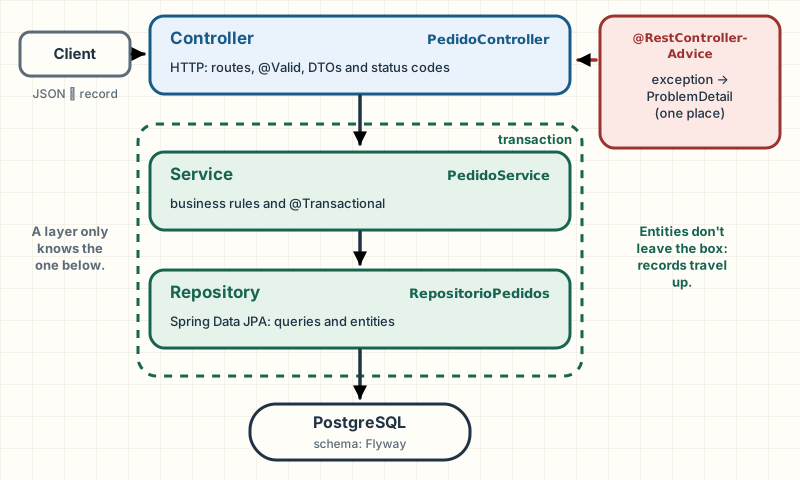
Each layer only knows the one below; entities stay inside the transaction and records travel up.
Documenting the API with OpenAPI
OpenAPI is a standard format for describing an HTTP API (routes, parameters, bodies and responses) in a JSON that both people and programs read. springdoc-openapi generates it from your controllers; the 3.x line is the one for Boot 4:
The contract ends up at /v3/api-docs and a page to try it out at /swagger-ui.html (springdoc), with the validations included: NuevoPedido shows up with its required fields. At startup, springdoc warns with a WARN that those endpoints are on by default and how to turn them off in production (springdoc.api-docs.enabled=false).
Note: On this site, the backend uses the same dependency (springdoc-openapi-starter-webmvc-ui 3.2.0). The OpenAPI contract it generates feeds the frontend's TypeScript client, and a test compares it with a saved copy to catch changes that would break the frontend.
What to take with you:
Every request goes through the DispatcherServlet, which delegates: who handles it, how to convert, what to do if it fails.
The HTTP status is part of the response.
Records as DTOs, never entities in the response.
Validation
Everything that comes into your API comes from outside. Validating with if in every controller ends in rules that are repeated and differ from endpoint to endpoint. Bean Validation (jakarta.validation) declares them as annotations on the data, and Boot turns it on with spring-boot-starter-validation:
NuevoPedido.java
public record NuevoPedido( @NotBlank @Size(max = 120) String cliente, @NotBlank @Email String correo, @NotEmpty List<@Valid Linea> lineas) { public record Linea(@ProductoEnCatalogo String producto, @Positive int cantidad) {}}
@NotBlank (not null, not empty, not just spaces), @Email, @Size, @NotEmpty (at least one element), @Positive. They're triggered by the @Valid on the controller parameter; the @Valid in List<@Valid Linea> validates each line as well.
A validator of your own
Whether a product exists in the catalog depends on your data, and no standard annotation covers it. A custom constraint has two pieces, the annotation and the class that evaluates it:
ProductoEnCatalogo.java
@Target({ElementType.FIELD, ElementType.PARAMETER, ElementType.RECORD_COMPONENT})@Retention(RetentionPolicy.RUNTIME)@Constraint(validatedBy = ProductoEnCatalogoValidator.class)public @interface ProductoEnCatalogo { String message() default "no está en el catálogo"; Class<?>[] groups() default {}; Class<? extends Payload>[] payload() default {};}
ProductoEnCatalogoValidator.java
public class ProductoEnCatalogoValidator implements ConstraintValidator<ProductoEnCatalogo, String> { private final Catalogo catalogo; public ProductoEnCatalogoValidator(Catalogo catalogo) { this.catalogo = catalogo; } @Override public boolean isValid(String producto, ConstraintValidatorContext contexto) { return producto != null && catalogo.existe(producto); }}
The validator receives the Catalogo through its constructor: Spring creates validators with its own factory, so they get dependency injection (Spring Framework Reference, 7.0). An order with four errors, in a single 400:
PedidoControllerTest.java
@Testvoid unPedidoInvalidoDevuelve400ConCadaCampoQueFalla() throws Exception { mvc.perform(post("/api/pedidos") .contentType(MediaType.APPLICATION_JSON) .content(""" {"cliente":"","correo":"no-es-correo","lineas":[{"producto":"tostadora","cantidad":0}]} """)) .andExpect(status().isBadRequest()) .andExpect(content().contentType(MediaType.APPLICATION_PROBLEM_JSON)) .andExpect(jsonPath("$.title").value("Datos inválidos")) .andExpect(jsonPath("$.errores.cliente").exists()) .andExpect(jsonPath("$.errores.correo").exists()) .andExpect(jsonPath("$.errores['lineas[0].producto']").value("no está en el catálogo")) .andExpect(jsonPath("$.errores['lineas[0].cantidad']").exists());}
The usual mistake: forgetting @Valid. The code compiles and the endpoint accepts anything. If a rule "doesn't work", check the parameter's @Valid first.
Going deeper
the price isn't in NuevoPedido on purpose. If the client sent it, no validation would stop a T-shirt for one cent: the server sets it from the Catalogo. Validating the shape of the data doesn't replace deciding which data you trust.
Errors the client understands
A client of your API needs predictable errors: the same format, the right HTTP status and a useful message, with no internal details. The road almost all of us take first, and where you want to end up:
In the "before", each endpoint decides its own error, and I checked it with a test: the 404 is plain text, the state conflict is a 400 with a JSON invented on the spot, and the 500 sends the client the internal message, including the name of the database server.
In the "after", the controllers catch nothing. @RestControllerAdvice gathers the app's @ExceptionHandler methods, and Spring uses the one for the most specific exception type. One place, one format.
ProblemDetail: the standard format
RFC 9457, Problem Details for HTTP APIs (July 2023, it replaces RFC 7807), defines a standard JSON for errors with type, title, status, detail and instance, and the application/problem+json media type (RFC 9457). Spring implements it in ProblemDetail (Spring Framework Reference, 7.0). The actual response for an order that doesn't exist:
$ curl -i http://localhost:8080/api/pedidos/99HTTP/1.1 404Content-Type: application/problem+json{"detail":"No existe el pedido 99","instance":"/api/pedidos/99","status":404,"title":"Pedido no encontrado"}
PedidoControllerTest.java
@Testvoid unPedidoQueNoExisteEsUn404ConProblemDetail() throws Exception { given(servicio.buscar(7)).willThrow(new PedidoNoEncontradoException(7)); mvc.perform(get("/api/pedidos/7")) .andExpect(status().isNotFound()) .andExpect(content().contentType(MediaType.APPLICATION_PROBLEM_JSON)) .andExpect(jsonPath("$.status").value(404)) .andExpect(jsonPath("$.title").value("Pedido no encontrado")) .andExpect(jsonPath("$.detail").value("No existe el pedido 7")) .andExpect(jsonPath("$.instance").value("/api/pedidos/7"));}
ManejadorDeErrores extends ResponseEntityExceptionHandler, Spring's base class that already answers Spring MVC's exceptions with a ProblemDetail: malformed JSON, a parameter that can't be converted, an unsupported HTTP method (Spring Framework Reference, 7.0). For validation, it overrides handleMethodArgumentNotValid and adds an errores map with every field that failed:
$ curl -X POST http://localhost:8080/api/pedidos -H 'Content-Type: application/json' \ -d '{"cliente":"","correo":"x","lineas":[{"producto":"tostadora","cantidad":0}]}'{"detail":"Invalid request content.","instance":"/api/pedidos","status":400,"title":"Datos inválidos","errores":{"cliente":"must not be blank","correo":"must be a well-formed email address","lineas[0].cantidad":"must be greater than 0","lineas[0].producto":"no está en el catálogo"}}
The standard messages come out in the JVM's language; the one for @ProductoEnCatalogo is the one we wrote.
Note: without a handler of your own, spring.mvc.problemdetails.enabled=true makes Spring MVC's errors come out as ProblemDetail; it defaults to false (Spring Boot Reference, 4.1). With domain exceptions, your own handler is the way to go.
Domain exceptions or ResponseStatusException
ResponseStatusException carries the HTTP status inside it. In a controller it's convenient; in a service, the service starts speaking HTTP, and when a nightly job calls it, a 404 won't mean anything.
That's why the app uses domain exceptions (PedidoNoEncontradoException, TransicionInvalidaException, LimiteDeLineasException), which say what happened in business terms; the translation to HTTP lives in the handler. Pedido throws TransicionInvalidaException without knowing HTTP exists:
Pedido.java
public void pagar() { if (estado != EstadoPedido.CREADO) throw new TransicionInvalidaException(id, estado, EstadoPedido.PAGADO); estado = EstadoPedido.PAGADO;}public void cancelar() { if (estado == EstadoPedido.ENVIADO || estado == EstadoPedido.CANCELADO) throw new TransicionInvalidaException(id, estado, EstadoPedido.CANCELADO); estado = EstadoPedido.CANCELADO;}
The usual mistake: returning the stack trace. A stack trace tells anyone which libraries you use, what your classes are called and sometimes which database you connect to. RFC 9457 asks you not to expose implementation details such as a stack dump (RFC 9457). Boot's default handler already avoids it (spring.web.error.include-stacktrace is never), but an @ExceptionHandler with body(e.toString()) breaks that. The app's handler answers with a generic text:
PedidoControllerTest.java
@Testvoid unErrorInesperadoNoLeMuestraLaTrazaAlCliente() throws Exception { given(servicio.buscar(1)).willThrow(new IllegalStateException("conexión rota a db-interna:5432")); mvc.perform(get("/api/pedidos/1")) .andExpect(status().isInternalServerError()) .andExpect(jsonPath("$.detail").value("Ocurrió un error inesperado.")) .andExpect(jsonPath("$.trace").doesNotExist()) .andExpect(content().string(org.hamcrest.Matchers.not( org.hamcrest.Matchers.containsString("db-interna"))));}
The usual mistake: logging the same exception three times. The repository catches it, logs it and rethrows it; the service does the same; the handler logs it once more. Three stack traces for one error, and whoever is on call thinks there were three. Either you handle it, or you propagate it. It's logged once, at the edge: in the app, ManejadorDeErrores, and only the unexpected as ERROR.
Note: On this site, a global @RestControllerAdvice answers with a format of its own, the ApiError record (code, message, timestamp), instead of ProblemDetail. It follows the same two rules: 404s, 400s and 429s go out as INFO, and the unexpected is logged once as ERROR, reported to Sentry, and the client gets a generic message.
Data with Spring Data JPA
JPA (Jakarta Persistence) is Java's specification for mapping objects to tables, Hibernate is the implementation Boot brings, and Spring Data JPA adds repositories: you write an interface and Spring generates the class.
(The state methods and the getters follow.) An entity is a class mapped to a table. @GeneratedValue(strategy = IDENTITY) lets Postgres generate the key; @OneToMany(mappedBy = "pedido") says the lines point to their order from the other table, and cascade = ALL, orphanRemoval = true that they're saved and deleted along with it. JPA requires a no-argument constructor; protected keeps it for Hibernate. On the other side, the line:
The usual mistake: leaving @ManyToOne without fetch = LAZY. In JPA it's eager by default: every line also loads its order, whether you need it or not. The Hibernate 7 guide calls this an unfortunate feature of JPA and recommends that almost all associations be lazy (An Introduction to Hibernate 7).
The usual mistake: Lombok's @Data on an entity. It generates equals, hashCode and toString with all the fields, including the lazy collection: a toString in a log fires a query, and a hashCode that changes when Hibernate assigns the id breaks Sets. On entities, getters and nothing else.
The repository
RepositorioPedidos.java
public interface RepositorioPedidos extends JpaRepository<Pedido, Long> {

    List<Pedido> findByEstadoOrderByCreadoEnDesc(EstadoPedido estado);

    long countByCorreo(String correo);

    @Query("select new com.ejemplo.pedidos.pedidos.ResumenPedido(p.id, p.cliente, p.estado, p.creadoEn) from Pedido p")
    Page<ResumenPedido> resumenes(Pageable pagina);
JpaRepository<Pedido, Long> already brings save, findById, findAll, pagination… Queries are added in two ways:
Derived from the name.findByEstadoOrderByCreadoEnDesc has no body: Spring Data builds the query by reading the name (Spring Data JPA Reference, 4.1). If the name no longer fits on one line, switch to the other way.
With @Query, in JPQL, JPA's SQL that talks about entities and fields.
resumenes is a projection: it builds a ResumenPedido from four columns, without loading entities or lines, which is all a listing needs. It takes a Pageable and returns a Page: the page plus the total, for which Spring Data runs the count query. The controller turns it into a record of its own, Pagina, so the contract doesn't depend on a Spring Data class.
Auditing and dates in UTC
With @CreatedDate on creadoEn, @EntityListeners(AuditingEntityListener.class) on the entity and this configuration, Spring Data fills in the date on save (Spring Data JPA Reference, 4.1):
ConfiguracionJpa.java
@Configuration@EnableJpaAuditingpublic class ConfiguracionJpa {}
The date is an Instant, a moment in time with no time zone, and the column is timestamp with time zone, which Postgres always stores in UTC (PostgreSQL 16 Documentation). It doesn't depend on the server's time zone and comes out in the JSON with its Z; the time zone is applied when you display it.
Dirty checking: saving without save()
PedidoService.java
@Transactionalpublic void pagar(long id) { var pedido = repositorio.findById(id).orElseThrow(() -> new PedidoNoEncontradoException(id)); pedido.pagar();}
There's no save(). Inside a transaction, the loaded entity is managed: Hibernate remembers what it looked like and, on commit, writes whatever changed. That's dirty checking (An Introduction to Hibernate 7), and I checked it with a test that pays an order and reads it back in another transaction. Without @Transactional, or bypassing the proxy through self-invocation, there's no transaction to commit and the change is lost without an error.
The N+1 problem
It's the most common performance mistake with JPA. We want to add up the total of every order:
NMasUnoTest.java
BigDecimal total = BigDecimal.ZERO;for (Pedido pedido : cargar.get()) { for (LineaPedido linea : pedido.getLineas()) { total = total.add(linea.subtotal()); }}
It looks like one query. With findAll() it's many more:
Walking 3 orders with their lines: N+1 queries
Your loop
select … from pedidos (discarded)
select lines of order 1 (discarded)
select lines of order 2 (discarded)
select lines of order 3 (discarded)
Queries sent
select … left join fetch lineas (done)
In memory
3 orders with their lines (done)
Step 6 of 6
Step 6 of 6: The 3 orders arrive with their lines already loaded. The loop is the same, but getLineas() no longer goes to the database. One query, whether it's 3 orders or 100.
findAll() sends one query: a select on the pedidos table. It brings back the 3 orders, but their lines are lazy: instead of the real list, each order holds an uninitialized collection that gets loaded when someone touches it.
The loop reaches the first order and calls getLineas(). The collection isn't loaded, so Hibernate sends another query: the lines of order 1.
Second order, another query. Each one is a round trip to the database, with its network latency.
Third order, third extra query. Total: 1 query for the orders + 1 per order = N+1. With 3 orders that's 4; with 100 it's 101. The test measures it.
The fix: ask for the orders and their lines in the same query. With join fetch (or @EntityGraph) Hibernate sends a single select with a join to lineas_pedido.
The 3 orders arrive with their lines already loaded. The loop is the same, but getLineas() no longer goes to the database. One query, whether it's 3 orders or 100.
To measure it, Hibernate keeps statistics, among them how many statements it prepared:
ContadorDeConsultas.java
final class ContadorDeConsultas { private final Statistics estadisticas; ContadorDeConsultas(EntityManagerFactory emf) { this.estadisticas = emf.unwrap(SessionFactory.class).getStatistics(); this.estadisticas.setStatisticsEnabled(true); } void reiniciar() { estadisticas.clear(); } long consultas() { return estadisticas.getPrepareStatementCount(); }}
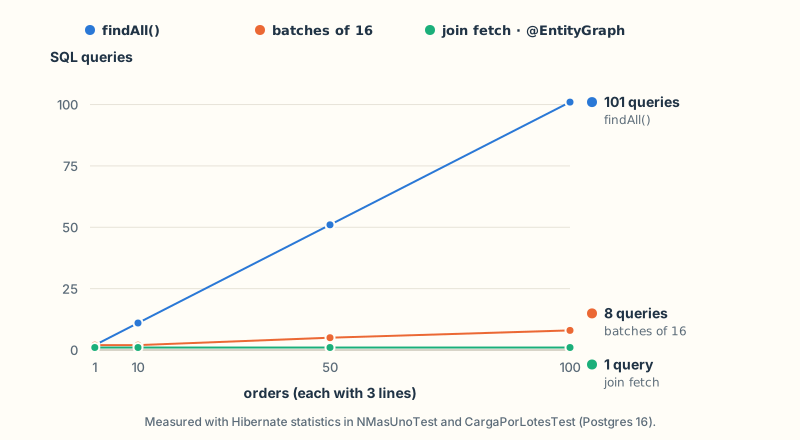
The numbers I measured against Postgres 16, with orders of three lines each:
N+1 grows with the data; join fetch stays at one query, and batch fetching lands in between.
Orders
findAll()
batches of 16
join fetch / @EntityGraph
1
2
2
1
10
11
2
1
50
51
5
1
100
101
8
1
With 10 orders on your machine, 11 queries go unnoticed. With thousands in production and the database in another network zone, the same screen takes seconds. N+1 doesn't show in the code: it shows when you measure.
RepositorioPedidos.java
@Query("select p from Pedido p left join fetch p.lineas")List<Pedido> todosConLineas();@EntityGraph(attributePaths = "lineas")List<Pedido> findByEstado(EstadoPedido estado);
join fetch: brings the orders and their lines in the same query. Since Hibernate 6 you don't need distinct: Hibernate no longer repeats the order once for each line in the join (Hibernate ORM 6.0 Migration Guide), and the test checks it.
@EntityGraph(attributePaths = "lineas"): the same thing on a derived method (Spring Data JPA Reference, 4.1).
Going deeper
the third line in the chart is batch fetching: with spring.jpa.properties.hibernate.default_batch_fetch_size=16, Hibernate loads the lines of up to 16 orders per query, 1 + ⌈N/16⌉. It caps the queries without touching the code and helps when you don't know which relationships you'll walk. Watch out: a join fetch of a collection combined with pagination can't paginate in SQL, because the rows are lines, not orders; for paginated listings, use a projection.
open-in-view: turn it off
In a web app, Boot registers Open EntityManager in View by default, which keeps the JPA session open for the whole request, including writing the JSON (Spring Boot Reference, 4.1). spring.jpa.open-in-view defaults to true and Boot warns you at startup. My output without the property:
WARN … JpaBaseConfiguration$JpaWebConfiguration : spring.jpa.open-in-view is enabled by default. Therefore, database queries may be performed during view rendering. Explicitly configure spring.jpa.open-in-view to disable this warning
With the session open, a lazy relationship that Jackson touches while serializing fires queries from the web layer, outside your transaction, holding the connection while the response is written: an N+1 nobody wrote. The app turns it off (open-in-view: false) and loads what it needs in the service.
Note: On this site, the backend's configuration also has open-in-view: false and ddl-auto: validate, which is the subject of the next section.
What to take with you:
Lazy associations, @ManyToOne included, and no @Data on entities.
Inside the transaction, changing the entity is saving it.
N+1 is measured and fixed with join fetch or @EntityGraph.
open-in-view: false.
Migrations with Flyway
Hibernate can create the tables from the entities (ddl-auto=update or create). For a prototype that's fine; with real data it isn't: it can't rename a column without losing what it held, it keeps no record of what changed, and every instance would try to change the schema at startup.
Flyway uses migrations: numbered SQL scripts applied in order, each one exactly once. With spring-boot-starter-flyway and the database module (flyway-database-postgresql), Boot looks for them in src/main/resources/db/migration and applies them at startup (Spring Boot How-to, 4.1). The name is V<version>__<description>.sql, with two underscores:
V1__pedidos.sql
create table pedidos ( id bigint generated by default as identity primary key, cliente varchar(120) not null, correo varchar(254) not null, estado varchar(20) not null, creado_en timestamp with time zone not null);create table lineas_pedido ( id bigint generated by default as identity primary key, pedido_id bigint not null references pedidos (id), producto varchar(80) not null, cantidad integer not null check (cantidad > 0), precio_unitario numeric(12, 2) not null);create index lineas_pedido_pedido_id_idx on lineas_pedido (pedido_id);
Flyway records every applied migration in its flyway_schema_history table. My log from the first startup:
INFO … DbMigrate : Migrating schema "public" to version "1 - pedidos"INFO … DbMigrate : Successfully applied 1 migration to schema "public", now at version v1
The next change is a new V2__…sql; Part 3 adds the version column that way.
ddl-auto=validate: Hibernate checks, it doesn't touch
With Flyway in charge of the schema, spring.jpa.hibernate.ddl-auto=validate makes Hibernate check that entities and tables match, and if they don't, the app doesn't start. I checked it with an entity that has a descuento field the table doesn't have:
Schema validation: missing column [descuento] in table [pedidos]
With Flyway and a non-embedded database, the default for ddl-auto is none, which checks nothing (Spring Boot How-to, 4.1): you have to set validate by hand.
An applied migration is never edited
The usual mistake: "V1 had a bug, I'll fix it". Flyway stores a checksum of every applied migration. If you change the file, the checksum doesn't match and Flyway refuses to continue, because that database already ran the old version (Flyway documentation). The test applies a V1, "edits" it and migrates again:
MigracionesTest.java
@Testvoid editarUnaMigracionYaAplicadaImpideMigrar() { flyway("original").migrate(); assertThatThrownBy(() -> flyway("editada").migrate()) .isInstanceOf(FlywayValidateException.class) .hasMessageContaining("Migration checksum mismatch for migration version 1");}
The actual output:
Validate failed: Migrations have failed validationMigration checksum mismatch for migration version 1-> Applied to database : -1704010591-> Resolved locally : -1961642280Either revert the changes to the migration, or run repair to update the schema history.
You undo the change and write a V2 that fixes it. repair rewrites the history: only if you know the database already looks like the new file says.
Note: On this site, the backend has twenty migrations, from the one that created the articles table to the one that added covers and series, and none was edited after being applied: every change arrived as a new version.
Calling other services
The app queries an external shipping-rates service. Spring has three HTTP clients, and the classic RestTemplate is deprecated in favor of RestClient according to the Spring Framework 7.0 documentation, although the class doesn't carry @Deprecated yet (Spring Framework Reference, 7.0).
RestClient
RestClient is the synchronous client with a fluent API: you describe the request as a chain and get the body back already converted. Boot configures a RestClient.Builder with the converters and the HTTP client, and recommends injecting it (Spring Boot Reference, 4.1). It comes with spring-boot-starter-restclient:
ConsultaTarifas.java
@Componentpublic class ConsultaTarifas { private final RestClient http; public ConsultaTarifas(RestClient.Builder builder, @Value("${tarifas.base-url}") String baseUrl) { this.http = builder.baseUrl(baseUrl).build(); } public Tarifa tarifa(String pais) { return http.get() .uri("/tarifas/{pais}", pais) .retrieve() .body(Tarifa.class); }}
Interfaces with @HttpExchange
For a service you call from several places, you write an interface and Spring generates the client, just like with repositories (Spring Framework Reference, 7.0):
In Boot 4 it's registered with @ImportHttpServices in a group whose base URL and timeouts come from spring.http.serviceclient.<group>.* (Spring Boot Reference, 4.1); the one for the tarifas group is in the application.yml above:
ConfiguracionTarifas.java
@Configuration@ImportHttpServices(group = "tarifas", types = ClienteTarifas.class)public class ConfiguracionTarifas {}
WebClient is Spring WebFlux's reactive client. Boot recommends it if your app already uses WebFlux; otherwise, RestClient (Spring Boot Reference, 4.1).
Timeouts, always
The usual mistake: calling another service without a timeout. In Boot 4.1, spring.http.clients.connect-timeout and read-timeout have no default value (Spring Boot 4.1.2 configuration metadata), and with the JDK's HTTP client, the one the app uses, not setting one means "block forever" (Java SE 21 API). If the other service hangs, every request of yours sits waiting with a thread held, and when the threads run out your API hangs too. A timeout turns a slow service into a fast error.
The app sets global timeouts (spring.http.clients.*) and one for the tarifas group. The test starts a fake rates server on localhost that takes three seconds, lowers the timeouts to half a second and checks that both clients cut off:
A test that calls the real service is slow and brittle. There are two alternatives: a real HTTP server on localhost (the JDK's, com.sun.net.httpserver.HttpServer), as above, for what happens on the network, and MockRestServiceServer, which intercepts the RestClient with no network and verifies what was asked of it:
ConsultaTarifasTest.java
@Testvoid leeLaTarifaDelServicio() { var builder = RestClient.builder(); var servidor = MockRestServiceServer.bindTo(builder).build(); servidor.expect(requestTo("https://tarifas.ejemplo.com/tarifas/CR")) .andRespond(withSuccess(""" {"pais":"CR","costo":12.50,"diasHabiles":3} """, MediaType.APPLICATION_JSON)); var tarifa = new ConsultaTarifas(builder, "https://tarifas.ejemplo.com").tarifa("CR"); assertThat(tarifa.diasHabiles()).isEqualTo(3); servidor.verify();}
Note: On this site, the backend verifies the Cloudflare Turnstile captcha with RestClient and tests it with MockRestServiceServer.
Logging
Boot brings Logback, and your code writes against SLF4J, the interface: LoggerFactory.getLogger(…) and log.info(…). By default ERROR, WARN and INFO are logged (Spring Boot Reference, 4.1):
NotificadorLog.java
@Componentclass NotificadorLog implements Notificador { private static final Logger log = LoggerFactory.getLogger(NotificadorLog.class); @Override public void pedidoCreado(Pedido pedido) { log.info("Aviso enviado: pedido {} con {} líneas", pedido.getId(), pedido.getLineas().size()); log.debug("Estado del pedido {}: {}", pedido.getId(), pedido.getEstado()); }}
Messages with {}, not concatenated: SLF4J builds the text only if the level is enabled.
The level says how serious it is: INFO for what happened in the business, DEBUG for detail while investigating, WARN for the odd thing that doesn't break anything, ERROR for what someone has to look at.
The level is tuned per package with logging.level.<package>. In the dev profile, com.ejemplo.pedidos: debug shows your code's detail and org.hibernate.SQL: debug shows every SQL statement (handy for spotting an N+1), without the DEBUG output of every library. Boot also brings the web and sql groups (Spring Boot Reference, 4.1).
What never gets logged
A log gets copied, shipped to other systems and read by people who shouldn't see your customers' data. These don't go in the log:
Passwords, tokens, API keys or Authorization headers.
Personal data: emails, phone numbers, addresses, ID documents. Log the order id, not the email of whoever placed it.
Full request and response bodies, which usually contain all of the above.
The test checks that the email doesn't show up and that the DEBUG line doesn't come out with the default configuration (the id is null because the order was never saved):
NotificadorLogTest.java
@Testvoid elLogDiceQuePedidoSeAvisoPeroNoAQuien(CapturedOutput salida) { var pedido = new Pedido("Ana", "ana@example.com"); pedido.agregarLinea("taza", 1, new BigDecimal("8.50")); new NotificadorLog().pedidoCreado(pedido); assertThat(salida).contains("Aviso enviado: pedido null con 1 líneas"); assertThat(salida).doesNotContain("ana@example.com"); assertThat(salida).doesNotContain("Estado del pedido");}
Note: On this site, the Logback configuration writes readable text with the local profile and structured JSON in staging and production, and a filter puts a requestId in the MDC (the logging thread's context) to correlate the lines of a single request. Structured logs are a topic for Part 3.
Tests
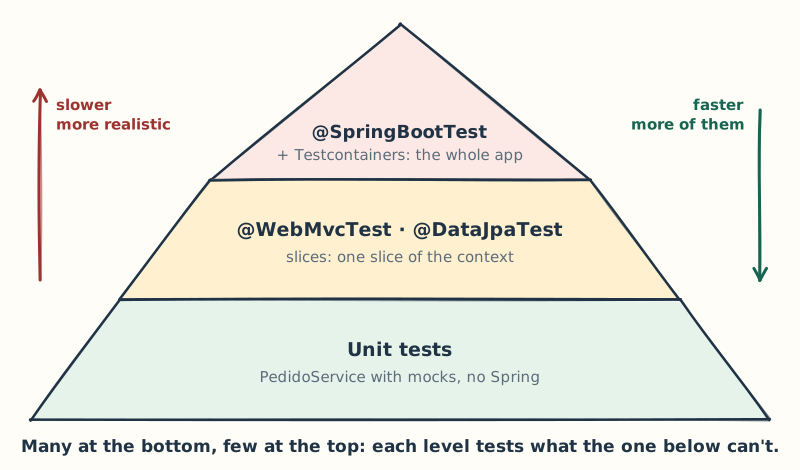
Boot gives you tools to test at three levels, and they're organized by Mike Cohn's test pyramid: tests of different granularity, and the higher the level, the fewer tests (Ham Vocke, The Practical Test Pyramid).
Each level tests what the one below can't, and that's why you need all three.
At the bottom: unit tests, no Spring
Thanks to constructor injection, PedidoService is tested with new and Mockito doubles, in milliseconds:
PedidoServiceTest.java
RepositorioPedidos repositorio = mock(RepositorioPedidos.class);Notificador notificador = mock(Notificador.class);PedidoService servicio = new PedidoService( repositorio, new Catalogo(), notificador, new PedidosProperties(2, "EUR", Duration.ofMinutes(30)));@Testvoid elPrecioLoPoneElCatalogoNoElCliente() { given(repositorio.save(any())).willAnswer(invocacion -> invocacion.getArgument(0)); var creado = servicio.crear(new NuevoPedido("Ana", "ana@example.com", List.of(new NuevoPedido.Linea("taza", 2)))); assertThat(creado.total()).isEqualByComparingTo(new BigDecimal("17.00")); verify(notificador).pedidoCreado(any());}@Testvoid masLineasQueElLimiteConfiguradoNoSeGuarda() { var lineas = List.of( new NuevoPedido.Linea("taza", 1), new NuevoPedido.Linea("libreta", 1), new NuevoPedido.Linea("camiseta", 1)); assertThatThrownBy(() -> servicio.crear(new NuevoPedido("Ana", "ana@example.com", lineas))) .isInstanceOf(LimiteDeLineasException.class); verify(repositorio, never()).save(any());}
This is where the business rules go. If you need to start Spring to test a rule, the rule is probably in the wrong place.
In the middle: slices
A slice starts only one piece of the context. @WebMvcTest loads the web layer (controllers, @ControllerAdvice, Jackson, validation), without services or a database, and the controller's dependencies are replaced with @MockitoBean (Spring Boot Reference, 4.1). That's how you test routes, conversion, validation, status codes and errors, as in the tests from the previous sections:
@DataJpaTest is the data slice: entities, repositories and the database. Each test runs in a transaction that's rolled back at the end (Spring Boot Reference, 4.1). replace = NONE stops it from swapping the database for an in-memory one: we want the real one. With @ServiceConnection the default (NON_TEST) already keeps it; NONE makes that explicit (Spring Boot API, 4.1).
in Boot 4 the packages changed: @WebMvcTest lives in org.springframework.boot.webmvc.test.autoconfigure, @DataJpaTest in org.springframework.boot.data.jpa.test.autoconfigure and @AutoConfigureTestDatabase in org.springframework.boot.jdbc.test.autoconfigure. Boot's @MockBean no longer exists: you use @MockitoBean, from Spring Framework (Spring Boot 4.0 Migration Guide).
At the top: the whole app against a real Postgres
@SpringBootTest starts the complete application; with @AutoConfigureMockMvc you send it requests without opening a port:
Against which database? An in-memory one like H2 has a different dialect and different types: a test that passes against H2 says little about Postgres. Testcontainers starts a real Postgres in a Docker container, and @ServiceConnection makes Boot connect to it without you writing a URL (Spring Boot Reference, 4.1):
ContenedoresDePrueba.java
@TestConfiguration(proxyBeanMethods = false)public class ContenedoresDePrueba { @Bean @ServiceConnection PostgreSQLContainer postgres() { return new PostgreSQLContainer(DockerImageName.parse("postgres:16-alpine")); }}
It's a @TestConfiguration, a test-only configuration that's added on top of the app's and that each test imports with @Import. The container starts once per Spring context. You need Docker; on my machine, this guide's 61 tests take about 17 seconds.
@Transactional on a test can hide a bug
The usual mistake: annotating integration tests with @Transactional "so they clean up after themselves". The test runs in a transaction that's rolled back at the end, and that changes how your code behaves: the test can pass while the same code fails in production (Spring Framework Reference, 7.0).
This class has a bug: it walks an order's lines in a method without@Transactional. findById opens and closes its transaction, and by the time getLineas() tries to load, there's no session left:
ContadorDeLineas.java
class ContadorDeLineas { private final RepositorioPedidos repositorio; ContadorDeLineas(RepositorioPedidos repositorio) { this.repositorio = repositorio; } int lineasDe(long id) { return repositorio.findById(id).orElseThrow().getLineas().size(); }}
With @Transactional, the test's session is still open and the test passes. Without it, as in production, LazyInitializationException. A suite that's @Transactional across the board ships that bug to production with everything green. To avoid depending on someone else's data, have each test create its own and look only at that, or clean up at the start. This isn't an argument against @DataJpaTest, which is transactional by default: there you're testing queries, not where a transaction begins and ends.
The context cache, or why your suite gets slow
Starting a full context costs seconds, so Spring keeps contexts in a static cache and reuses one if another class asks for exactly the same configuration (Spring Framework Reference, 7.0). The classes, the profiles, the properties, and also every @MockitoBean and every @DynamicPropertySource are part of the key: change one and it's a different context. This test runs four classes and counts the contexts:
Four classes, three contexts: PruebaA and PruebaB share one, and the @MockitoBean and the different property create one each. With a hundred @SpringBootTest classes that each mock something different, that's a hundred contexts, each with its pool and its container: that's how a suite goes from one minute to fifteen without a single slow test.
What to take with you:
Pyramid: many unit tests, slices for web and data, few @SpringBootTests.
A real database with Testcontainers and @ServiceConnection.
No @Transactional on integration tests.
Few distinct test configurations.
Going deeper
the cache holds up to 32 contexts with LRU eviction (spring.test.context.cache.maxSize) and lives in a static variable, inside one JVM. If Surefire uses a new JVM per class, there's no cache between classes and the build gets much slower (Spring Framework Reference, 7.0). To count contexts, set the org.springframework.test.context.cache logger to DEBUG.
Note: On this site, the integration tests inherit from a base class that starts a postgres:16-alpine with @Container and @ServiceConnection. And Surefire runs with reuseForks=false, one JVM per test class: that's how intermittent failures with no explanation went away. In exchange, each class builds its own context, exactly what the cache is meant to avoid.
What only experience teaches
I learned almost all of this through an incident:
The main outside the root package doesn't give an error: it gives a 404.
A bean of your own turns off the entire auto-configuration for that type. For a detail, a property or a customizer.
--debug and /actuator/conditions answer "where did this bean come from?". Don't guess.
A forgotten environment variable overrides your application.yml, and Origin tells you which one it was.
Entities stay out of the API. Records in and records out.
N+1 doesn't show in the code, you measure it.
open-in-view: false from day one. Turning it off later, in a big app, hurts.
An applied migration is never touched.
Without a timeout, a slow service hangs you.
The exception is logged once, at the edge, and the client gets a ProblemDetail with no stack trace.
@Transactional on a test is a safety net that doesn't exist in production.
A slow suite almost never has slow tests: it has too many contexts.
In Part 3 we take this app to production: security, concurrency, observability, deployment and startup performance.
Which of these found you first? And if you had to bet, how many Spring contexts does your project's suite create today?