Mutability, Order and Equality: What Your Collection Promises
Part 2 of 3 in the series on Java collections. It follows part 1: List is not ArrayList and continues with part 3: streams.
The promises you cannot see in the code
In part 1 we learned to choose a collection by what it does: positions, duplicates, keys. But there is a second layer of decisions that does not show up in the line List<Person> people = new ArrayList<>(), and it is the one that separates a program that works from one that works always:
- Can anyone modify this list after I return it?
- How does a
HashSetknow that twoPersonobjects are "the same one"? - What does it mean to "sort" a list of
Person? - What happens if two parts of the program touch the same collection at the same time?
Each of those questions has a precise answer in Java, and each answer has a classic mistake worth watching fail before watching it fixed. That is the plan for this article.
As in part 1, every example goes inside a main with import java.util.*;, and the outputs are the real ones from running them on Java 21. This time we also need import java.util.concurrent.*; and import java.util.concurrent.atomic.*; for the second half. We keep the same record Person(String name, int age, String city) {}.
1. Three degrees of "cannot be changed"
What it is. A mutable collection can be modified: add, remove, replace. Almost everything we used so far was mutable. But Java offers two degrees of protection against changes, and they get mixed up all the time because both throw the same exception.
- Unmodifiable view (
Collections.unmodifiableList): a "window" onto the original list. Through the window you cannot modify, but if someone modifies the original list, the window reflects it. - Immutable (
List.of,List.copyOf): a copy that never changes, whatever the rest of the program does.
Example.
// 1. A normal, mutable list
List<Integer> mutable = new ArrayList<>(List.of(2, 3, 5));

// 2. An unmodifiable view ONTO that list
List<Integer> view = Collections.unmodifiableList(mutable);

// 3. An immutable copy OF that list
List<Integer> immutable = List.copyOf(mutable);

// 4. Modify the original
mutable.add(7);

System.out.println("mutable   = " + mutable);
System.out.println("view      = " + view);
System.out.println("immutable = " + immutable);
What happened.
mutable   = [2, 3, 5, 7]
view      = [2, 3, 5, 7]
immutable = [2, 3, 5]
The view "saw" the 7 that was added to the original. The immutable copy did not, because it is another list. And neither accepts direct changes:
view.add(11);Exception in thread "main" java.lang.UnsupportedOperationExceptionimmutable.add(11);Exception in thread "main" java.lang.UnsupportedOperationException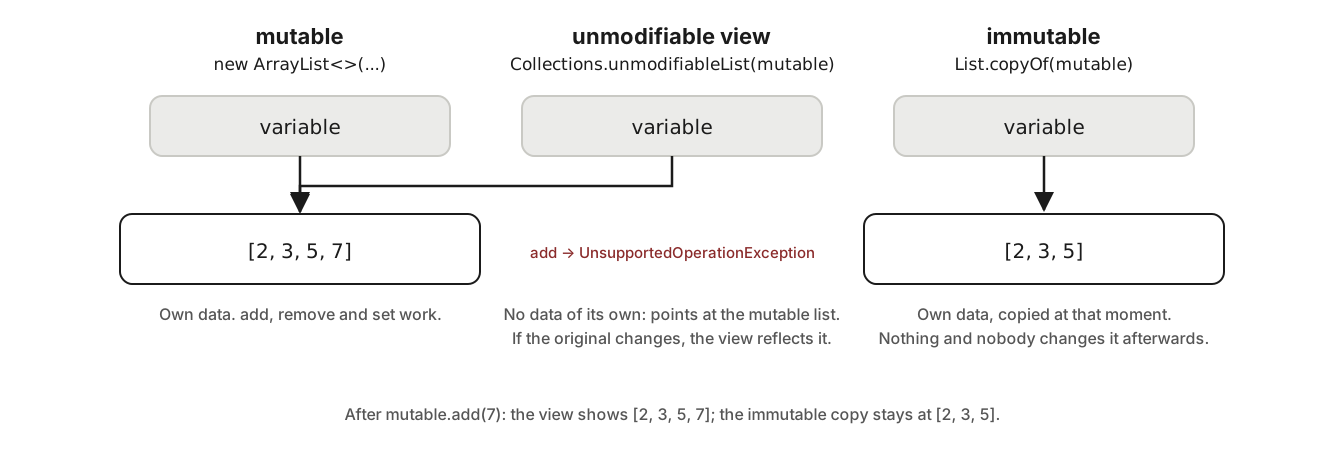
The view has no data of its own: it points at the original list, which is why it sees its changes. The immutable copy has its own and points at nobody.
One more detail of List.of and List.copyOf that will bite you if you do not know it: they do not accept null.
List.of(1, null);Exception in thread "main" java.lang.NullPointerExceptionAn ArrayList does accept null as an element. It is one of the few contract differences between the two.
When to use each. List.of/List.copyOf when you hand data to someone and do not want them to change it (return values, constants, parameters you keep). Collections.unmodifiableList when you want to expose an internal collection as "read-only" but still have it reflect the changes you make from inside.
Takeaway: the unmodifiable view follows the original; the immutable copy does not. Both throw the same exception, but they are not the same thing.
2. Why you would want something not to change
Saying "immutable" sounds like a limitation. In practice it is the opposite: it is the property that lets you stop worrying.
The problem. You have a record Team with a list of members. You build it with a list you had at hand, and then keep using that list for something else:
record Team(String name, List<Person> members) {}

List<Person> folks = new ArrayList<>(List.of(new Person("Ana", 31, "San José")));
Team team = new Team("Backend", folks);

folks.add(new Person("Luis", 45, "Heredia"));   // we keep using "folks" for something else

System.out.println("team = " + team.members().size());
Without protection, this prints 2: the team "changed" without anyone calling a method on the team. It is the kind of bug that surfaces far from where it was caused and takes hours to find.
The fix: defensive copy. The record keeps its own immutable copy in the constructor. In a record, the "compact constructor" is written without parameters and exists precisely for this:
record Team(String name, List<Person> members) {
    Team {
        members = List.copyOf(members);   // immutable copy, owned by the team
    }
}
What happened.
folks  = 2
team = 1
Now team has one member, even though folks has two. And if someone tries to modify the team's list from outside:
team.members().add(new Person("X", 1, "Y"));Exception in thread "main" java.lang.UnsupportedOperationExceptionThe analogy that preserves the structure: a signed document. Once signed it is not edited; if another version is needed, you make another document. What the analogy does not cover: in Java, making "another document" is cheap (List.copyOf of an already immutable list does not even copy; it returns the same one).
Three reasons to prefer immutable, in order of importance:
- You can share it without fear. If nobody can change it, it does not matter how many parts of the program hold it.
- You can use it as a
Mapkey or aSetelement. The next section explains why an object that changes breaks those collections. - It is thread-safe without doing anything. What does not change needs no synchronization. We come back to this in section 7.
Takeaway: when you keep a collection someone handed you, keep an immutable copy. What cannot change cannot break at a distance.
3. equals and hashCode: how a Set knows two things are equal
What it is. Every class in Java inherits two methods from Object: equals(other), which answers "is this object equal to that one?", and hashCode(), which returns the number that the Hash... collections use to place the object (we saw it in part 1). The inherited version of equals says "yes" only if they are the same object in memory, not if they have the same content.
The classic mistake: a HashSet with "duplicates"
A hand-written class, with no equals or hashCode:
static class PersonClass {
    String name;
    int age;
    PersonClass(String name, int age) { this.name = name; this.age = age; }
    public String toString() { return name + "(" + age + ")"; }
}Set<PersonClass> withoutEquals = new HashSet<>();
withoutEquals.add(new PersonClass("Ana", 31));
withoutEquals.add(new PersonClass("Ana", 31));
System.out.println(withoutEquals + " size=" + withoutEquals.size());
System.out.println(new PersonClass("Ana", 31).equals(new PersonClass("Ana", 31)));What happened.
[Ana(31), Ana(31)] size=2
false
The set holds two "Ana, 31". To Java they are different objects: two new calls produce two objects in memory, and the inherited equals compares only that. The Set kept its contract; the one who did not define what "equal" means was you.
The fix: define equality by content. You must override both methods together, always. Java's contract says: if two objects are equals, they must have the same hashCode. If you break that, a HashSet may store the object in one bucket and look for it in another, and never find it. A record generates both for you, from all its fields:
Set<Person> withRecord = new HashSet<>();
withRecord.add(new Person("Ana", 31, "San José"));
withRecord.add(new Person("Ana", 31, "San José"));
System.out.println(withRecord + " size=" + withRecord.size());[Person[name=Ana, age=31, city=San José]] size=1If you cannot use a record (for instance, the class has to be mutable, or extends another), your editor generates equals and hashCode for you; what matters is generating them from the same fields in both.
The second mistake: mutating a key after storing it
If a class does have content-based equals/hashCode, but its content can change, an even harder-to-find bug appears:
static class Key {
    String value;
    Key(String value) { this.value = value; }
    @Override public boolean equals(Object o) { return o instanceof Key k && k.value.equals(value); }
    @Override public int hashCode() { return value.hashCode(); }
    public String toString() { return value; }
}Map<Key, Integer> map = new HashMap<>();
Key key = new Key("ana");
map.put(key, 31);
System.out.println(map.get(key));
key.value = "ANA"; // 1. change the key AFTER storing it
System.out.println(map.get(key)); // 2. does it find it?
System.out.println(map.containsKey(key) + " " + map.size() + " " + map);What happened.
31
null
false 1 {ANA=31}
The map says it has one entry, prints it, and at the same time says the key is not there. What happened: when storing, the HashMap computed the hash of "ana" and put the entry in that bucket. When the value changed to "ANA", the hash changed, and now get looks in a different bucket, where there is nothing. The entry is still there, but unreachable.
Hence the simple rule: Map keys and Set elements must be immutable. String, Integer, records and enums are. If you use a class of your own, give it no setters.
Takeaway:
equalsandhashCodeare defined together and from the same fields. And whatever goes into aSetor serves as aMapkey must not change.
4. Comparable and Comparator: what "sorting" means
What it is. To sort numbers or strings, Java already knows which comes first: that is the natural order (smallest to largest, alphabetical). For your classes, it does not know, and there are two ways to tell it:
Comparable: the class itself declares its natural order by implementing thecompareTomethod. There can be only one.Comparator: a separate object that knows how to compare two elements. You can have as many as you want, and they are passed tosort,TreeSet,TreeMap,PriorityQueue...
The classic mistake: sorting something that does not know how to be sorted
List<Person> people = new ArrayList<>(List.of(
    new Person("Ana", 31, "San José"),
    new Person("Luis", 45, "Heredia"),
    new Person("Marta", 28, "Alajuela"),
    new Person("Luis", 29, "Cartago")));

Collections.sort(people);
This does not even compile: Collections.sort requires the elements to be Comparable, and Person is not. (If you force it to compile by dropping the generics, it fails at runtime with ClassCastException: Person cannot be cast to class java.lang.Comparable.) Java will not guess whether a person "comes first" by name, by age or by city. You have to decide.
Comparable: one natural order
A Student with a grade, where "smaller" means "lower grade":
record Student(String name, int grade) implements Comparable<Student> {
    public int compareTo(Student other) {
        return Integer.compare(grade, other.grade);
    }
}
compareTo returns a negative number if this comes first, zero if they are equivalent, positive if it comes after. Integer.compare does that for you with two integers; for strings, String already has compareTo.
List<Student> students = new ArrayList<>(List.of(
    new Student("Ana", 88), new Student("Luis", 95), new Student("Marta", 72)));

Collections.sort(students);
System.out.println(students);
System.out.println(new TreeSet<>(students));
System.out.println(Collections.max(students));[Student[name=Marta, grade=72], Student[name=Ana, grade=88], Student[name=Luis, grade=95]]
[Student[name=Marta, grade=72], Student[name=Ana, grade=88], Student[name=Luis, grade=95]]
Student[name=Luis, grade=95]With a single compareTo, sort, TreeSet, max, min and PriorityQueue all know what to do with a Student.
Comparator: as many orders as you need
For Person there is no obvious "natural" order, so we do not give it Comparable. We give each use a different Comparator:
// 1. By age
people.sort(Comparator.comparing(Person::age));
System.out.println(people);

// 2. By name and, on a tie, by age
people.sort(Comparator.comparing(Person::name).thenComparing(Person::age));
System.out.println(people);

// 3. By age, oldest first
people.sort(Comparator.comparing(Person::age).reversed());
System.out.println(people);[Person[name=Marta, age=28, city=Alajuela], Person[name=Luis, age=29, city=Cartago], Person[name=Ana, age=31, city=San José], Person[name=Luis, age=45, city=Heredia]]
[Person[name=Ana, age=31, city=San José], Person[name=Luis, age=29, city=Cartago], Person[name=Luis, age=45, city=Heredia], Person[name=Marta, age=28, city=Alajuela]]
[Person[name=Luis, age=45, city=Heredia], Person[name=Ana, age=31, city=San José], Person[name=Luis, age=29, city=Cartago], Person[name=Marta, age=28, city=Alajuela]]Comparator.comparing(Person::age) reads as "compare by what age() returns". Person::age is a method reference; it is equivalent to p -> p.age(). thenComparing adds the tie-breaker, reversed flips it.
If the list may contain null, natural order fails with NullPointerException. nullsFirst (or nullsLast) handles them:
List<String> withNulls = new ArrayList<>(Arrays.asList("Luis", null, "Ana"));
withNulls.sort(Comparator.nullsFirst(Comparator.naturalOrder()));
System.out.println(withNulls);[null, Ana, Luis]The third mistake: a TreeSet that "loses" elements
TreeSet and TreeMap do not use equals. They use only the Comparator (or compareTo): if the comparison returns zero, they consider it the same element. Watch what happens with a comparator that looks only at age:
Set<Person> byAge = new TreeSet<>(Comparator.comparing(Person::age));
byAge.add(new Person("Ana", 31, "San José"));
byAge.add(new Person("Luis", 31, "Heredia"));
System.out.println(byAge + " size=" + byAge.size());[Person[name=Ana, age=31, city=San José]] size=1Luis vanished. He has the same age as Ana, the comparator said "zero", and the TreeSet understood "already there". For a TreeSet, the comparator must distinguish everything equals distinguishes. The fix is to break the tie:
Set<Person> byAgeAndName = new TreeSet<>(
    Comparator.comparing(Person::age).thenComparing(Person::name));
byAgeAndName.add(new Person("Ana", 31, "San José"));
byAgeAndName.add(new Person("Luis", 31, "Heredia"));
System.out.println(byAgeAndName.size());2When to use each. Comparable when the class has an obvious, single order (dates, amounts, grades). Comparator for everything else, and whenever the order depends on context.
Takeaway:
Comparableis the class's natural order;Comparatoris an order you choose at the point of use. And aTreeSetonly sees what its comparator distinguishes.
5. NavigableMap and NavigableSet: finding "the closest one"
What it is. TreeMap and TreeSet keep everything sorted, and that allows questions the Hash... versions cannot answer: which key is closest to this value? Which ones fall in this range? Those questions live in the NavigableMap and NavigableSet interfaces, which TreeMap and TreeSet implement. You must declare with those interfaces to see the methods (the lesson from part 1).
Example. A catalog by price, and we want to know "what can I buy with 4000":
NavigableMap<Integer, String> byPrice = new TreeMap<>();
byPrice.put(1200, "Keyboard");
byPrice.put(4500, "Monitor");
byPrice.put(800, "Mouse");
byPrice.put(25000, "Laptop");
byPrice.put(3000, "Chair");
System.out.println(byPrice);

System.out.println(byPrice.floorEntry(4000));     // 1. the largest price <= 4000
System.out.println(byPrice.ceilingEntry(4000));   // 2. the smallest price >= 4000
System.out.println(byPrice.headMap(3000));        // 3. everything below 3000
System.out.println(byPrice.headMap(3000, true));  // 4. ... including 3000
System.out.println(byPrice.tailMap(3000, true));  // 5. from 3000 upward
System.out.println(byPrice.subMap(1000, true, 5000, false));   // 6. between 1000 and 5000
System.out.println(byPrice.firstEntry() + " " + byPrice.lastKey());
What happened.
{800=Mouse, 1200=Keyboard, 3000=Chair, 4500=Monitor, 25000=Laptop}
3000=Chair
4500=Monitor
{800=Mouse, 1200=Keyboard}
{800=Mouse, 1200=Keyboard, 3000=Chair}
{3000=Chair, 4500=Monitor, 25000=Laptop}
{1200=Keyboard, 3000=Chair, 4500=Monitor}
800=Mouse 25000
floor is "the largest that does not go over" and ceiling "the smallest that reaches". headMap/tailMap/subMap return views of the map (section 1 again): if the original changes, the view reflects it.
For a set it is the same, with floor, ceiling, subSet, plus pollFirst to take out the smallest:
NavigableSet<Integer> ages = new TreeSet<>(List.of(31, 45, 28, 29, 52));
System.out.println(ages.floor(30) + " " + ages.ceiling(30) + " " + ages.subSet(29, true, 45, true));
System.out.println(ages.pollFirst() + " " + ages);
System.out.println(ages.descendingSet());29 31 [29, 31, 45]
28 [29, 31, 45, 52]
[52, 45, 31, 29]When to use it. Date, price or version ranges; "the rate that applies to this amount"; "the next available time slot". Any time the question is "the closest one" rather than "exactly this one".
Takeaway: if you will ask about ranges or "the closest one",
TreeMap/TreeSetdeclared asNavigableMap/NavigableSet.
6. How much each operation costs
What it is. Each implementation is fast at some operations and slow at others. The standard way of saying it is Big-O notation: O(1) means "takes the same time no matter how many elements there are"; O(log n) "grows very slowly with size"; O(n) "takes time proportional to the size, because it walks everything".
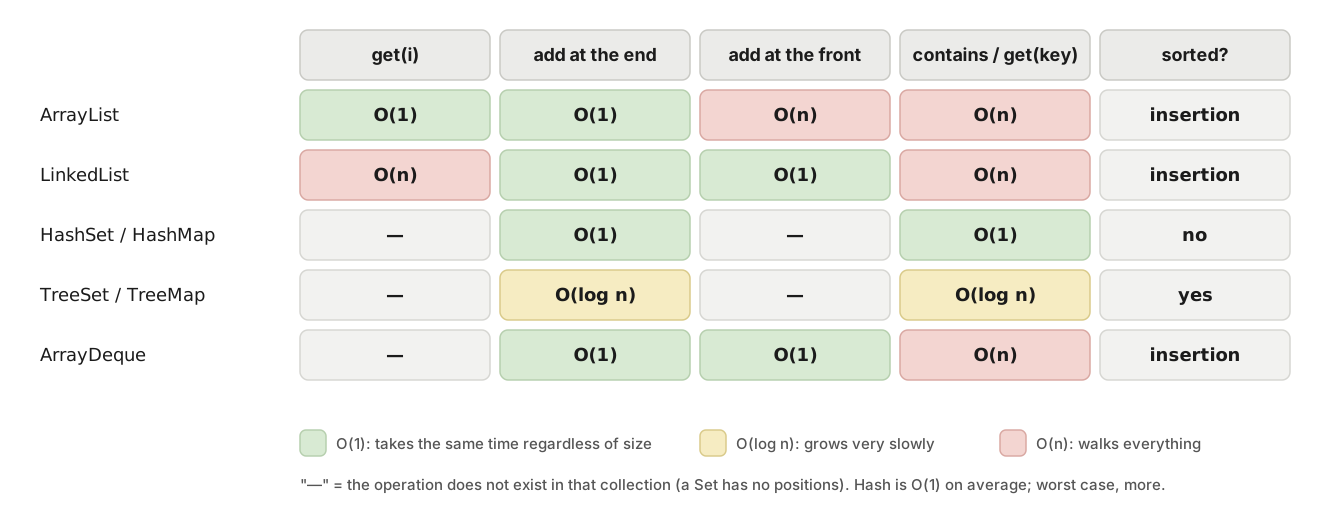
Green: immediate (O(1)). Yellow: grows slowly (O(log n)). Red: walks everything (O(n)). What matters is not memorizing the table, but knowing which operation you are about to do millions of times.
What you truly need to remember:
ArrayList:get(i)andaddat the end are O(1). Inserting or removing at the front or in the middle is O(n) because it shifts everything after it.containsis O(n): it walks.LinkedList:addFirst/removeFirstare O(1).get(i)is O(n).containsis O(n).HashSet/HashMap:add,contains,get,put,removeare O(1) on average. That is why they are the default choice. No order.TreeSet/TreeMap: everything is O(log n), a little slower than hash, but sorted and withfloor/ceiling/ranges.ArrayDeque: putting in and taking out at either end is O(1).
The most common practical consequence: if you have a List and call contains inside a loop over another large list, that is O(n²). Turning the first one into a HashSet makes it O(n). It is the cheapest and most frequent optimization you will ever make.
Takeaway: hash is O(1), tree is O(log n), and
containson a list is O(n). Acontainsinside a loop is the sign that you need aSet.
7. When there are several threads
What it is. A thread is a sequence of instructions that runs independently; a program can have several running at once. Almost every Java server handles each request on a different thread, so two requests can touch the same collection at the same time. The collections from part 1 are not prepared for that.
For the examples we use virtual threads (Java 21): Executors.newVirtualThreadPerTaskExecutor() creates an executor you hand tasks to, and the try-with-resources waits for all of them to finish.
The classic mistake: a shared ArrayList
Four threads each add 10,000 elements to the same list. We expect 40,000.
List<Integer> shared = new ArrayList<>();
try (var executor = Executors.newVirtualThreadPerTaskExecutor()) {
    for (int t = 0; t < 4; t++) {
        executor.submit(() -> {
            for (int i = 0; i < 10_000; i++) {
                shared.add(i);
            }
        });
    }
}
System.out.println("size=" + shared.size() + " (expected 40000)");
What happened. I ran it three times:
attempt 1: size=12500 (expected 40000)
attempt 2: size=12991 (expected 40000)
attempt 3: size=14195 (expected 40000)
Between 25,000 and 28,000 elements were lost, a different amount each time. On your machine the numbers will be different, and sometimes instead of losing elements you will see an ArrayIndexOutOfBoundsException. What happens inside: add does two things, "write at position size" and "increase size". If two threads read the same size before either increases it, they write to the same slot and one overwrites the other.
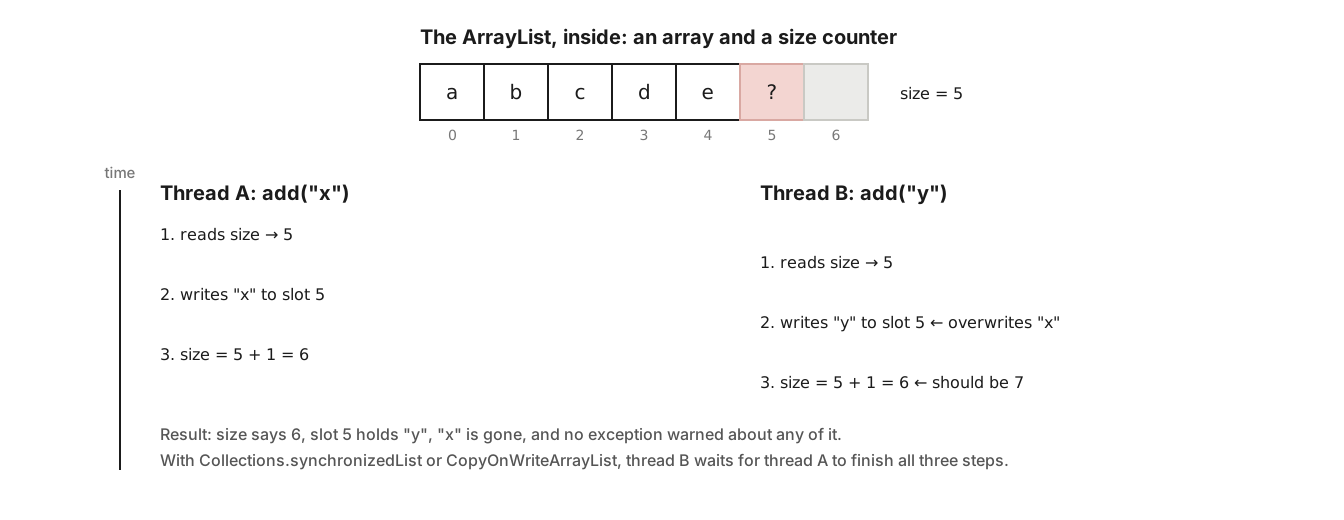
Both threads read size = 5, both write to slot 5, and both increase size. Result: one slot with an overwritten value and another left empty.
A program that gives different results depending on how the threads interleave is said to have a race condition. It is the hardest bug to reproduce there is, because most of the time it does not happen.
First fix: synchronize
Collections.synchronizedList wraps the list so that only one thread at a time can run each method:
List<Integer> safe = Collections.synchronizedList(new ArrayList<>());
// ... the same four threads ...
System.out.println("size=" + safe.size());size=40000It works. The price is that threads take turns: while one adds, the others wait. With many simultaneous reads, that shows.
The old ones: Vector, Stack and Hashtable
Here come the classes I left pending in part 1. Vector, Stack and Hashtable are the collections from Java 1.0 (1996), older than the collections framework. They still exist because Java does not break old programs. They are exactly what synchronizedList does: every method is synchronized.
And that is precisely their problem, the same one synchronizedList has: synchronizing each method does not synchronize the whole operation. Look at this case, called "check-then-act": eight threads try to add the numbers 0 to 99 without duplicates.
List<Integer> vector = new Vector<>();
try (var executor = Executors.newVirtualThreadPerTaskExecutor()) {
    for (int t = 0; t < 8; t++) {
        executor.submit(() -> {
            for (int i = 0; i < 100; i++) {
                if (!vector.contains(i)) {    // 1. check
                    vector.add(i);            // 2. act
                }
            }
        });
    }
}
System.out.println("size=" + vector.size() + " (expected 100)");attempt 1: size=101 (expected 100)
attempt 2: size=106 (expected 100)
attempt 3: size=127 (expected 100)There are duplicates even though Vector is "thread-safe". contains is atomic and add is atomic, but between the one and the other, another thread may have added the same number. Atomic means "it happens whole or not at all; nobody can get in the middle". Each method is; the pair of methods is not.
That is why they are no longer used, and why the replacement is not "a synchronized list" but collections designed so that compound operations are atomic:
Vector→ArrayListif single-threaded;CopyOnWriteArrayListif multi-threaded and read far more than written.Stack→ArrayDeque(one thread) orConcurrentLinkedDeque(several).Hashtable→HashMap(one thread) orConcurrentHashMap(several).
ConcurrentHashMap: atomic compound operations
The most frequent case on a server: counting things from many threads. With HashMap, counts get lost; with ConcurrentHashMap, merge is atomic (read, combine and write with nobody getting in between):
Map<String, Integer> countBad  = new HashMap<>();
Map<String, Integer> countGood = new ConcurrentHashMap<>();
List<String> words = List.of("java", "list", "map", "java", "set");

try (var executor = Executors.newVirtualThreadPerTaskExecutor()) {
    for (int t = 0; t < 8; t++) {
        executor.submit(() -> {
            for (int i = 0; i < 1000; i++) {
                for (String w : words) {
                    countBad.merge(w, 1, Integer::sum);
                    countGood.merge(w, 1, Integer::sum);
                }
            }
        });
    }
}
System.out.println("HashMap           = " + countBad);
System.out.println("ConcurrentHashMap = " + countGood);HashMap = {set=7856, java=14889, list=7906, map=7842}
ConcurrentHashMap = {java=16000, set=8000, list=8000, map=8000}8 threads × 1000 rounds × 2 "java" = 16,000. The HashMap counted 14,889 (and on your machine, another number; sometimes it also corrupts itself internally and throws exceptions or hangs). The ConcurrentHashMap counted exactly, and on top of that does not block all threads against each other: it splits the map into segments and locks only the segment being touched.
ConcurrentHashMap is the concurrent collection you will use most. merge, compute, computeIfAbsent and putIfAbsent are atomic on it.
CopyOnWriteArrayList: when reads are many and writes are few
Every write copies the whole array and readers keep reading the old copy. Writing is expensive, but reading never blocks, and on top of that you can modify it while iterating (which in part 1 threw ConcurrentModificationException):
List<String> listeners = new CopyOnWriteArrayList<>(List.of("Ana", "Luis", "Marta"));
for (String n : listeners) {
    if (n.equals("Luis")) {
        listeners.add("Rosa");    // modify while iterating, no exception
    }
}
System.out.println(listeners);[Ana, Luis, Marta, Rosa]The for walked the old version (three names) and the new list has four. It is ideal for lists of "subscribers" or "listeners" that almost never change but are iterated all the time.
BlockingQueue: one thread produces, another consumes
What it is. A queue where take() waits if it is empty and put() waits if it is full. It is the standard way to connect a thread that generates work with another that processes it, without either having to ask "is there anything yet?" in a loop.
BlockingQueue<String> orders = new ArrayBlockingQueue<>(2);   // capacity 2

Thread producer = Thread.ofVirtual().start(() -> {
    try {
        for (int i = 1; i <= 5; i++) {
            orders.put("order-" + i);            // waits if the queue is full
            System.out.println("produced order-" + i);
        }
        orders.put("END");
    } catch (InterruptedException e) { }
});

Thread consumer = Thread.ofVirtual().start(() -> {
    try {
        while (true) {
            String o = orders.take();            // waits if the queue is empty
            if (o.equals("END")) break;
            Thread.sleep(50);                    // simulates the work
            System.out.println("processed " + o);
        }
    } catch (InterruptedException e) { }
});

producer.join();
consumer.join();produced order-1
produced order-2
produced order-3
processed order-1
produced order-4
processed order-2
produced order-5
processed order-3
processed order-4
processed order-5Notice how the producer gets throttled: it produces three (two in the queue plus one the consumer already took) and then can only produce one each time the consumer frees a slot. The bounded queue regulates the pace on its own. That is called backpressure, and it is what keeps a fast producer from filling up memory.
When to use each. ConcurrentHashMap for any shared map. CopyOnWriteArrayList for lists that are read a lot and change little. BlockingQueue to pass work between threads. synchronizedList almost never: it is the 1998 solution to a problem the others solve better.
Takeaway: a "synchronized" collection protects each method, not the whole operation. The collections in
java.util.concurrentmake the compound operations that matter atomic.
8. "Transactions" in memory: copy, validate, publish
What it is. Sometimes it is not enough for each operation to be atomic: you need a group of changes to be seen whole or not seen at all, like a database transaction. In memory, the pattern that achieves this combines the two halves of this article: immutable collections (section 1) and an atomic reference swap.
The idea. The state lives in an atomic reference to an immutable list. To change it: copy the list, make all the changes on the copy, and at the end replace the reference in one go. Nobody ever sees a half-done state, because the list they see is immutable and the new one appears complete.
AtomicReference<List<String>> cart = new AtomicReference<>(List.of());

try (var executor = Executors.newVirtualThreadPerTaskExecutor()) {
    for (int t = 0; t < 8; t++) {
        final int id = t;
        executor.submit(() -> {
            for (int i = 0; i < 100; i++) {
                final int n = i;
                cart.updateAndGet(current -> {
                    List<String> updated = new ArrayList<>(current);   // 1. copy
                    updated.add("t" + id + "-" + n);                     // 2. change the copy
                    return List.copyOf(updated);                         // 3. publish immutable
                });
            }
        });
    }
}
System.out.println("items=" + cart.get().size() + " (expected 800)");items=800 (expected 800)updateAndGet takes a function "current state → new state" and applies it atomically: if another thread changed the reference in the meantime, it retries with the latest state. That is why the function must be pure (no effects outside itself): it may run more than once.
The manual version is compareAndSet(expected, updated): "replace only if the reference is still the one I saw". It returns false if someone got there first:
List<String> before = cart.get();
System.out.println(cart.compareAndSet(before, List.of("empty")));   // nobody changed it: true
System.out.println(cart.compareAndSet(before, List.of("again")));   // already changed: false
System.out.println(cart.get());true
false
[empty]The limit, stated plainly. This is not a database transaction. It does not survive the process crashing, it does not coordinate two references at once, and it has no rollback for external effects (if you sent an email halfway through, the email is gone). It is a tool for keeping an in-memory state coherent across threads. For everything else, the transaction comes from the database, and the in-memory collection is at most a read copy.
Takeaway: copy, change the copy and publish it with an atomic swap is memory's "transaction". It serves coherence across threads; it does not replace the database.
Takeaways from the whole article
- Unmodifiable view ≠ immutable copy: the first follows the original, the second does not.
- What you keep from others, keep as an immutable copy. What does not change does not break at a distance.
equalsandhashCodeare defined together, from the same fields; arecorddoes it for you.Mapkeys andSetelements must not change after being stored.Comparableis the natural order;Comparatoris the order you choose. ATreeSetonly distinguishes what its comparator distinguishes.NavigableMap/NavigableSetanswer "the closest one" and "the ones in this range".- Hash is O(1), tree is O(log n),
containson a list is O(n). - Synchronizing each method does not make the compound operation atomic: use
ConcurrentHashMap,CopyOnWriteArrayList,BlockingQueue. - Copy, change and publish with
AtomicReferencegives coherence in memory; it is not a database transaction.
In part 3 we stop writing loops: filtering, transforming, grouping and summarizing collections with streams, from filter to Collectors few people know.
Have you run into the HashSet with "duplicates" or the key that vanishes from the Map? How long did it take you to find it? I would like to read it in the comments.
References
- Oracle, Java 21 API: java.util.concurrent.
- Oracle, Java 21 API: Object.equals and Object.hashCode. The contract between the two, in the official documentation.
- Oracle, Java 21 API: Comparator.
- Brian Goetz et al., Java Concurrency in Practice, Addison-Wesley, 2006. The reference book on concurrent collections and race conditions.
- JEP 444, Virtual Threads, Java 21.