Java Streams: From filter to Expert Collectors
Part 3 of 3 in the series on Java collections. It follows part 1: List is not ArrayList and part 2: mutability, order and equality.
The loop you have written a thousand times
There is a loop we have all written hundreds of times, with small variations: walk a list, keep some elements, transform them and store them in another list.
List<Integer> numbers = List.of(1, 2, 3, 4, 5, 6, 7, 8, 9, 10);

List<Integer> evenSquares = new ArrayList<>();
for (Integer n : numbers) {
    if (n % 2 == 0) {
        evenSquares.add(n * n);
    }
}
System.out.println(evenSquares);[4, 16, 36, 64, 100]It works. But to understand what it does you have to read the whole thing: the empty list, the loop, the condition, the operation, the add. And when the loop has three conditions and two intermediate lists, reading it costs more than writing it.
Since Java 8 there is another way of saying exactly the same thing:
List<Integer> withStream = numbers.stream()
    .filter(n -> n % 2 == 0)
    .map(n -> n * n)
    .toList();
System.out.println(withStream);[4, 16, 36, 64, 100]It reads top to bottom like a sentence: "from the numbers, filter the even ones, transform each into its square, and give me a list". There is no empty list to create and no add to forget. That is a stream, and this article goes from that first line all the way to the parts almost nobody uses.
As in the previous parts: everything goes inside a main, with import java.util.*;, and now also import java.util.stream.*; and import java.util.function.*;. The outputs are real, from Java 21. We use the same Person as always, with one extra field so we can sum and average:
record Person(String name, int age, String city, double salary) {}

List<Person> people = List.of(
    new Person("Ana", 31, "San José", 1800),
    new Person("Luis", 45, "Heredia", 2500),
    new Person("Marta", 28, "Alajuela", 1500),
    new Person("Luis", 29, "Cartago", 1700),
    new Person("Rosa", 52, "San José", 3100),
    new Person("Diego", 35, "Heredia", 2100));
1. What a stream is (and is not)
What it is. A stream is a sequence of elements passing through a chain of operations. It is not a collection: it stores nothing. It is more like a description of "what to do with each element" that runs when you ask for the result.
Every stream chain has three parts:
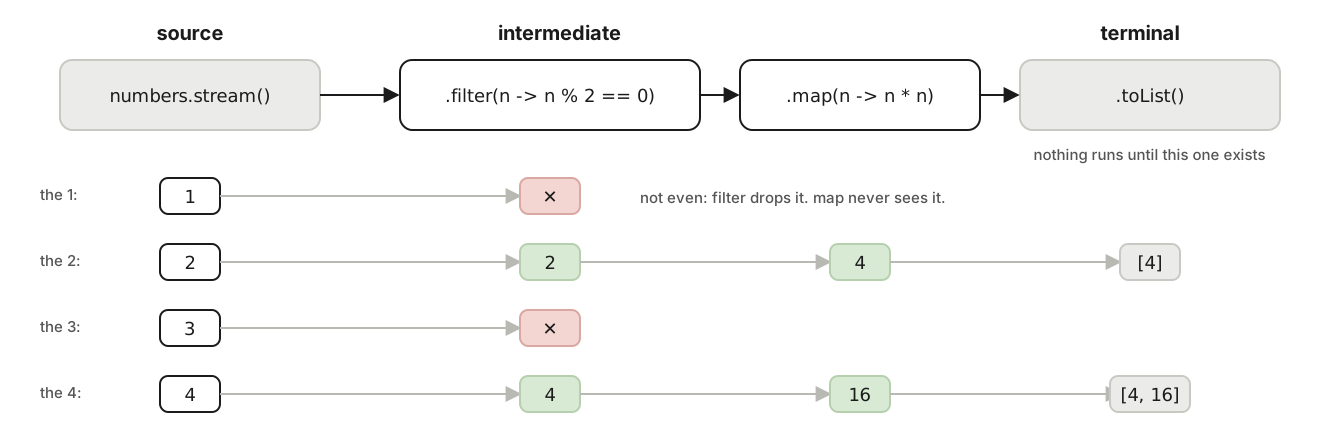
Each element walks the whole chain before the next one enters: 1 goes through filter and is dropped; 2 goes through filter, through map and reaches toList. Nothing runs until there is a terminal operation.
- The source: where the elements come from.
list.stream(),Stream.of(...),IntStream.rangeClosed(1, 10). - Intermediate operations: they turn the stream into another stream.
filter,map,sorted,distinct,limit... You can chain as many as you want. - The terminal operation: it produces the result and closes the stream.
toList(),count(),forEach,collect(...). There can be only one.
Two properties you have to see with your own eyes, because they go against intuition.
First: a stream is lazy. Intermediate operations do nothing until the terminal one arrives. To see it, we print inside each step:
Stream<Integer> s = numbers.stream()
    .filter(n -> { System.out.println("filter " + n); return n % 2 == 0; })
    .map(n -> { System.out.println("map " + n); return n * n; });

System.out.println("-- nothing has happened yet --");

List<Integer> r = s.limit(2).toList();
System.out.println(r);
What happened.
-- nothing has happened yet --
filter 1
filter 2
map 2
filter 3
filter 4
map 4
[4, 16]
Three things to see. First, the line "nothing has happened yet" came out before any filter: defining the stream ran nothing. Second, elements go one at a time through the whole chain: 2 went through filter and map before 3 entered filter. It is not "filter everything, then map everything". Third, it stopped at 4: limit(2) needed only two results and, once it had them, stopped asking for elements. It never looked at 5 through 10.
Second: a stream is consumed only once.
Stream<Integer> evens = numbers.stream().filter(n -> n % 2 == 0);
System.out.println(evens.count());
System.out.println(evens.count()); // the same stream again5
Exception in thread "main" java.lang.IllegalStateException: stream has already been operated upon or closedIf you need to traverse twice, you create two streams from the collection (list.stream() twice). The collection is still there; the stream is not.
When to use it. When the operation is described as "from these elements, the ones that meet such condition, transformed like so, gathered in such form". When the loop needs an index, modifies several things at once or has complicated breaks, the loop is still better.
Takeaway: a stream stores no data; it describes a traversal. It is lazy, processes one at a time, and is used only once.
2. The intermediate operations with primes
We are going to build the list of primes up to 50 with a stream and use it to see each operation. IntStream.rangeClosed(2, 50) generates the integers from 2 to 50; boxed() turns the stream of int into a stream of Integer so they can be stored in a List. Examples::isPrime is the same method from part 1, passed as a reference (if your class has a different name, change it).
List<Integer> primes = IntStream.rangeClosed(2, 50)
    .filter(Examples::isPrime)
    .boxed()
    .toList();
System.out.println(primes);[2, 3, 5, 7, 11, 13, 17, 19, 23, 29, 31, 37, 41, 43, 47]And now each operation, one line and its output:
// map: transforms each element (here, its square)
System.out.println(primes.stream().map(p -> p * p).toList());

// sorted: sorts (with a Comparator, in whatever order you want)
System.out.println(primes.stream().sorted(Comparator.reverseOrder()).toList());

// limit: only the first n
System.out.println(primes.stream().limit(5).toList());

// skip: skips the first n
System.out.println(primes.stream().skip(10).toList());

// distinct: drops duplicates (uses equals, like a Set)
System.out.println(Stream.of(3, 5, 3, 7, 5, 2).distinct().toList());

// several chained filters: each one narrows further
System.out.println(primes.stream().filter(p -> p > 10).filter(p -> p % 10 == 3).toList());[4, 9, 25, 49, 121, 169, 289, 361, 529, 841, 961, 1369, 1681, 1849, 2209]
[47, 43, 41, 37, 31, 29, 23, 19, 17, 13, 11, 7, 5, 3, 2]
[2, 3, 5, 7, 11]
[31, 37, 41, 43, 47]
[3, 5, 7, 2]
[13, 23, 43]filter takes a function that returns true or false (a predicate) and lets through only the true ones. map takes a function that turns each element into something else, of the same type or another: map(Person::name) turns a stream of Person into one of String.
Takeaway:
filterdecides who gets through,mapdecides what it becomes. The rest (sorted,distinct,limit,skip) do what their names say.
3. The terminal operations and Optional
What it is. The terminal is the one that runs everything and yields a result. The ones you will use most, in three groups.
Gathering into a collection
List<Integer> immutable = primes.stream().filter(p -> p < 10).toList();
immutable.add(11);Exception in thread "main" java.lang.UnsupportedOperationExceptiontoList() (Java 16 and later) returns an immutable list, like List.of in part 2. If you need to modify the result, the classic form is collect(Collectors.toList()), which returns an ArrayList:
List<Integer> mutable = primes.stream().filter(p -> p < 10).collect(Collectors.toList());
mutable.add(11);
System.out.println(mutable);[2, 3, 5, 7, 11]Collectors.toSet() does the same into a HashSet, and Collectors.joining(", ") glues strings:
System.out.println(people.stream().map(Person::name).collect(Collectors.joining(", ")));Ana, Luis, Marta, Luis, Rosa, DiegoAsking
System.out.println(primes.stream().filter(p -> p > 20).count());
System.out.println(primes.stream().anyMatch(p -> p % 2 == 0));   // is any of them even?
System.out.println(primes.stream().allMatch(p -> p > 1));        // are all of them > 1?
System.out.println(primes.stream().noneMatch(p -> p > 50)); // is none of them > 50?7
true
true
trueanyMatch, allMatch and noneMatch stop as soon as they know the answer (like limit in section 1): anyMatch stops at the first true.
Finding one: Optional
findFirst() returns the first element that arrives. But what does it return if none arrives? Before Java 8, null, and the NullPointerExceptions that causes. Since Java 8, it returns an Optional: a box that may hold a value or be empty, and that forces you to decide what to do in each case.
Optional<Integer> first = primes.stream().filter(p -> p > 40).findFirst();
System.out.println(first);
System.out.println(first.isPresent() + " " + first.get());

Optional<Integer> none = primes.stream().filter(p -> p > 100).findFirst();
System.out.println(none);
System.out.println(none.orElse(-1));Optional[41]
true 41
Optional.empty
-1The classic mistake: get() without asking
none.get();Exception in thread "main" java.util.NoSuchElementException: No value presentget() on an empty Optional throws an exception, just as the null would have. You gained nothing. The correct ways to get the value out:
orElse(defaultValue)when there is a reasonable value for "not found".orElseThrow(() -> new YourException("clear message"))when not finding it is an error, and you want to say which:
none.orElseThrow(() -> new IllegalArgumentException("no primes greater than 100"));Exception in thread "main" java.lang.IllegalArgumentException: no primes greater than 100ifPresent(value -> ...)when you only want to do something if it is there.map(...)to transform the value if present, without taking it out.
max, min and reduce without an initial value also return Optional, for the same reason: an empty stream has no maximum.
System.out.println(people.stream().max(Comparator.comparing(Person::salary)));Optional[Person[name=Rosa, age=52, city=San José, salary=3100.0]]Reducing to a single value
reduce combines all elements into one, applying an operation two at a time. To add up primes:
System.out.println(primes.stream().reduce(0, Integer::sum));
System.out.println(primes.stream().mapToInt(Integer::intValue).sum());328
328Both give the same. The second converts to IntStream (a stream of primitive int) and uses sum(), which exists only there; so do average(), max(), min(). For numbers, mapToInt/mapToDouble is almost always clearer than reduce.
Takeaway:
toList()is immutable;collect(toList())is not.findFirst,maxandminreturnOptional, andget()without asking is the same mistake as anull.
4. Collectors: from the list to the Map
This is where streams stop being "a shorter loop" and become a different tool. collect takes a Collector: a recipe for how to gather the elements. The ones that matter live in the Collectors class.
toMap: one entry per element
Map<String, Integer> ageByName = people.stream()
    .filter(p -> !p.name().equals("Luis"))
    .collect(Collectors.toMap(Person::name, Person::age));
System.out.println(ageByName);{Marta=28, Ana=31, Diego=35, Rosa=52}toMap(howToGetTheKey, howToGetTheValue). I filtered Luis out on purpose, because there are two. Watch what happens without the filter:
The classic mistake: duplicate keys in toMap
people.stream().collect(Collectors.toMap(Person::name, Person::age));Exception in thread "main" java.lang.IllegalStateException: Duplicate key Luis (attempted merging values 45 and 29)Unlike put on a Map, which replaces silently, toMap refuses to decide for you. You tell it how to combine with a third parameter:
Map<String, Integer> oldest = people.stream()
    .collect(Collectors.toMap(Person::name, Person::age, Math::max));
System.out.println(oldest);{Marta=28, Ana=31, Diego=35, Luis=45, Rosa=52}And a fourth parameter picks the map implementation, if you need order:
Map<String, Person> byName = people.stream()
    .collect(Collectors.toMap(Person::name, Function.identity(), (a, b) -> a, TreeMap::new));
System.out.println(byName.keySet());[Ana, Diego, Luis, Marta, Rosa]Function.identity() means "the element itself" (the value is the whole Person). (a, b) -> a means "if there are two, keep the first". TreeMap::new is the map factory.
groupingBy: one list per key
The most useful collector of all. It groups the elements by whatever the function returns:
Map<String, List<Person>> byCity = people.stream()
    .collect(Collectors.groupingBy(Person::city));

byCity.forEach((city, list) ->
System.out.println(city + " -> " + list.stream().map(Person::name).toList()));San José -> [Ana, Rosa]
Alajuela -> [Marta]
Heredia -> [Luis, Diego]
Cartago -> [Luis]It is the computeIfAbsent from part 1, in one line. And the order of the cities is not promised, because the map is a HashMap.
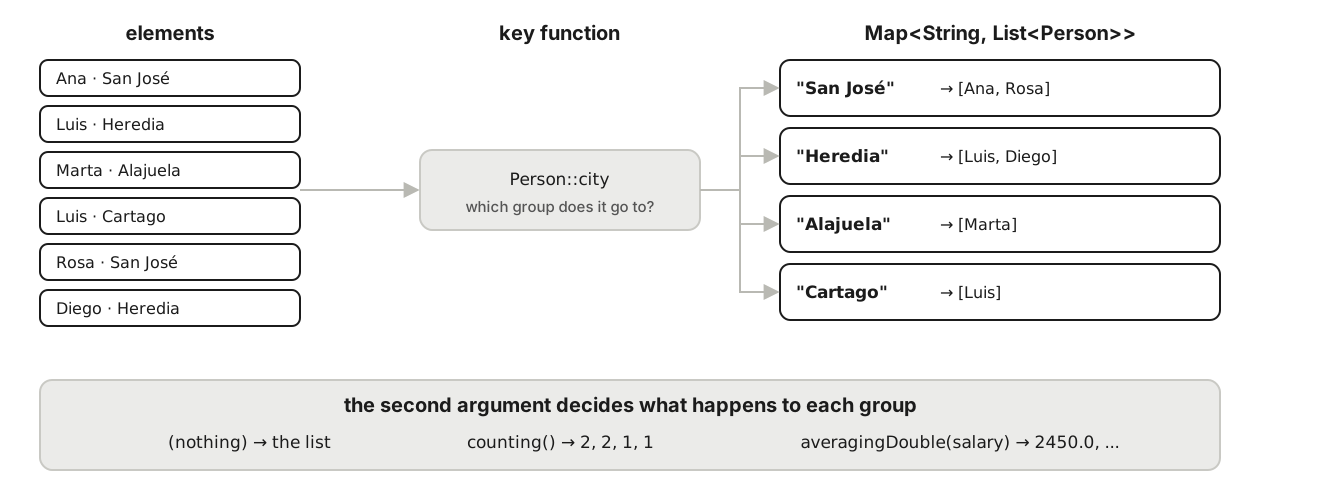
Each element goes through the key function (Person::city) and falls into the matching group. The second argument, the "downstream" collector, decides what is done with each group: keep the list, count it, average it.
groupingBy with a second collector
What makes groupingBy so powerful is the second argument: what to do with each group instead of keeping the list.
// count per city
System.out.println(people.stream()
    .collect(Collectors.groupingBy(Person::city, Collectors.counting())));

// average salary per city
System.out.println(people.stream()
    .collect(Collectors.groupingBy(Person::city, Collectors.averagingDouble(Person::salary))));

// only the names per city
System.out.println(people.stream()
    .collect(Collectors.groupingBy(Person::city, Collectors.mapping(Person::name, Collectors.toList()))));

// sum of salaries per city
System.out.println(people.stream()
.collect(Collectors.groupingBy(Person::city, Collectors.summingDouble(Person::salary))));{San José=2, Alajuela=1, Heredia=2, Cartago=1}
{San José=2450.0, Alajuela=1500.0, Heredia=2300.0, Cartago=1700.0}
{San José=[Ana, Rosa], Alajuela=[Marta], Heredia=[Luis, Diego], Cartago=[Luis]}
{San José=4900.0, Alajuela=1500.0, Heredia=4600.0, Cartago=1700.0}counting() returns Long, not Integer: hence a Map<String, Long>. mapping(function, collector) transforms each element of the group before gathering it.
With three arguments you choose the map (TreeMap::new so it comes out sorted), just as in toMap. A compiler detail: assign the result to a variable with an explicit type, because inside a println it sometimes cannot infer the types and fails with a long error that says nothing useful.
Map<String, String> namesByCity = people.stream()
    .collect(Collectors.groupingBy(Person::city, TreeMap::new,
             Collectors.mapping(Person::name, Collectors.joining("/"))));
System.out.println(namesByCity);

Map<Integer, Long> byDecade = people.stream()
    .collect(Collectors.groupingBy(p -> p.age() / 10 * 10, TreeMap::new, Collectors.counting()));
System.out.println(byDecade);{Alajuela=Marta, Cartago=Luis, Heredia=Luis/Diego, San José=Ana/Rosa}
{20=2, 30=2, 40=1, 50=1}The key function can be any computation: p.age() / 10 * 10 turns 31 into 30, 45 into 40 (integer division), and so groups by decade.
partitioningBy: two groups, yes and no
When the key is a true/false, partitioningBy always returns both entries, even if one is empty:
Map<Boolean, List<String>> adults = people.stream()
    .collect(Collectors.partitioningBy(p -> p.age() >= 30,
             Collectors.mapping(Person::name, Collectors.toList())));
System.out.println(adults);{false=[Marta, Luis], true=[Ana, Luis, Rosa, Diego]}When to use each. toMap when each element yields one entry. groupingBy when several elements share a key. partitioningBy when the question is yes/no.
Takeaway:
groupingBy(key, downstreamCollector)is the operation that replaces most of the loops with aMapyou have ever written.
5. flatMap and primitive streams
What it is. map turns each element into one. flatMap turns each element into a stream of several, and flattens them all into a single stream. It is what you need when the elements contain lists.
Example. Orders with lines:
record Line(String product, int quantity, double price) {
    double total() { return quantity * price; }
}
record Order(String customer, List<Line> lines) {}

List<Order> orders = List.of(
    new Order("Ana",   List.of(new Line("Keyboard", 1, 1200), new Line("Mouse", 2, 800))),
    new Order("Luis",  List.of(new Line("Monitor", 1, 4500))),
    new Order("Marta", List.of(new Line("Mouse", 1, 800), new Line("Chair", 1, 3000), new Line("Keyboard", 1, 1200))));
With map you get a stream of lists (three lists); with flatMap, a stream of lines (six lines):
System.out.println(orders.stream().map(Order::lines).toList().size());

List<Line> allLines = orders.stream().flatMap(o -> o.lines().stream()).toList();
System.out.println(allLines.size() + " " + allLines.stream().map(Line::product).toList());3
6 [Keyboard, Mouse, Monitor, Mouse, Chair, Keyboard]And from the six lines, every business question is one line each:
// distinct products, sorted
System.out.println(allLines.stream().map(Line::product).distinct().sorted().toList());

// total sold
System.out.println(allLines.stream().mapToDouble(Line::total).sum());

// total per order
orders.forEach(o -> System.out.println(o.customer() + " -> " + o.lines().stream().mapToDouble(Line::total).sum()));

// units per product
System.out.println(allLines.stream().collect(Collectors.groupingBy(Line::product, Collectors.summingInt(Line::quantity))));[Chair, Keyboard, Monitor, Mouse]
12300.0
Ana -> 2800.0
Luis -> 4500.0
Marta -> 5000.0
{Monitor=1, Mouse=3, Chair=1, Keyboard=2}Primitive streams and statistics
IntStream, LongStream and DoubleStream are streams of primitive numbers. They exist because storing each number as an Integer object costs memory and time, and because they have operations a Stream<Integer> lacks: sum, average, max, min, and summaryStatistics, which gives all of them at once:
DoubleSummaryStatistics stats = people.stream().mapToDouble(Person::salary).summaryStatistics();
System.out.println(stats);
System.out.println(stats.getAverage() + " " + stats.getMax());

System.out.println(IntStream.rangeClosed(1, 5).map(n -> n * n).sum());
System.out.println(IntStream.rangeClosed(1, 5).boxed().toList());DoubleSummaryStatistics{count=6, sum=12700.000000, min=1500.000000, average=2116.666667, max=3100.000000}
2116.6666666666665 3100.0
55
[1, 2, 3, 4, 5]You go from one to the other with mapToInt/mapToDouble (object → primitive) and boxed() (primitive → object).
Takeaway: when each element contains a list,
flatMap. For numbers,mapToInt/mapToDoubleandsummaryStatistics.
6. Expert level: what almost nobody uses and should
Everything above covers 95% of daily use. What follows is the 5% that separates those who know the tool from those who merely use it.
teeing: two collectors at once
What it is. teeing(collectorA, collectorB, howToCombine) (Java 12) passes each element through two collectors at the same time and combines the two results. Without it, computing the minimum and the maximum took two traversals.
String range = primes.stream().collect(Collectors.teeing(
    Collectors.minBy(Comparator.<Integer>naturalOrder()),
    Collectors.maxBy(Comparator.<Integer>naturalOrder()),
    (min, max) -> min.get() + ".." + max.get()));
System.out.println(range);

var averageAndCount = people.stream().collect(Collectors.teeing(
    Collectors.averagingDouble(Person::salary),
    Collectors.counting(),
    (avg, n) -> "average=" + avg + " of " + n + " people"));
System.out.println(averageAndCount);2..47
average=2116.6666666666665 of 6 people(Comparator.<Integer>naturalOrder() carries the explicit type for the same reason as before: sometimes the compiler cannot infer it inside teeing.)
A Collector of your own
What it is. A collector is four functions: how to create the container, how to add an element, how to combine two containers (for the parallel case) and how to finish. Collector.of takes them in that order. One that glues names between brackets using StringJoiner:
Collector<String, StringJoiner, String> inBrackets = Collector.of(
    () -> new StringJoiner(", ", "[", "]"),   // 1. create the container
    StringJoiner::add,                        // 2. add an element
    StringJoiner::merge,                      // 3. combine two containers
    StringJoiner::toString);                  // 4. produce the result

System.out.println(people.stream().map(Person::name).collect(inBrackets));[Ana, Luis, Marta, Luis, Rosa, Diego]This particular one already exists (Collectors.joining(", ", "[", "]")); I wrote it to show the four pieces. When you truly need one is to gather into a structure of your own, or for an accumulation no Collectors method covers.
Infinite sources: iterate and generate
// iterate with a stop condition (Java 9): powers of 2 up to 100
System.out.println(Stream.iterate(1, n -> n <= 100, n -> n * 2).toList());

// infinite iterate + limit: the first 10 Fibonacci numbers
System.out.println(Stream.iterate(new int[]{0, 1}, f -> new int[]{f[1], f[0] + f[1]})
    .limit(10).map(f -> f[0]).toList());

// generate: calls the function each time it needs an element
Random random = new Random(42);
System.out.println(Stream.generate(() -> random.nextInt(10)).limit(5).toList());[1, 2, 4, 8, 16, 32, 64]
[0, 1, 1, 2, 3, 5, 8, 13, 21, 34]
[0, 3, 8, 4, 0]An infinite stream without limit or takeWhile never ends. This works only because the stream is lazy (section 1): limit(10) stops asking for elements after the tenth.
takeWhile and dropWhile
(Java 9.) takeWhile takes elements while the condition holds and stops at the first that does not; dropWhile discards them while it holds and keeps the rest. The difference from filter matters:
System.out.println(primes.stream().takeWhile(p -> p < 20).toList());
System.out.println(primes.stream().dropWhile(p -> p < 20).toList());
System.out.println(Stream.of(5, 1, 30, 2, 40).takeWhile(n -> n < 20).toList());[2, 3, 5, 7, 11, 13, 17, 19]
[23, 29, 31, 37, 41, 43, 47]
[5, 1]The third line is the one that explains it: filter(n -> n < 20) would give [5, 1, 2], but takeWhile stopped at 30 and never saw the 2. It is useful on sorted or infinite data.
mapMulti: flatMap without creating streams
(Java 16.) When flatMap produces few elements per input, creating a stream per element is waste. mapMulti gives you an emit function and you decide how many elements to produce from each one, zero included:
List<String> products = orders.stream().<String>mapMulti((order, emit) -> {
    for (Line l : order.lines()) {
        if (l.quantity() > 1) {
            emit.accept(l.product() + " x" + l.quantity());
        }
    }
}).toList();
System.out.println(products);[Mouse x2]It is flatMap and filter in a single step. The <String> before mapMulti tells the compiler the result type, which it cannot guess.
And what is coming: Gatherers
Java 24 (March 2025) added Stream.gather(...) with Gatherers: intermediate operations you can write yourself, like windowFixed(3) (group three at a time) or fold. It is outside the Java 21 baseline of this series, but if you work on Java 24 or later, it is the next topic to read.
Takeaway:
teeingfor two results in one traversal,takeWhileon sorted data,mapMultiwhenflatMapproduces little. AndCollector.ofis four functions.
7. The traps
Three mistakes that fail neither at compile time nor with an exception, and that is why they reach production.
Side effects in the pipeline
A side effect is modifying something outside the stream from inside an operation. It works sequentially and breaks in parallel:
List<Integer> sideEffects = new ArrayList<>();
IntStream.rangeClosed(1, 1000).parallel().forEach(sideEffects::add);
System.out.println("with side effect: " + sideEffects.size() + " (expected 1000)");

List<Integer> good = IntStream.rangeClosed(1, 1000).parallel().boxed().toList();
System.out.println("without side effect: " + good.size());with side effect: 961 (expected 1000)
without side effect: 1000It is the shared ArrayList from part 2, disguised as a stream. If the result has to come out of a stream, it comes out through the terminal (toList, collect), never by adding to a list on the outside.
parallel() is neither free nor always faster
parallel() splits the work across several threads. With small data, coordinating the threads costs more than the work. And the order of forEach is no longer guaranteed:
StringBuilder sb = new StringBuilder();
IntStream.rangeClosed(1, 10).parallel().forEach(n -> sb.append(n).append(' '));
System.out.println("parallel forEach: " + sb);

StringBuilder sb2 = new StringBuilder();
IntStream.rangeClosed(1, 10).parallel().forEachOrdered(n -> sb2.append(n).append(' '));
System.out.println("forEachOrdered: " + sb2);parallel forEach: 7 3 5 4 10 2 8
forEachOrdered: 1 2 3 4 5 6 7 8 9 10Look closely at the first line: it is not only out of order; numbers are missing and there is a stray double space. StringBuilder is not thread-safe, and it lost writes. On your machine something else will come out. forEachOrdered respects the order (and serializes the access along the way), but with that you lost the reason to go parallel in the first place. By contrast, collect(Collectors.joining(" ")) in parallel does give 1 2 3 ... 10, because collectors are designed to combine partial results in order.
Rule: use parallel() only with many elements, heavy work per element, no side effects, and after measuring.
Modifying the collection while the stream traverses it
List<Integer> base = new ArrayList<>(List.of(1, 2, 3, 4));
base.stream().forEach(n -> { if (n == 2) base.add(99); });Exception in thread "main" java.util.ConcurrentModificationExceptionThe same exception as the for-each in part 1, for the same reason. The stream traverses the collection with its iterator; nobody may modify it in the meantime.
peek is for looking, not for doing
peek runs an action with each element and lets it through unchanged. It is for debugging a pipeline:
List<Integer> withPeek = Stream.of(1, 2, 3)
    .peek(n -> System.out.println("saw " + n))
    .filter(n -> n > 1)
    .toList();
System.out.println(withPeek);saw 1
saw 2
saw 3
[2, 3]The problem is when it is used to modify the elements or something external "because it fits in one line". Java does not guarantee that peek runs for every element (if a terminal like count() can compute the result without traversing, it does not traverse). To transform, map; to act at the end, forEach.
Takeaway: nothing outside gets modified from inside the pipeline.
parallel()only with lots of data and after measuring.peekis for looking.
Takeaways from the whole article
- A stream describes a traversal; it stores no data. It is lazy, processes one at a time and is used once.
filterdecides who gets through;mapdecides what it becomes;flatMapflattens lists of lists.toList()is immutable;collect(Collectors.toList())is not.findFirst,max,minreturnOptional;orElseandorElseThroware the right ways to open it.toMapfails on duplicate keys until you say how to combine;groupingBy(key, collector)replaces almost every loop with aMap.- For numbers,
mapToInt/mapToDoubleandsummaryStatistics. teeing,takeWhile,mapMultiandCollector.ofare the 5% worth knowing.- No side effects in the pipeline,
parallel()only after measuring, andpeekonly for looking.
Takeaways from the whole series
Three articles, one underlying idea: a collection is a promise. List promises positions; Set, no duplicates; Map, lookup by key. Hash promises speed, Tree promises order, Linked promises arrival order. List.of promises nobody changes it. ConcurrentHashMap promises that merge is atomic. A stream promises to traverse one at a time, touching nothing outside.
Choosing well is reading those promises and keeping the one you need, not one more. And the line we started with, List<String> names = new ArrayList<>(), now reads in full: on the left, the promise; on the right, who keeps it.
Which loop with a Map do you still write by hand that, after reading this, you are going to swap for a groupingBy? I would like to read it in the comments.
References
- Oracle, Java 21 API: java.util.stream. Includes the section on side effects and parallelism.
- Oracle, Java 21 API: Collectors.
- Oracle, Java 21 API: Optional.
- JEP 485, Stream Gatherers, Java 24.