Java Collections: List Is Not ArrayList
Part 1 of 3 in the series on Java collections. Continue with part 2: mutability, order and equality and part 3: streams.
A line we all write without understanding it
There is a line that shows up in almost every Java program:
List<String> names = new ArrayList<>();Many of us wrote it for years before we could explain why the left side says List and the right side says ArrayList. If they are the same thing, why two names? And if they are not, which is which?
Ask that question on your team and count the awkward silences. It is not the fault of whoever cannot answer: most tutorials teach you to use collections, not to understand them. This article is the one I wish I had read when I started.
We are going to start from zero. I will not assume you know what an interface is, or what a hash is, or what "natural order" means. Every new word gets explained at the moment it appears. The only thing you need is basic Java: variables, classes, methods and loops.
And we are going to do it with code that runs. Every output you will see was copied from running the examples on Java 21; whenever the output could differ on your machine, I will say so.
How to read the examples. They all live inside a program like this one:
import java.util.*;

public class Examples {
    public static void main(String[] args) {
        // each example's code goes here
    }
}
To avoid repeating that every time, from here on I show only what goes inside main. The import java.util.*; brings in every collection class we are going to use.
1. Before collections: the array
What it is. An array is a row of numbered slots, all of the same type, with a size that is fixed when you create it and never changes. It is the simplest structure Java has for keeping several values together.
Example. Let's store the first five prime numbers (a prime is a number greater than 1 that is divisible only by 1 and itself: 2, 3, 5, 7, 11, 13...).
// 1. Create an array with room for 5 integers
int[] primes = new int[5];

// 2. Fill each slot by position (the first one is 0)
primes[0] = 2;
primes[1] = 3;
primes[2] = 5;
primes[3] = 7;
primes[4] = 11;

System.out.println(Arrays.toString(primes));

// 3. Try to store a sixth prime
primes[5] = 13;
What happened.
[2, 3, 5, 7, 11]
Exception in thread "main" java.lang.ArrayIndexOutOfBoundsException: Index 5 out of bounds for length 5
The array held the first five without trouble. But when we tried to store the sixth, the program stopped with an exception: "index 5 out of bounds for length 5". The array has five slots (0 through 4) and there is no way to give it a sixth. To hold six, you have to create another array of six and copy everything over.
When to use it. When you know in advance how many elements you will have and that number never changes. In practice that is rare: data almost always grows (more orders, more users, more primes).
Takeaway: an array is fast and simple, but its size is fixed. That limit is the reason collections exist.
2. The collection that grows
What it is. A collection is an object that holds other objects and grows or shrinks as needed. You do not have to tell it how many elements it will have. ArrayList is the most used collection in Java.
Example. The same problem, with ArrayList:
// 1. Create the empty list (no size needed)
List<Integer> primes = new ArrayList<>();

// 2. Add the primes one by one
primes.add(2);
primes.add(3);
primes.add(5);
primes.add(7);
primes.add(11);

// 3. Add the sixth, which failed before
primes.add(13);

System.out.println(primes);
System.out.println(primes.size());
What happened.
[2, 3, 5, 7, 11, 13]
6
The sixth prime went in without trouble. size() tells us how many elements there are now: six. Internally, ArrayList uses an array, and when it runs out of room it creates a bigger one and copies everything over by itself. You never see it.
Two details of that first line worth understanding right away:
<Integer>is called a generic: it tells the list what kind of thing it will hold. That way, if you try to put a string into a list of integers, the compiler warns you before anything runs. Collections do not accept primitive types likeint; that is why we useInteger, the "object" version ofint. Java converts between the two automatically.<>on the right (the "diamond") tells the compiler "use the same type I put on the left". It is only there so you do not writeIntegertwice.
Takeaway: a collection grows on its own.
size()tells you how many elements it holds right now, not how many fit.
3. Interface and implementation: the question from the start
Back to the line we began with. Now we can answer it.
List<Integer> primes = new ArrayList<>();What an interface is. An interface is a contract: a list of methods that something promises to have, without saying how it does them. List is an interface. It says: "whatever implements me will have add, get, size, remove and a few more, and will keep elements in the order they were added". It says nothing about how they are stored inside.
What an implementation is. An implementation is a concrete class that fulfills that contract with a specific way of storing the data. ArrayList is an implementation of List: it fulfills the contract using an array internally. LinkedList is another implementation of the same contract, which internally uses nodes linked to each other (we will see it in a moment).
An analogy that works because it preserves the structure: the interface is the wall socket and the implementation is the appliance you plug in. The socket promises what will come out (current at a certain voltage), not how it is generated. You can swap one appliance for another as long as it respects the socket. Where the analogy stops working: an interface can have many implementations at once in the same program, which a socket cannot.
Example of what you cannot do. Since List is only a contract, you cannot create "a List":
List<Integer> primes = new List<>();What happened. This does not compile. The compiler says:
error: List is abstract; cannot be instantiatedTo instantiate is to create a real object in memory with new. A contract is not instantiated; something that fulfills it is.
So why not write ArrayList on both sides? You can, and it compiles. But declaring the variable with the interface (List) has a real advantage: the rest of your code depends only on the contract, not on the implementation. If tomorrow you find that LinkedList suits you better, you change one word on one line and everything else stays the same, because everything else only used List methods.
List<Integer> primes = new LinkedList<>();   // I changed only this
primes.add(2);                               // this stays the same
primes.get(0);                               // and so does this
There is another effect, less obvious, that we will see at the end of the article: the interface you declare with decides which methods you can call. If you declare as List, you only see List methods, even if the actual object is an ArrayList with more.
When to use each. Declare with the interface (List, Set, Map...) in variables, parameters and return types. Pick the implementation (ArrayList, HashSet, HashMap...) only in the new.
How the interfaces are organized
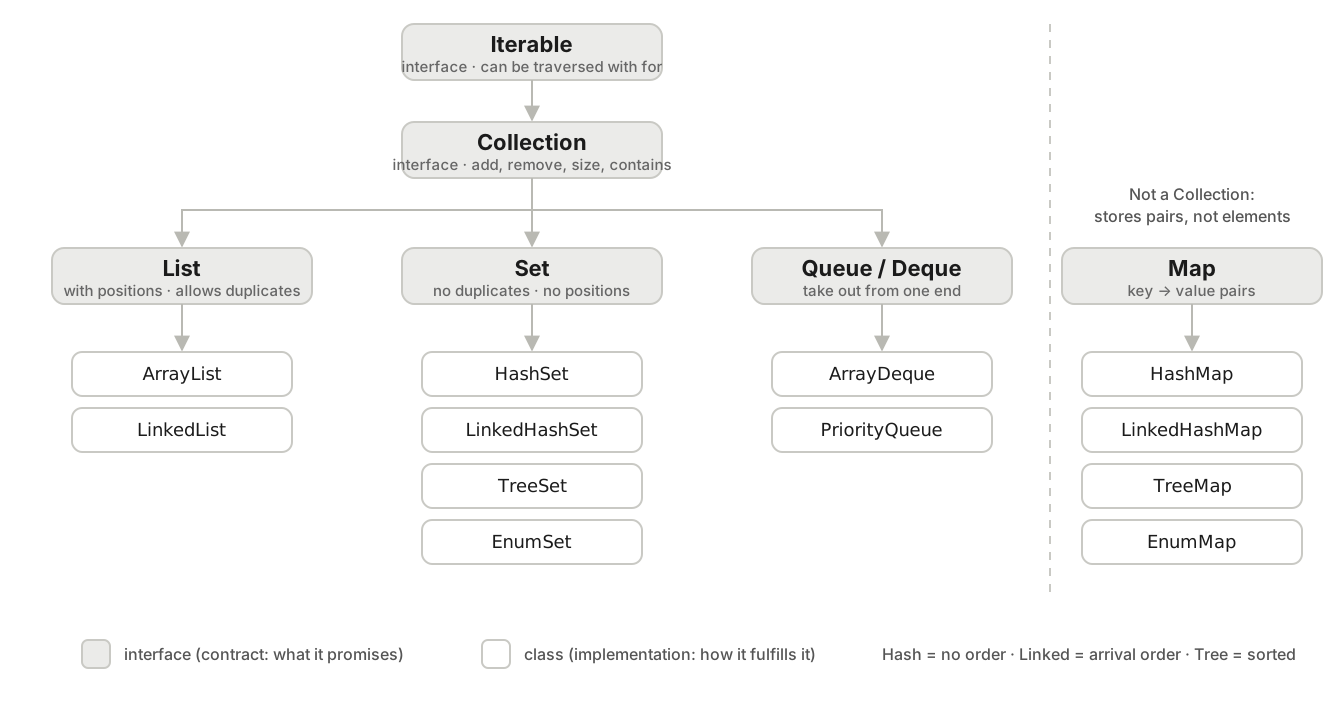
The three families (List, Set, Queue) descend from Collection. Map stands apart: it stores key-value pairs, not loose elements, so it is not a Collection. Below each interface are its most used implementations; they are the ones we will cover in this article.
Iterable: the bare minimum. Promises it can be traversed with afor.Collection: a group of elements. Promisesadd,remove,size,contains...List: a collection with insertion order and positions (index 0, 1, 2...). Allows duplicates.Set: a collection with no duplicates. Order depends on the implementation.Queue: a collection meant for taking elements out in a certain order (a line or a stack).Map: not a collection of elements; a table of key → value pairs. It is in the figure because it is used alongside the others all the time.
Takeaway:
Listis the contract;ArrayListis one way of fulfilling it. You declare with the contract and choose the implementation in thenew.
4. List: every way to load a list
We know what List promises: insertion order, numbered positions, duplicates allowed. Now let's see the real ways to create and fill one, because in other people's code you will meet all of them.
Example. Seven ways, from the most basic to the most convenient:
// a) Empty, then add one by one
List<Integer> a = new ArrayList<>();
a.add(2);
a.add(3);
a.add(5);
System.out.println("a = " + a);

// b) Empty, but reserving room for 100 (still empty)
List<Integer> b = new ArrayList<>(100);
System.out.println("b = " + b + " size=" + b.size());

// c) From loose values, with Arrays.asList
List<Integer> c = Arrays.asList(2, 3, 5);
System.out.println("c = " + c);

// d) From loose values, with List.of (Java 9 and later)
List<Integer> d = List.of(2, 3, 5);
System.out.println("d = " + d);

// e) Copying another list into a new ArrayList
List<Integer> e = new ArrayList<>(List.of(2, 3, 5));
e.add(7);
System.out.println("e = " + e);

// f) Adding several at once to an existing list
List<Integer> f = new ArrayList<>();
Collections.addAll(f, 2, 3, 5, 7);
System.out.println("f = " + f);

// g) Computing the elements in a loop
List<Integer> g = new ArrayList<>();
for (int n = 2; n <= 30; n++) {
    if (isPrime(n)) {
        g.add(n);
    }
}
System.out.println("g = " + g);
isPrime is a method we write separately, outside main:
static boolean isPrime(int n) {
    if (n < 2) return false;
    for (int d = 2; d * d <= n; d++) {
        if (n % d == 0) return false;
    }
    return true;
}
What happened.
a = [2, 3, 5]
b = [] size=0
c = [2, 3, 5]
d = [2, 3, 5]
e = [2, 3, 5, 7]
f = [2, 3, 5, 7]
g = [2, 3, 5, 7, 11, 13, 17, 19, 23, 29]
All seven produce lists. But they are not all the same kind of list, and here is the first serious trap.
The classic mistake: thinking Arrays.asList and List.of give you a normal list
Let's take c (from Arrays.asList) and d (from List.of), and try to modify them:
c.add(7); // does it add?Exception in thread "main" java.lang.UnsupportedOperationException"Unsupported operation". The list from Arrays.asList has a fixed size: you can swap one element for another with set, but you cannot add or remove.
c.set(0, 11);
System.out.println(c);[11, 3, 5]And the one from List.of is stricter still: you cannot even change an element.
d.set(0, 11);Exception in thread "main" java.lang.UnsupportedOperationExceptionWhy do they exist, then? Because very often you want a list that nobody modifies: a list of constants, a return value you do not want the caller to alter. That has a name (immutability) and it is the central topic of part 2. For now, the practical rule:
- If you will add or remove elements later:
new ArrayList<>(), ornew ArrayList<>(List.of(...))if you already know the first ones. - If the list will never change:
List.of(...). Arrays.asListis the old way (Java 1.2); today you almost always want one of the other two.
Working by position
What sets List apart from the other collections is that every element has a position, starting at 0.
System.out.println(g.get(0));       // the first
System.out.println(g.get(3));       // the fourth
System.out.println(g.contains(7));  // is 7 in there?
System.out.println(g.indexOf(7));   // at which position?

g.remove(Integer.valueOf(29));      // removes the ELEMENT 29
System.out.println(g);
g.remove(0);                        // removes the element at POSITION 0
System.out.println(g);2
7
true
3
[2, 3, 5, 7, 11, 13, 17, 19, 23]
[3, 5, 7, 11, 13, 17, 19, 23]Look at the two remove calls. With a list of Integer, remove(29) would be read as "remove position 29" and would fail; that is why we write Integer.valueOf(29) to say "remove the element whose value is 29". With lists of strings or other objects there is no such confusion.
A list of your own objects
So far we stored numbers. A list holds any object, including yours. We are going to use a Person from here on, because the examples that follow need it. It is a record, a short way of declaring a class that only holds data (Java 16 and later):
record Person(String name, int age, String city) {}That one line creates the class with its three fields, its constructor and a reader method per field (name(), age(), city()). It goes outside main, next to isPrime.
List<Person> people = new ArrayList<>();
people.add(new Person("Ana", 31, "San José"));
people.add(new Person("Luis", 45, "Heredia"));
people.add(new Person("Marta", 28, "Alajuela"));

System.out.println(people);
System.out.println(people.get(1).name());[Person[name=Ana, age=31, city=San José], Person[name=Luis, age=45, city=Heredia], Person[name=Marta, age=28, city=Alajuela]]
LuisArrayList or LinkedList
Both fulfill the List contract. The difference is how they store elements internally, and that changes which operations are fast.
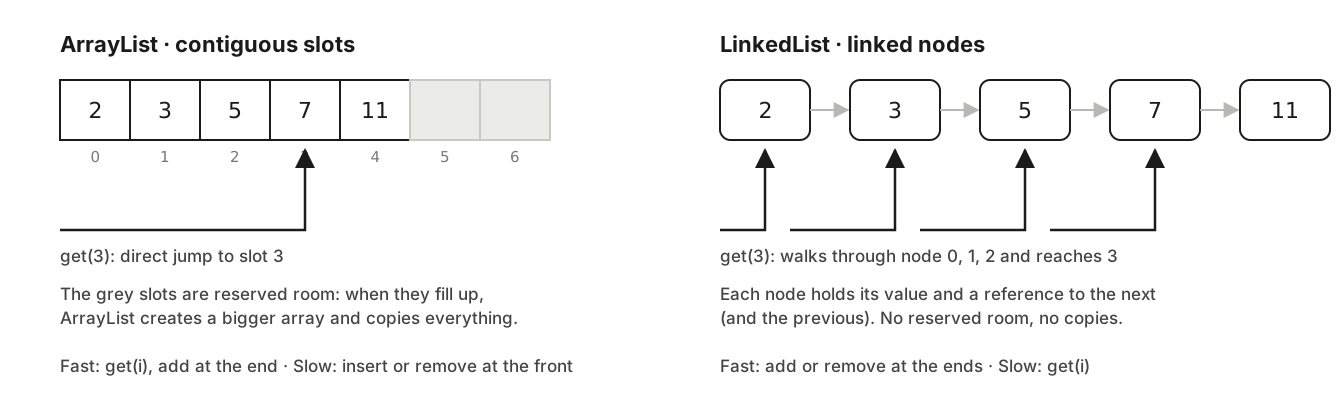
ArrayList is an array that grows on its own: going to position 3 is a direct jump. LinkedList is a chain of nodes: to reach the third one you have to pass through the two before it.
ArrayList:get(i)is immediate, adding at the end is immediate almost always. Inserting or removing at the beginning or in the middle forces everything after it to shift.LinkedList: adding or removing at the ends is immediate (addFirst,addLast,removeFirst). Butget(i)has to walk the chain from the start.
List<Integer> h = new LinkedList<>(List.of(3, 5, 7));
h.addFirst(2);
h.addLast(11);
System.out.println("h = " + h);h = [2, 3, 5, 7, 11]When to use each. ArrayList by default, always. LinkedList only if your program adds and removes at the front all the time and almost never accesses by position; and even then, ArrayDeque (section 6) is usually better. In sixteen years I have needed LinkedList very few times.
Takeaway: there are many ways to load a list, but not all of them give you a modifiable list.
ArrayListis the default choice.
5. Set: the collection that rejects duplicates
What it is. A Set is a collection that rejects duplicate elements. If you add something that is already there, nothing happens: the set stays the same. In exchange, a Set has no positions: there is no get(0).
There are three implementations you will use, and the difference between them is the order the elements come out in. To see it, we load the same names, with duplicates, into all three.
Example.
List<String> names = List.of("María", "Juan", "Ana", "Juan", "Pedro", "Ana", "Luis");

// 1. All three load the same way: with the list in the constructor
Set<String> hashed   = new HashSet<>(names);
Set<String> ordered  = new LinkedHashSet<>(names);
Set<String> sorted   = new TreeSet<>(names);

System.out.println("list    = " + names);
System.out.println("HashSet = " + hashed);
System.out.println("Linked  = " + ordered);
System.out.println("TreeSet = " + sorted);
What happened.
list    = [María, Juan, Ana, Juan, Pedro, Ana, Luis]
HashSet = [Ana, Luis, María, Pedro, Juan]
Linked  = [María, Juan, Ana, Pedro, Luis]
TreeSet = [Ana, Juan, Luis, María, Pedro]
All three dropped the duplicates: seven names became five. But look at the order:
HashSetreturned them in an order that is neither insertion nor alphabetical. On my machine it came out like that; on yours it may come out differently, and that is exactly the point:HashSetpromises no order at all. If your code depends on the order of aHashSet, you have a bug waiting to show up.LinkedHashSetkept the order they were added in (the first time each one appeared).TreeSetreturned them sorted: alphabetically, because they are strings. If they were numbers, smallest to largest. That "built-in" order of each type is called natural order, and in part 2 we will see how to define it for your own classes.
Why HashSet has no order. A HashSet computes for each element a number called a hash (a numeric digest of the content: equal strings give the same number) and uses that number to decide which internal bucket to store it in. That is why checking whether an element is already there is immediate: compute the hash and look in that bucket. The price is that the buckets do not follow the order you added things in. LinkedHashSet does the same but additionally links the elements in arrival order; TreeSet does not use hashes at all, it uses a tree that keeps everything sorted.
Adding and asking.
System.out.println(hashed.add("Juan"));     // already there
System.out.println(hashed.add("Rosa"));     // new
System.out.println(hashed.contains("Ana"));false
true
trueadd returns false when the element was already there. It is a very handy way to detect duplicates without asking first.
When to use each. HashSet when all you care about is "is it there or not?" and duplicates must vanish. LinkedHashSet when you also need arrival order preserved (for example, to display them as the user typed them). TreeSet when you want them always sorted.
Takeaway:
Setdrops duplicates.HashSetpromises no order,LinkedHashSetkeeps arrival order andTreeSetsorts.
6. Queue and Deque: taking out in a certain order
What it is. A Queue is a collection meant for putting in on one side and taking out on the other, like a line: the first to arrive is the first to leave. A Deque (double-ended queue, pronounced "deck") lets you put in and take out on both sides, and so it also works as a stack: the last one in is the first one out, like a stack of plates.
The line analogy preserves the structure, so I use it: in a bank line, offer is joining at the back, peek is looking at who is first without moving them, and poll is serving the first one and removing them from the line.
Example as a line.
Queue<String> queue = new ArrayDeque<>();
queue.offer("Ana");     // 1. they arrive in this order
queue.offer("Luis");
queue.offer("Marta");
System.out.println(queue);

System.out.println(queue.peek());   // 2. who is next? (does not remove)
System.out.println(queue.poll());   // 3. serve the first one (removes it)
System.out.println(queue);
What happened.
[Ana, Luis, Marta]
Ana
Ana
[Luis, Marta]
Example as a stack. A browser's "back" history is a stack: the last page you visited is the first one you go back to.
Deque<String> stack = new ArrayDeque<>();
stack.push("page1");   // 1. we visit three pages
stack.push("page2");
stack.push("page3");
System.out.println(stack);

System.out.println(stack.pop());   // 2. "back" returns the last one
System.out.println(stack);[page3, page2, page1]
page3
[page2, page1]ArrayDeque serves both purposes. If you ever see the class Stack in old code, it is the old version of this; in part 2 I explain why it is no longer used.
PriorityQueue: the most important one comes out first. It is a queue where poll does not return whoever arrived first, but the smallest by natural order (or by an order you define). If we load primes out of order:
PriorityQueue<Integer> byPriority = new PriorityQueue<>(List.of(13, 2, 11, 3, 7, 5));
System.out.println(byPriority);

while (!byPriority.isEmpty()) {
    System.out.print(byPriority.poll() + " ");
}[2, 3, 5, 13, 7, 11]
2 3 5 7 11 13Notice: when printing the whole queue, the internal order is not fully sorted ([2, 3, 5, 13, 7, 11]). PriorityQueue only guarantees that what comes out with poll is the smallest at that moment; it promises nothing about the rest. It is another case of "do not depend on an order the collection does not promise".
When to use it. ArrayDeque for task queues and for stacks (undo, history, walking trees). PriorityQueue when the next thing to process is "the most urgent", not "the oldest".
Takeaway:
Queuetakes out in arrival order,Dequealso works as a stack,PriorityQueuetakes out the smallest. For the first two,ArrayDeque.
7. Map: looking up by key
What it is. A Map stores pairs: a key and a value associated with it. Keys do not repeat; values can. The question a Map answers is not "is it there?" but "what is the value for this key?".
The analogy that preserves the structure: lockers with a unique label. The label is the key; what is inside is the value. Two lockers cannot have the same label, but they can have the same contents. Where the analogy fails: in a Map the label can be any object, not only a name.
Example. Age by name:
Map<String, Integer> ages = new HashMap<>();
ages.put("Ana", 31);        // 1. store key -> value
ages.put("Luis", 45);
ages.put("Marta", 28);
System.out.println(ages);

System.out.println(ages.get("Luis"));             // 2. look up by key
System.out.println(ages.get("Pedro"));            // 3. a key that does not exist
System.out.println(ages.getOrDefault("Pedro", 0)); // 4. same, with a default value

ages.put("Ana", 32);                              // 5. same key: replaces
System.out.println(ages);
What happened.
{Marta=28, Ana=31, Luis=45}
45
null
0
{Marta=28, Ana=32, Luis=45}
Three things to see:
getof a key that does not exist returnsnull, it does not throw. If you do not want to deal withnull,getOrDefaultgives you a fallback value.putwith a key that already exists replaces the value. The key is not duplicated.- The order it printed in (
Marta, Ana, Luis) is not insertion order.HashMapworks likeHashSet: it uses the key's hash to place it, and so promises no order.
The example that makes it click: counting
The most common use of a Map is counting things. Let's count how many names start with each letter:
List<String> names = List.of("María", "Juan", "Ana", "Juan", "Pedro", "Ana", "Luis");

Map<Character, Integer> countByInitial = new HashMap<>();
for (String name : names) {
    char initial = name.charAt(0);
    // 1. read how many so far (0 if it is the first time)
    int current = countByInitial.getOrDefault(initial, 0);
    // 2. store one more
    countByInitial.put(initial, current + 1);
}
System.out.println(countByInitial);{P=1, A=2, J=2, L=1, M=1}That works, but Java has a method that does both steps at once: merge(key, valueIfNew, howToCombine).
Map<Character, Integer> countByInitial2 = new HashMap<>();
for (String name : names) {
    countByInitial2.merge(name.charAt(0), 1, Integer::sum);
}
System.out.println(countByInitial2);{P=1, A=2, J=2, L=1, M=1}Read it as: "for this key, if it does not exist store 1; if it does, combine what was there with 1 using addition". Integer::sum is a reference to the sum method of Integer; it is the same as writing (old, incoming) -> old + incoming.
And if instead of counting you want to group (all names by their initial), the method is computeIfAbsent: "if the key has no value, create it with this function; then give it to me".
Map<Character, List<String>> byInitial = new HashMap<>();
for (String name : names) {
    byInitial.computeIfAbsent(name.charAt(0), k -> new ArrayList<>()).add(name);
}
System.out.println(byInitial);{P=[Pedro], A=[Ana, Ana], J=[Juan, Juan], L=[Luis], M=[María]}Without computeIfAbsent you would have to write "if the key is missing, create the list, store it; then look it up and add". Four lines become one.
The three Map implementations and their order
Same as with Set, there are three and they differ in order. We load eight names into all three:
List<String> keys = List.of("Marta", "Ana", "Luis", "Carlos", "Beatriz", "Diego", "Elena", "Zoe");

Map<String, Integer> hashed  = new HashMap<>();
Map<String, Integer> ordered = new LinkedHashMap<>();
Map<String, Integer> sorted  = new TreeMap<>();

for (String key : keys) {
    hashed.put(key, key.length());
    ordered.put(key, key.length());
    sorted.put(key, key.length());
}
System.out.println("HashMap       = " + hashed);
System.out.println("LinkedHashMap = " + ordered);
System.out.println("TreeMap = " + sorted);HashMap = {Marta=5, Zoe=3, Ana=3, Luis=4, Diego=5, Carlos=6, Beatriz=7, Elena=5}
LinkedHashMap = {Marta=5, Ana=3, Luis=4, Carlos=6, Beatriz=7, Diego=5, Elena=5, Zoe=3}
TreeMap = {Ana=3, Beatriz=7, Carlos=6, Diego=5, Elena=5, Luis=4, Marta=5, Zoe=3}Same pattern as the sets: HashMap in an order that is not promised (and may differ on your machine), LinkedHashMap in insertion order, TreeMap sorted by key.
Iterating a Map and creating a fixed one
A Map is not iterated directly with for, because it is not a Collection. You iterate over its entries (each key-value pair is a Map.Entry):
for (Map.Entry<String, Integer> entry : sorted.entrySet()) {
    System.out.println(entry.getKey() + " has " + entry.getValue() + " letters");
}Ana has 3 letters
Beatriz has 7 letters
Carlos has 6 letters
...You can also iterate only the keys (keySet()) or only the values (values()).
And like List.of, there is Map.of for a map that never changes:
Map<String, Integer> fixed = Map.of("Ana", 31, "Luis", 45);
System.out.println(fixed.get("Ana"));
fixed.put("Marta", 28);31
Exception in thread "main" java.lang.UnsupportedOperationExceptionMap with your own objects as values
The most frequent thing in a real program is a Map whose value is one of your objects, so you can find it fast by its identifier:
Map<String, Person> byName = new HashMap<>();
for (Person p : people) {
    byName.put(p.name(), p);
}
System.out.println(byName.get("Marta").city());AlajuelaWhen to use each. HashMap by default. LinkedHashMap if you are going to display the entries and want arrival order. TreeMap if you want them sorted by key, or if you will need questions like "the closest key to this one" (part 2).
Takeaway:
Mapanswers "what is the value for this key?".mergecounts,computeIfAbsentgroups, and order follows the same rule as inSet.
8. EnumSet and EnumMap: when the key is an enum
What it is. An enum is a type with a fixed set of possible values (days of the week, the statuses of an order). When the elements of a Set or the keys of a Map come from an enum, Java has two special implementations: EnumSet and EnumMap. They do the same as HashSet and HashMap, but faster and with elements always in the order the enum declares them.
Example. The statuses of an order:
enum OrderStatus { NEW, PAID, SHIPPED, DELIVERED, CANCELLED }(It goes outside main, like Person.)
// 1. A set of "active" statuses
Set<OrderStatus> active = EnumSet.of(OrderStatus.NEW, OrderStatus.PAID, OrderStatus.SHIPPED);
System.out.println(active);
System.out.println(active.contains(OrderStatus.CANCELLED));

// 2. Its complement: all those NOT in it
Set<OrderStatus> finalStates = EnumSet.complementOf(EnumSet.copyOf(active));
System.out.println(finalStates);

// 3. A map of how many orders there are per status
Map<OrderStatus, Integer> ordersByStatus = new EnumMap<>(OrderStatus.class);
ordersByStatus.put(OrderStatus.SHIPPED, 4);
ordersByStatus.put(OrderStatus.NEW, 10);
ordersByStatus.put(OrderStatus.CANCELLED, 1);
System.out.println(ordersByStatus);
What happened.
[NEW, PAID, SHIPPED]
false
[DELIVERED, CANCELLED]
{NEW=10, SHIPPED=4, CANCELLED=1}
The EnumMap keys came out in enum order (NEW before SHIPPED), not in the order we inserted them. EnumMap needs you to pass the enum class in the constructor (OrderStatus.class) because it reserves one slot per possible value internally; that is why it is so fast.
When to use them. Whenever the element or key type is an enum. There is no reason to use HashSet<OrderStatus> instead of EnumSet.
Takeaway: if the key is an enum,
EnumSet/EnumMap: faster, and always in enum order.
9. Iterating: for-each, Iterator and forEach
We have already iterated several collections with for. It is worth pausing here, because there is a mistake every one of us makes exactly once.
The three ways to iterate a list.
List<Integer> primes = new ArrayList<>(List.of(3, 5, 7, 11, 13, 17, 19, 23));

// a) for-each: the normal way
for (Integer p : primes) {
    System.out.print(p + " ");
}
System.out.println();

// b) by index: when you need the position
for (int i = 0; i < primes.size(); i++) {
    System.out.print(i + ":" + primes.get(i) + " ");
}
System.out.println();

// c) forEach with a lambda: when the action fits in one line
primes.forEach(p -> System.out.print(p + " "));
System.out.println();3 5 7 11 13 17 19 23
0:3 1:5 2:7 3:11 4:13 5:17 6:19 7:23
3 5 7 11 13 17 19 23A lambda (p -> ...) is a nameless function written in place: "given p, do this". For a Map, forEach takes two parameters, key and value:
ages.forEach((name, age) -> System.out.println(name + " -> " + age));The classic mistake: removing elements inside a for-each
We want to remove the primes greater than 10:
for (Integer p : primes) {
    if (p > 10) {
        primes.remove(p);
    }
}Exception in thread "main" java.util.ConcurrentModificationExceptionThe for-each internally uses an object called an Iterator, which keeps pointing at the current element. If you modify the list from outside that iterator while it is traversing, the iterator detects that the list changed under its feet and throws this exception. The name is scary ("concurrent modification"), but there are no threads here: it is a single loop modifying what it traverses.
The two correct fixes. The classic one is to use the iterator yourself and remove through it:
Iterator<Integer> it = primes.iterator();
while (it.hasNext()) {
    Integer p = it.next();
    if (p > 10) {
        it.remove();     // removes the last one next() returned
    }
}
System.out.println(primes);[3, 5, 7]And the modern one, which is the one I always use: removeIf.
primes.removeIf(p -> p > 10);
System.out.println(primes);[3, 5, 7]Takeaway: never modify a collection inside a for-each that is traversing it. To remove,
removeIf.
10. How to choose: the decision guide
After all this, choosing a collection comes down to three or four questions. Ask them in this order:
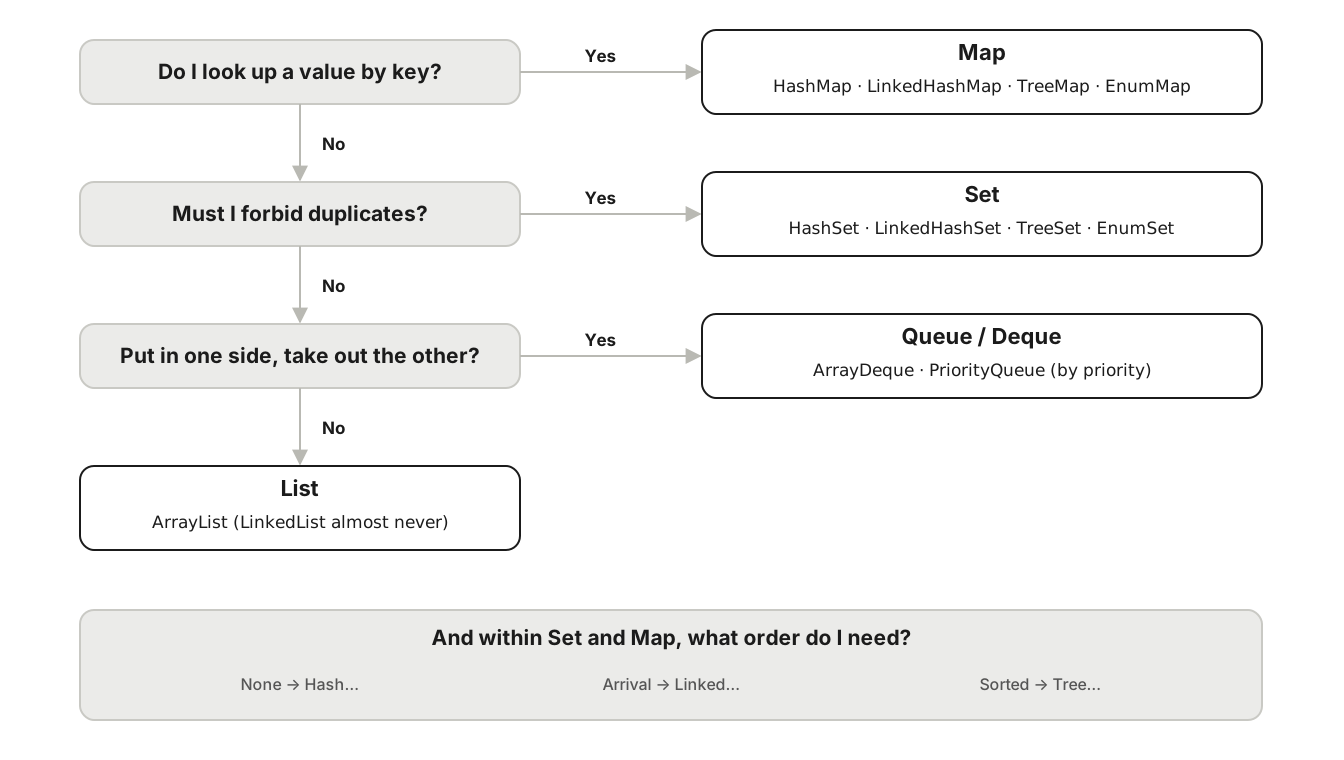
The questions, in order: do I look up by key? → Map. Do I forbid duplicates? → Set. Do I take elements out from one end? → Queue/Deque. Otherwise, List. And within each family, order decides the implementation.
- Do I need to find a value from a key? Yes →
Map. If not, go on. - Must I forbid duplicates? Yes →
Set. If not, go on. - Is what I do putting in on one side and taking out on the other (line, stack, most urgent)? Yes →
Queue/Deque. If not,List. - Within the family, what order do I need? None →
Hash...; arrival →Linked...; sorted →Tree.... ForList,ArrayList. ForQueue/Deque,ArrayDeque(orPriorityQueueif by priority). If the key is an enum,Enum....
Java 21 note: SequencedCollection
Since Java 21, every collection that has a defined order (List, LinkedHashSet, TreeSet, ArrayDeque...) shares a new interface, SequencedCollection, with methods for the ends: getFirst(), getLast(), addFirst(), removeLast() and reversed(). For ordered maps (LinkedHashMap, TreeMap) there is SequencedMap, with firstEntry(), lastEntry() and reversed().
System.out.println(primes.getFirst() + " " + primes.getLast());
System.out.println(primes.reversed());3 23
[23, 19, 17, 13, 11, 7, 5, 3]And here the lesson from section 3 returns, with a real example that happened to me while writing this article. I tried this:
Set<String> ordered = new LinkedHashSet<>(names);
ordered.getFirst();error: cannot find symbol
symbol: method getFirst()
location: variable ordered of type Set<String>The object is a LinkedHashSet, which does have getFirst(). But the variable is declared as Set, and Set promises no order, so it has no such method. The interface you declare with decides what you can call. The fix is to declare with the interface that does promise it:
SequencedSet<String> ordered = new LinkedHashSet<>(names);
System.out.println(ordered.getFirst() + " " + ordered.getLast());María LuisIf you work on Java 17 or earlier, none of this section exists: getFirst() is written get(0), and for the last one, get(size() - 1).
Takeaway: key →
Map; no duplicates →Set; take out from one end →Queue; everything else →List. And the interface you declare is the one that gives you the methods.
They exist, but you do not need them yet
So they do not surprise you when you meet them:
WeakHashMap: a map whose keys can be released by the garbage collector. For special caches.IdentityHashMap: compares keys by identity (==) instead of by content. Very rare cases.BitSet: a set of bits, for marking "yes/no" very compactly.ConcurrentSkipListMap/ConcurrentSkipListSet:TreeMap/TreeSetsafe for multiple threads.Vector,Stack,Hashtable: the old versions ofArrayList,ArrayDequeandHashMap. I explain them in part 2, in the concurrency section, because that is where it becomes clear why they fell out of use.
Takeaways from the whole article
- An array has a fixed size; a collection grows on its own.
Listis a contract andArrayListis one way to fulfill it. You declare with the contract and choose the implementation in thenew.- Not every way of loading a list gives you a modifiable list:
List.ofandArrays.asListdo not. Listhas positions and duplicates;Sethas no duplicates;Queuetakes out from one end;Maplooks up by key.- In
SetandMap,Hash...promises no order,Linked...keeps arrival order andTree...sorts. - Never modify a collection inside the for-each that traverses it.
- The interface you declare with decides which methods you can call.
In part 2 we go into what I left flagged here: why List.of refuses to change and when that is what you want, what it takes for a HashSet of Person to recognize duplicates, how to define the natural order of your classes, and what happens to all of this when there are multiple threads.
Which of the seven ways to load a list do you use most in your code, and did you know which of them cannot be modified afterwards? I would like to read it in the comments.
References
- Oracle, Java 21 API: java.util. The full reference for every interface and class mentioned.
- Oracle, The Collections Framework (Java Tutorials).
- JEP 431, Sequenced Collections, Java 21.