Java Evolution Through Its LTS Releases: From Java 8 to Java 25
Picture this: you maintain a service written in Java 8, and someone on the team suggests moving it to Java 21. Words like records, virtual threads and pattern matching come up in the meeting, and the question nobody asks out loud is: what actually changes in the code I write every day?
This guide answers that question, one release at a time. It isn't a list of everything that changed in the JDK. It's a walk through the features you'll run into most in real code, explained the way I wish someone had explained them to me.
Every feature follows the same path: why it was born, how the problem was solved without it, what it looks like with it, and when you're better off not using it. If you're new to Java, the main text takes nothing for granted. If you've been at it for years, the Going deeper boxes hold the fine print.
I compiled and ran every example on the JDK its label names, and the outputs you see are the ones I got.
Before we start: why follow the LTS releases
Since 2018, Java has shipped a new release every six months. Some of them are LTS (long-term support) releases: versions the vendor commits to patching for years. Many teams stay on one LTS and jump straight to the next, which makes them a natural way to tell the story.
This guide uses Oracle's classification, where the LTS releases are 8, 11, 17, 21 and 25 (Oracle Java SE Support Roadmap). Each JDK vendor publishes its own support timelines, so if your team uses a different one, check theirs.
Here's the key point: many features aren't born in an LTS. Records, for example, first appeared as a preview (a trial version you have to switch on explicitly) in Java 14 and became final in Java 16. Java 17 is the first LTS that includes them. That's why every feature carries three facts:
| Fact | What it tells you |
|---|---|
| Final in | From which release you can use it without enabling anything |
| First LTS | Which chapter of this guide you'll find it in |
| Origin | Whether it went through preview or incubation first, and when |
- Java 8
- Lambdas
- Streams
- Optional
- java.time
- Default methods
- Java 11
- var
- List.of, Set.of, Map.of
- HttpClient
- New String methods
- java Hola.java
- Java 17
- Switch expressions
- Text blocks
- Records
- Pattern matching for instanceof
- Sealed classes
- Java 21
- Virtual threads
- Pattern matching for switch
- Record patterns
- Sequenced collections
- Java 25
- Unnamed variables (_)
- Stream Gatherers
- Scoped values
- Compact source files
- Flexible constructor bodies
Two notes before we begin. A preview feature is still a preview even when it ships inside an LTS: I don't count it as part of that release until it's final. And the journey ends at Java 25: as I write this, Java 26 and 27 are already out, neither is an LTS, and the next LTS Oracle has planned is Java 29, in September 2027 (Oracle Java SE Support Roadmap).
Java 8: the functional leap
Java 8 came out in March 2014, and it's probably the biggest change in how Java is written since the language was created. If you could only study one chapter of this guide, it would be this one: almost everything that came later builds on it.
Lambdas: passing behavior without writing a class
Lambdas and functional interfaces · language · final in Java 8 · first LTS: Java 8 · JEP 126
Say you have a list of orders and you want to sort it by amount and, when two amounts tie, by customer name.
Why it was born. To sort, Collections.sort needs you to tell it how two orders compare. Before Java 8, that "how" could only be passed as an object, almost always an anonymous class: a class with no name that you declare and create in the same spot. What you care about are the lines that do the comparing; the rest (new Comparator<Pedido>(), @Override, the signature of compare) is ceremony you repeat every time. The official Java tutorial admits as much: for interfaces with a single method, that syntax "may seem unwieldy and unclear" (The Java Tutorials, Lambda Expressions).
JEP 126 adds the other half: other languages already had closures (functions you pass around as values), and without them Java couldn't offer the internal iteration you'll see in Streams.
The same ordering, before and after:
Before · Java 7
static void ordenar(List<Pedido> pedidos) {
    Collections.sort(pedidos, new Comparator<Pedido>() {
        @Override
        public int compare(Pedido a, Pedido b) {
            int porImporte = Integer.compare(a.getImporte(), b.getImporte());
            if (porImporte != 0) {
                return porImporte;
            }
            return a.getCliente().compareTo(b.getCliente());
        }
    });
}
After · Java 8
static void ordenar(List<Pedido> pedidos) {
    pedidos.sort(Comparator.comparing(Pedido::getImporte)
            .thenComparing(Pedido::getCliente));
}
Output
Pedidos ordenados: [Luis 40, Bruno 90, Ana 120, Marta 120]As everywhere in this guide, the code keeps the Spanish names it was verified with: a Pedido is an order, importe is its amount and cliente its customer. The "after" uses List.sort, a method Java 8 added to List; how it managed that without breaking anything is the subject of default methods, at the end of the chapter.
What it is. A lambda is a short function written right where it's used. (a, b) -> Integer.compare(a.getImporte(), b.getImporte()) reads as "given two orders, compare them by amount". Java turns it into an instance of a functional interface: an interface with exactly one abstract method, like Comparator. The @FunctionalInterface annotation asks the compiler to check that rule, although any interface that meets it works, annotated or not (FunctionalInterface javadoc). The java.util.function package provides the general-purpose ones: Predicate (a condition), Function (a transformation), Consumer (uses a value) and Supplier (produces one).
A method reference, such as Pedido::getImporte, is an even shorter lambda for when all you do is call a method that already exists: it's equivalent to pedido -> pedido.getImporte(). Comparator.comparing takes that function and builds the comparator, and thenComparing adds the tiebreaker.
Why it's better. The "after" states the rule in the same order you thought of it: by amount, then by customer. There's no if (porImporte != 0) to get right and no class to read through to find the rule.
When not to use it. Once the logic grows past two or three lines, it reads better as a named method that you pass with a reference. And a lambda can only use outside local variables that don't change after they're assigned.
Going deeper
the exact rule is that any local variable, formal parameter or exception parameter a lambda uses but doesn't declare must be final or effectively final: never reassigned after it gets its value (JLS 8, §15.27.2). Unlike in an anonymous class, inside a lambda this is the surrounding object (JLS 8, §15.8.3). And comparing(Pedido::getImporte) boxes each int into an Integer to compare it; comparingInt avoids that conversion.
Exercise. Sort the orders from highest to lowest amount, with ties still broken by customer from A to Z. Hint: Comparator has a method that reverses the order, and where you put it matters.
Solution
reversed() reverses the comparator built up to that point, so it goes right after the amount:
pedidos.sort(Comparator.comparing(Pedido::getImporte)
        .reversed()
        .thenComparing(Pedido::getCliente));
It prints De mayor a menor: [Ana 120, Marta 120, Bruno 90, Luis 40] ("highest to lowest"). With reversed() at the end of the chain, the tiebreaker flips too and Marta lands before Ana: Con reversed al final: [Marta 120, Ana 120, Bruno 90, Luis 40].
Streams: say what you want, not how to loop
Streams · API · final in Java 8 · first LTS: Java 8 · JEP 107
Say you have the amounts of several orders and you want to keep the ones that reach 100.
Why it was born. Before Java 8, the only way to walk through a collection was for your code to do the walking: a for loop that fetches each element, decides what to do with it, and stores it in a list you created by hand. That's called external iteration. It works, but it has two costs. The first is that what you actually mean ("the amounts of 100 or more") gets buried under the empty list, the loop, the if and the add. The second is less visible: because your code controls the walk, the library can't do anything to optimize it, such as spreading the work across several cores.
The JEPs behind this part of Java put it this way: JEP 126 proposes moving to internal iteration, where the collection decides how to walk itself, and JEP 107 asks for filter, map and reduce operations like the ones other languages already had, leaving the door open to running them in parallel without rewriting the program.
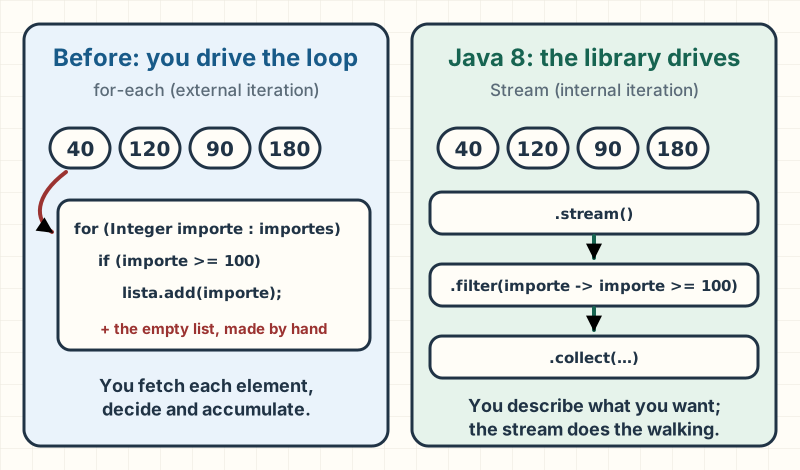
The same problem, before and after. On the left, the best Java 7 allowed; on the right, Java 8:
Before · Java 7
static List<Integer> importesDesde100(List<Integer> importes) {
    List<Integer> seleccionados = new ArrayList<>();
    for (Integer importe : importes) {
        if (importe >= 100) {
            seleccionados.add(importe);
        }
    }
    return seleccionados;
}
After · Java 8
static List<Integer> importesDesde100(List<Integer> importes) {
    return importes.stream()
            .filter(importe -> importe >= 100)
            .collect(Collectors.toCollection(ArrayList::new));
}
Output
Importes de 100 o más: [120, 180]Both versions return the same values, in the same order, and in both the resulting list can still be modified. That last part isn't an accident: I asked for it on purpose, and the box below explains why.
What it is. A stream is a sequence of elements that flows through a chain of operations. It stores nothing: it's a description of what to do with each element. The chain has three parts:
- The source: where the elements come from. Here,
importes.stream(). - Intermediate operations: they transform the sequence.
filterlets through only the elements that meet a condition. - The terminal operation: it produces the result.
collectgathers the elements into a collection.
The condition importe -> importe >= 100 is a lambda like the ones in the previous section: read it as "given an amount, return whether it's at least 100".
What surprises people most at first is the order in which things happen. A stream doesn't filter the whole list and then copy it: each element travels the entire chain before the next one enters. Step through it:
amounts
filter(amount >= 100)
collect → list
- 120 (done)
- 180 (done)
Step 5 of 5
- The list holds four amounts. Writing the chain runs nothing yet: the work starts when you call collect.
- In goes 40. filter checks the condition: it doesn't reach 100, so it's discarded and goes no further.
- In goes 120. It passes the filter and lands straight in the result list, before the next amount even starts.
- In goes 90. It doesn't reach 100 either, so it's discarded.
- In goes 180. It passes and is added after 120: the original order is kept. Result: [120, 180].
Why it's better. The stream version reads top to bottom like a sentence: "from the amounts, keep the ones that reach 100 and gather them into a list". There's no empty list to create and no add to forget, and every step has a name that says what it does. As the chain grows (filter, transform, sort, group), the difference from a nested loop becomes even clearer.
When not to use it. The loop is still valid, and sometimes it's better:
- When you need to stop the walk with complex logic (several
breakorreturnstatements depending on state), a loop says it more clearly. - When the body throws checked exceptions (such as
IOException): the interfaces a stream uses, like the one behindfilter, don't declare them, so you have to catch or wrap them inside the lambda. - When you expect it to be faster. A stream isn't faster just because it's a stream, and it doesn't run in parallel unless you ask for it with
parallel(), which has its own pitfalls.
Going deeper
the "before" and "after" are equivalent because I chose the collector carefully. Collectors.toList() makes no guarantees about the type or mutability of the list it returns (its javadoc says so), so to compare on equal terms with the loop I asked for an explicit ArrayList with Collectors.toCollection(ArrayList::new). Since Java 16 there's Stream.toList(), which is shorter but returns an unmodifiable list: if someone later calls add, it fails at runtime. Lazy evaluation (nothing runs until the terminal operation) is also what makes operations like findFirst or limit possible, since they stop the walk without processing the rest. To go further, Java Streams: From filter to Expert Collectors covers advanced collectors and the pitfalls of parallel().
Exercise. Using the same list of amounts, count how many orders reach 100 without creating any intermediate list. Hint: there's a terminal operation that counts.
Solution
count() is a terminal operation that returns how many elements made it to it, as a long:
long pedidosGrandes = importes.stream()
        .filter(importe -> importe >= 100)
        .count();
It prints Pedidos de 100 o más: 2 ("orders of 100 or more: 2"). No element is stored in a collection: the stream only counts the ones that pass the filter.
What to take with you: a stream describes what you want to do with a collection and leaves the walking to the library. Each element goes through the whole chain before the next one, order is preserved, and nothing runs until the terminal operation. It isn't faster on its own, and a loop is still the better choice when controlling the walk gets complicated.
Optional: saying in the type that the result may be missing
Optional · API · final in Java 8 · first LTS: Java 8 · no JEP of its own
Now you look up an order by its ID to find out which customer placed it. That order might not exist.
Why it was born. Optional has no JEP explaining why it exists: its Java 8 javadoc only describes it as a container that may or may not hold a non-null value. So what follows is my reading. Before Java 8, the usual way to say "not found" was to return null. The problem is that null doesn't show up in the signature: Pedido buscarPedido(...) looks the same whether it always returns an order or sometimes returns nothing. The caller has to know to check. If they forget, the program still compiles and fails at runtime with a NullPointerException (an NPE, the error you get from using a reference that points to nothing) when it calls getCliente(), often far from where the null came from.
That reading has official backing, if later: since Java 9, the Optional javadoc says it's primarily intended as a method return type, where there's a clear need to represent "no result" and using null is likely to cause errors.
Before · Java 7
static Pedido buscarPedido(List<Pedido> pedidos, String id) {
    for (Pedido pedido : pedidos) {
        if (pedido.getId().equals(id)) {
            return pedido;
        }
    }
    return null;
}

static String clienteDe(List<Pedido> pedidos, String id) {
    Pedido pedido = buscarPedido(pedidos, id);
    if (pedido == null) {
        return "sin cliente";
    }
    return pedido.getCliente();
}
After · Java 8
static Optional<Pedido> buscarPedido(List<Pedido> pedidos, String id) {
    return pedidos.stream()
            .filter(pedido -> pedido.getId().equals(id))
            .findFirst();
}

static String clienteDe(List<Pedido> pedidos, String id) {
    return buscarPedido(pedidos, id)
            .map(Pedido::getCliente)
            .orElse("sin cliente");
}
Output
Cliente de P-2: Luis
Cliente de P-9: sin cliente
Notice that the "before" is correct: it checks for null. The difference is that in the "after" you can't forget, because the return type forces you to decide what happens when there's no order. (sin cliente means "no customer".)
What it is. An Optional<Pedido> is a box that either holds an order or is empty. You create one with Optional.of(value), Optional.empty() or, if the value may be null, Optional.ofNullable(value), and some Java 8 APIs already return one, such as findFirst() on a stream. To work with the contents without unpacking them by hand:
map(Pedido::getCliente)transforms the value if there is one; if the box is empty, it returns another empty box.orElse("sin cliente")hands you the value or, if there isn't one, the fallback you pass.
Why it's better. The possibility of a missing result is in the signature, and the "no order" case is handled in the same chain as the normal one, with no separate if.
When not to use it. Optional is for return values. Anywhere else, it gets in the way:
- As a field. It doesn't implement
Serializable(its declaration doesn't include it), and every present value gets wrapped in one more object. Inside your own class, a field that may benullis a private detail you control. - As a parameter. It forces callers to wrap their arguments, and nothing stops them from passing
nullinstead of anOptional. Two versions of the method, with and without that parameter, are clearer. - Inside a collection, as in
List<Optional<Pedido>>. A list can already express "there isn't one": just leave the element out.
And don't call get() without checking first: on an empty box it throws NoSuchElementException, and you've traded one exception for another.
Going deeper
orElse(x) receives x already computed, whether there's a value or not, because Java evaluates arguments before calling the method. If the fallback is expensive to produce (a query, say), orElseGet(() -> ...) only invokes its function when the box is empty. And Optional.of(null) throws an NPE: if the value may be null, use ofNullable.
java.time: dates that don't change behind your back
java.time · API · final in Java 8 · first LTS: Java 8 · JEP 150
An order is placed on February 27, 2024, delivered three days later, and the customer has one month from delivery to return it.
Why it was born. JEP 150 sums it up in one line: the existing date and time classes were "poor, mutable, and have unpredictable performance", and there had been a long-standing desire for a better API based on the Joda-Time project. Day to day, it showed up like this:
- They're mutable, meaning their value can change after they're created.
Calendar.addmodifies the same object, and aDatecan be changed withsetTime. If you store aDatein an order and some other code modifies that same object, your order changes date without anyone touching the order. - Months start at 0. The
DateandCalendarjavadocs say so: January is 0 and December is 11. Writenew GregorianCalendar(2024, 2, 27)thinking of February and you get March 27. SimpleDateFormatisn't synchronized. Its javadoc recommends one instance per thread, or synchronizing access externally. A plain shared constant, the first thing that comes to mind, does neither.
Before · Java 7
Calendar calendario = new GregorianCalendar(2024, Calendar.FEBRUARY, 27);
Date fechaPedido = calendario.getTime();
calendario.add(Calendar.DAY_OF_MONTH, 3);
Date fechaEntrega = calendario.getTime();
calendario.add(Calendar.MONTH, 1);
Date devolucionHasta = calendario.getTime();

SimpleDateFormat formato = new SimpleDateFormat("dd/MM/yyyy");
System.out.println("Pedido: " + formato.format(fechaPedido));
System.out.println("Entrega: " + formato.format(fechaEntrega));
System.out.println("Devolución hasta: " + formato.format(devolucionHasta));
After · Java 8
LocalDate fechaPedido = LocalDate.of(2024, 2, 27);
LocalDate fechaEntrega = fechaPedido.plusDays(3);
LocalDate devolucionHasta = fechaEntrega.plus(Period.ofMonths(1));

DateTimeFormatter formato = DateTimeFormatter.ofPattern("dd/MM/yyyy");
System.out.println("Pedido: " + fechaPedido.format(formato));
System.out.println("Entrega: " + fechaEntrega.format(formato));
System.out.println("Devolución hasta: " + devolucionHasta.format(formato));
Output
Pedido: 27/02/2024
Entrega: 01/03/2024
Devolución hasta: 01/04/2024
The "before" is correct, but look at the order of the lines: calendario is a single object that changes with every add, so each date has to be read (getTime()) at exactly the right moment. I used Calendar.FEBRUARY instead of a number to stay clear of month 0; the full program confirms it by printing Calendar.FEBRUARY vale 1 ("is worth 1"), while in java.time February is month 2. (The output lines are the order date, the delivery date and the return deadline, in day/month/year format.)
What it is. java.time is the new date and time package, with one class per concept:
LocalDate: a date with no time and no time zone, such as February 27, 2024.LocalDateTimeandZonedDateTime: a date with a time, without or with a zone.Instant: an exact point on the timeline.Period: an amount of time in years, months and days, such as "one month".Durationis its counterpart in hours, minutes and seconds.DateTimeFormatter: the formatter.
All of its classes are immutable and thread-safe (the package documentation says so): plusDays(3) doesn't change fechaPedido, it returns a new date.
Why it's better. Each date has its own variable and none of them changes afterward, so the order of the lines stops mattering. Months run from 1 to 12, the formatter can live in a constant, and the type says what the value represents: a LocalDate can't hide a time of day.
When not to use it. In new code there's hardly ever a reason to go back to Date. The limit is libraries that still ask for a Date, and even there you don't have to give up java.time: Java 8 added Date.from(instant) and date.toInstant() so you convert only at that boundary. And pick the right class: LocalDate knows nothing about time zones, so it's no good for recording the exact moment of a payment; that's what Instant is for.
Exercise. How much slack is there between the order date and the last day to return it? Hint: Period can work it out between two dates.
Solution
Period.between counts the full months first and then the days left over:
LocalDate fechaPedido = LocalDate.of(2024, 2, 27);
LocalDate devolucionHasta = LocalDate.of(2024, 4, 1);
Period margen = Period.between(fechaPedido, devolucionHasta);
It prints Margen: 1 mes y 5 días (P1M5D) ("slack: 1 month and 5 days"): from February 27 to March 27 is one month, and from there to April 1, five days. P1M5D is how a Period writes itself, in the ISO 8601 format.
Default methods: adding methods to an interface without breaking anyone
Default methods · language · final in Java 8 · first LTS: Java 8 · JEP 126
A while ago your team published an interface, Pedidos, with a single method, todos() ("all"), and other teams already implement it. Now you want every implementation to be able to compute the total amount.
Why it was born. Before Java 8, an interface could only declare abstract methods, with no body. Adding one broke every class that already implemented it: they stopped compiling until someone wrote the new method. With an interface of your own and two implementations, that's an afternoon of work. With java.util.Collection, implemented by code that isn't yours, it's impossible.
And that was exactly Java 8's problem: streams needed every collection to have a stream() method. JEP 126 frames it this way: virtual extension methods (the working name for default methods) address the long-standing limitation of not being able to add methods to widely used interfaces, and let interfaces evolve in a source- and binary-compatible way. That's why importes.stream() works on any list: stream() has been a default method of Collection since Java 8, just as forEach is one of Iterable (javadoc for both).
Without default methods, the way out was a separate utility class, the way Collections sits next to Collection:
Before · Java 7
interface Pedidos {
    List<Pedido> todos();
}

// Ya existía y no se toca.
static class PedidosEnMemoria implements Pedidos {
    private final List<Pedido> pedidos;

    PedidosEnMemoria(List<Pedido> pedidos) {
        this.pedidos = pedidos;
    }

    @Override
    public List<Pedido> todos() {
        return pedidos;
    }
}

// La operación nueva no cabe en la interfaz sin romper a quien la implementa.
static final class PedidosUtil {
    private PedidosUtil() {
    }

    static int importeTotal(Pedidos pedidos) {
        int total = 0;
        for (Pedido pedido : pedidos.todos()) {
            total += pedido.getImporte();
        }
        return total;
    }
}
After · Java 8
interface Pedidos {
    List<Pedido> todos();

    default int importeTotal() {
        int total = 0;
        for (Pedido pedido : todos()) {
            total += pedido.getImporte();
        }
        return total;
    }
}

// Ya existía y no se toca.
static class PedidosEnMemoria implements Pedidos {
    private final List<Pedido> pedidos;

    PedidosEnMemoria(List<Pedido> pedidos) {
        this.pedidos = pedidos;
    }

    @Override
    public List<Pedido> todos() {
        return pedidos;
    }
}
Output
Importe total: 340In both versions, PedidosEnMemoria is identical: it's the class that already existed. The only thing that changes is where importeTotal lives.
What it is. A default method is an interface method with a body, marked with the default keyword. Classes that implement the interface inherit it without doing anything, and any of them can override it if it has a better way: an implementation backed by a database could compute the total with a query. Its body can only rely on the interface's other methods (here, todos()), because an interface has no instance fields.
Why it's better. The operation lives where you look for it: tienda.importeTotal() shows up in autocomplete instead of hiding in a PedidosUtil class you have to know about. And PedidosEnMemoria didn't change a single line.
When not to use it. A default method is for evolving an interface, not for turning it into a class with multiple inheritance. If you need to keep state, what you want is an abstract class: an interface can't hold it. And be careful when you add one to a public interface: if an implementation already had a method with the same signature, the class's method wins (JLS 8, §8.4.8) and yours never runs for it.
Going deeper
if a class implements two interfaces that bring the same default method, the compiler rejects it (JLS 8, §8.4.8.4); javac 8 reports it as class C inherits unrelated defaults for nombre() from types A and B. You fix it by overriding the method in the class, and from there you can call whichever version you want with A.super.nombre(). If instead the superclass already has a concrete method with that signature, the superclass method wins and there's no conflict. I checked all three by compiling with javac 8.
Also in Java 8. CompletableFuture, a Future (the result of a task that may still be running) that can be completed explicitly and that, as a CompletionStage, lets you chain functions and actions that trigger when it completes (CompletableFuture javadoc, Java 8).
What to take with you: the pieces of Java 8 lean on each other. Lambdas and method references let you pass behavior around as a value, always through a functional interface. Streams use that so you can describe what to do with a collection and leave the walking to the library: each element goes through the whole chain, order is preserved, and nothing runs until the terminal operation. Default methods are what made it possible to add
stream()to existing collections without breaking anyone.Optionallets a method say in its return type that the result may be missing, andjava.timebrings immutable dates with months from 1 to 12. None of it is mandatory: a loop or a carefully checkednullis still the better choice when it makes the code clearer.
Java 11: less ceremony, more JDK
Java 11 came out in September 2018, and it's the first LTS after Java 8. It's also the first one on today's schedule: JEP 322 set a release every six months, and it explains it with an example, the March 2018 release is JDK 10 and the September 2018 release is JDK 11. Java 9 and 10 weren't LTS releases: each one was superseded by the next as soon as it came out (Oracle Java SE Support Roadmap).
That's why this chapter gathers what was born in 9, 10 and 11. If your team jumped from 8 to 11, all of this landed at once. None of these features changes how you think about a program the way streams did: most of them remove chores you used to write without thinking.
var: stop writing the type you can already see
var · language · final in Java 10 · first LTS: Java 11 · JEP 286
Say you want to group the order amounts by customer and print them in alphabetical order.
Why it was born. In Java 8, every local variable carries its type written out in front, even when the same line already says it. With generics (types with parameters between < >, like List<Integer>) the type repeats and grows: Map<String, List<Integer>> shows up in the declaration, and walking through the map asks you to write Map.Entry<String, List<Integer>>, a type nobody wants to write or read.
JEP 286 starts from that complaint: developers object to boilerplate, and with good names the type of each local variable is often unnecessary. It adds a less obvious point: having to write every type pushes you to chain long expressions instead of breaking them into named variables, because each intermediate variable costs a line of types.
The same grouping, before and after:
Before · Java 8
static void imprimirPorCliente(List<Pedido> pedidos) {
    Map<String, List<Integer>> importesPorCliente = new TreeMap<>();
    for (Pedido pedido : pedidos) {
        importesPorCliente
                .computeIfAbsent(pedido.cliente, cliente -> new ArrayList<>())
                .add(pedido.importe);
    }
    for (Map.Entry<String, List<Integer>> entrada : importesPorCliente.entrySet()) {
        System.out.println(entrada.getKey() + ": " + entrada.getValue());
    }
}
After · Java 11
static void imprimirPorCliente(List<Pedido> pedidos) {
    var importesPorCliente = new TreeMap<String, List<Integer>>();
    for (var pedido : pedidos) {
        importesPorCliente
                .computeIfAbsent(pedido.cliente, cliente -> new ArrayList<>())
                .add(pedido.importe);
    }
    for (var entrada : importesPorCliente.entrySet()) {
        System.out.println(entrada.getKey() + ": " + entrada.getValue());
    }
}
Output
Ana: [120, 90]
Luis: [40, 180]
I use a TreeMap, a map that keeps its keys sorted, so the customers always come out in the same order. (As in the rest of the guide, the code keeps the Spanish names it was verified with: importesPorCliente means amounts by customer.)
What it is. var asks the compiler to infer the type of a local variable from its initializer, the expression to the right of the =. That's called type inference. The variable still has a fixed type, decided at compile time: importesPorCliente is a TreeMap<String, List<Integer>> and can't hold anything else later. Java doesn't become a dynamic language: you just stop writing what the compiler already knows.
It works for local variables with an initializer and in for loops, both the classic and the enhanced one. It doesn't work for fields, method parameters or return types.
Why it's better. The type appears once, where the object is created, and in the loop var entrada replaces Map.Entry<String, List<Integer>> entrada. What stays in view are the names, which is what you read first.
When not to use it. When you can't tell the type by reading the line. var total = calcular(pedidos); sends you off to find out what calcular returns: an int, a long, a BigDecimal? With money, that difference matters. My rule: var when the right-hand side states the type (a new, a literal, a method whose name leaves no doubt); the written type when it doesn't. Also, the compiler needs something to infer from: there's no var without an initializer or with null.
Going deeper
var isn't a keyword but a reserved type name (JEP 286): code that already used it as a variable name still compiles. It infers the concrete type: new TreeMap<...>() gives you a TreeMap, not a Map; if you want to program against the interface, write it out. Since Java 11 it also works for lambda parameters (JEP 323), so you can annotate them without writing their types: (@Nonnull var x, @Nullable var y) -> x.process(y). It's all or nothing: either every parameter uses var, or none does.
Exercise. What type does estados have in var estados = new ArrayList<>();? Does it compile if you add "PAGADO" and then 42?
Solution
it compiles, and that's the problem. The diamond <> infers the type parameters from context, almost always the type of the variable receiving the object. With var that type doesn't exist yet, so you get ArrayList<Object>.
var estados = new ArrayList<>();   // el diamante no tiene de dónde deducir: ArrayList<Object>
estados.add("PAGADO");
estados.add(42);                   // compila: también es un Object
// String primero = estados.get(0); // no compilaría: get devuelve Object
It prints Elementos: [PAGADO, 42] and Tipo del primero al leerlo: Object ("type of the first one when read"): an overload the compiler picks based on the type of estados.get(0) confirms it's Object. With var, write the type inside the diamond: new ArrayList<String>().
Small unmodifiable collections in a single expression
List.of, Set.of, Map.of · API · final in Java 9 · first LTS: Java 11 · JEP 269
The store has data that should never change: the possible states of an order and the shipping cost per zone.
Why it was born. In Java 8 there was no way to write a small unmodifiable collection in a single expression. For a list, the shortest route was wrapping Arrays.asList in Collections.unmodifiableList. For a map, not even that: you had to create a HashMap, call put once per entry and wrap it. Since that doesn't fit in a constant's declaration, it ended up in a static block, away from the field it fills.
JEP 269 puts it this way: Java is often criticized for its verbosity, and static collections have to be populated in static initializer blocks rather than in the field declaration. It adds a detail that matters: the shortcuts of the time didn't create inherently unmodifiable collections. Collections.unmodifiableList returns a read-only view of another list (Collections javadoc): if someone keeps the original and changes it, the change shows through the view.
The same constants, before and after:
Before · Java 8
static final List<String> ESTADOS =
        Collections.unmodifiableList(Arrays.asList("PENDIENTE", "PAGADO", "ENVIADO"));

static final Map<String, Integer> COSTO_ENVIO;
static {
    Map<String, Integer> costos = new HashMap<>();
    costos.put("NACIONAL", 5);
    costos.put("INTERNACIONAL", 20);
    COSTO_ENVIO = Collections.unmodifiableMap(costos);
}
After · Java 11
static final List<String> ESTADOS = List.of("PENDIENTE", "PAGADO", "ENVIADO");

static final Map<String, Integer> COSTO_ENVIO = Map.of("NACIONAL", 5, "INTERNACIONAL", 20);
Output
Estados: [PENDIENTE, PAGADO, ENVIADO]
Envío internacional: 20
Agregar un estado: UnsupportedOperationException
Both versions print the same thing (the states, the international shipping cost, and what happens when you add a state), and in both, trying to add a state fails.
What it is. List.of, Set.of and Map.of are factory methods: static methods that build the object for you and hand it back. They take the elements (for Map.of, alternating key and value, up to ten pairs; beyond that there's Map.ofEntries) and return an unmodifiable collection: nothing can be added, removed or replaced, and any attempt throws UnsupportedOperationException, the exception Java uses when a collection doesn't support an operation (List and Set javadoc).
Why it's better. The constant is declared and filled in the same place, and there's no original collection lying around that someone could keep modifying. What you read is exactly what it holds.
When not to use it. Three concrete limits:
- When you need to modify the collection. To start from some values and add more later, copy it:
new ArrayList<>(List.of(...)). - When there may be a
null. They don't allow it: creating one with anullthrowsNullPointerException(List,SetandMapjavadoc). - When you care about the order of
Set.oforMap.of. Their iteration order is unspecified and subject to change (SetandMapjavadoc).List.ofdoes keep the order of its arguments. That's why my example prints the whole list but only looks up one key in the map. If you need order, use aLinkedHashMapor aTreeMap.
Going deeper
Set.of and Map.of reject duplicates at creation time with IllegalArgumentException: Map.of("NACIONAL", 5, "NACIONAL", 7) compiles, but fails as soon as it runs. The instances are value-based: the javadoc says not to rely on their identity (==, synchronized). And what's unmodifiable is the collection, not its elements: if you store mutable objects, their contents can change.
Exercise. Arrays.asList("PAGADO", null) stores the null without complaint. What happens with List.of("PAGADO", null)? And if you ask a list created with List.of for contains(null)?
Solution
both throw NullPointerException.
List<String> conArrays = Arrays.asList("PAGADO", null);
System.out.println("Arrays.asList con null: " + conArrays);

try {
    List.of("PAGADO", null);
} catch (NullPointerException e) {
    System.out.println("List.of con null: NullPointerException");
}

List<String> estados = List.of("PENDIENTE", "PAGADO");
try {
    estados.contains(null);
} catch (NullPointerException e) {
    System.out.println("contains(null): NullPointerException");
}
It prints Arrays.asList con null: [PAGADO, null], List.of con null: NullPointerException and contains(null): NullPointerException. The List javadoc guarantees the first exception. The second is more surprising: the Collection javadoc allows, as optional, contains to throw it in collections that don't permit null, and the JDK implementation does.
A modern HTTP client inside the JDK
HttpClient · API · final in Java 11 · first LTS: Java 11 · JEP 321 · incubator in Java 9 (JEP 110) and 10
The store asks another service, over HTTP, what state order 42 is in.
Why it was born. Up to Java 10, the JDK's standard API for speaking HTTP was HttpURLConnection, and JEP 110 lists its problems: it was designed for several protocols that are no longer in use (such as ftp and gopher), it predates HTTP/1.1 and is too abstract, it's hard to use, it has undocumented behavior, and it's hard to maintain. And it only works in blocking mode: the thread that makes the request sits idle until the response arrives, one thread per request.
You can see it in the code: you cast the connection, set the method with a String, read the body as a byte stream, close it and disconnect. JEP 110 shipped a new client in Java 9 as an incubator module (an API that comes with the JDK marked as not final, so it can be tried before it's settled); it was updated in 10, and JEP 321 standardized it in Java 11, in the java.net.http package.
The same request, before and after:
Before · Java 8
static void consultarEstado(String url) throws IOException {
    HttpURLConnection conexion = (HttpURLConnection) new URL(url).openConnection();
    try {
        conexion.setRequestMethod("GET");
        int status = conexion.getResponseCode();
        String cuerpo;
        try (BufferedReader lector = new BufferedReader(
                new InputStreamReader(conexion.getInputStream(), StandardCharsets.UTF_8))) {
            cuerpo = lector.lines().collect(Collectors.joining("\n"));
        }
        System.out.println("Status: " + status);
        System.out.println("Cuerpo: " + cuerpo);
    } finally {
        conexion.disconnect();
    }
}
After · Java 11
static void consultarEstado(HttpClient cliente, String url)
        throws IOException, InterruptedException {
    HttpRequest peticion = HttpRequest.newBuilder(URI.create(url)).GET().build();
    HttpResponse<String> respuesta =
            cliente.send(peticion, HttpResponse.BodyHandlers.ofString());
    System.out.println("Status: " + respuesta.statusCode());
    System.out.println("Cuerpo: " + respuesta.body());
}
Output
Status: 200
Cuerpo: ENVIADO
So the example doesn't depend on the network, the full program starts its own server, a com.sun.net.httpserver.HttpServer on a free port on the local machine, and shuts it down at the end. It's identical in both versions, so I leave it out of the comparison. (Cuerpo means body, and ENVIADO, shipped.)
What it is. The API has three pieces. HttpClient holds the configuration and the resources shared by every request; once built it doesn't change, and it can send many of them (HttpClient javadoc). HttpRequest describes what you ask for: the address, the method and the headers. HttpResponse carries what comes back: the status code, the headers and the body. The body handler, here BodyHandlers.ofString(), says what to turn the body into.
There are two ways to send: send blocks until it has the response, as in the example, and sendAsync returns right away with a CompletableFuture that completes when the response arrives.
Why it's better. No cast, no streams to close by hand: the body arrives already converted. Each piece has a name that says what it is, and the asynchronous style comes built in instead of forcing you to set up your own threads.
When not to use it. If your project already uses a framework's HTTP client, with retries, metrics and centralized configuration, swapping it out just to use the JDK's buys you nothing; my rule is to use it in new code without that ecosystem. And know its defaults: it doesn't follow redirects (the policy is NEVER), so a 301 comes back as is unless you configure followRedirects.
Going deeper
the client prefers HTTP/2 by default, and its javadoc notes that some constraints, such as certain proxies, can make it use HTTP/1.1. The server in my example only speaks HTTP/1.1, and the request works without configuring anything. send declares InterruptedException because it blocks the thread: if someone interrupts that thread while it waits, you find out.
String methods for what you used to do by hand
isBlank, lines, strip, repeat · API · final in Java 11 · first LTS: Java 11 · no JEP (String javadoc, @since 11)
A customer can write notes on their order, over several lines, with extra spaces and the odd empty line. You want to print them cleanly on the receipt, between two separators.
Why it was born. These methods have no JEP, so there's no official text explaining why: what follows is my reading. They were operations almost every project needed, and in Java 8 you assembled them from parts meant for something else: splitting into lines with a regular expression (split("\\R")), checking whether a text is blank with trim().isEmpty(), which trims first and asks second, or repeating a dash with String.join and Collections.nCopies, which you have to read twice.
And trim has its own idea of "space": any character whose code is less than or equal to U+0020 (String javadoc). That leaves out Unicode spaces, which show up, for example, in text copied from another program.
The same notes, before and after:
Before · Java 8
static List<String> notasUtiles(String notas) {
    return Arrays.stream(notas.split("\\R"))
            .map(String::trim)
            .filter(linea -> !linea.isEmpty())
            .collect(Collectors.toList());
}

static String separador(int ancho) {
    return String.join("", Collections.nCopies(ancho, "-"));
}
After · Java 11
static List<String> notasUtiles(String notas) {
    return notas.lines()
            .filter(linea -> !linea.isBlank())
            .map(String::strip)
            .collect(Collectors.toList());
}

static String separador(int ancho) {
    return "-".repeat(ancho);
}
Output
---------------------
Dejar en portería
Llamar antes de subir
---------------------
For these notes ("leave it with the doorman", "call before coming up"), both versions give the same result. In general they aren't identical, and the exercise below shows why.
What it is. Four methods, all final in Java 11:
isBlank()returnstrueif the text is empty or contains only white space.lines()returns a stream of the text's lines, without the line break. It recognizes\n,\rand\r\n, and a break at the very end doesn't produce an extra empty line.strip()removes white space from the start and the end;stripLeading()andstripTrailing(), from one side only.repeat(n)concatenates the textntimes. With0it returns""; with a negative number it throwsIllegalArgumentException.
"White space", in the first three, is whatever Character.isWhitespace says, and that's where the difference from trim lies. trim removes every character with a code up to U+0020: the space, the tab, line breaks and also control characters such as U+0000. strip removes the space, the tab, line breaks and Unicode separators such as the em space (U+2003), but not most control characters, such as U+0000, nor the non-breaking spaces (U+00A0, U+2007, U+202F) (Character javadoc). Neither one contains the other.
Why it's better. Each method states its intent: isBlank asks, strip cleans, repeat repeats. lines avoids the regular expression, and its javadoc adds that it performs better than split("\\R"), because it supplies the lines lazily and finds the breaks faster.
When not to use them. strip doesn't mean "clean everything". If your data comes from HTML, is U+00A0 and strip keeps it: you have to replace it yourself. Don't swap trim for strip in a system that already works without checking what data it handles, either: they remove different things. And lines recognizes fewer breaks than \R, which also accepts U+0085, U+2028 and U+2029, among others (Pattern javadoc).
Exercise. The text "\u2003PAGADO\u2003" has an em space on each side. How many characters are left after trim()? And after strip()?
Solution
trim() leaves it alone, because U+2003 is above U+0020; strip() removes it.
String estado = "\u2003PAGADO\u2003";   // U+2003: espacio eme, un espacio Unicode
System.out.println("trim():  " + estado.trim().length() + " caracteres");
System.out.println("strip(): " + estado.strip().length() + " caracteres");
System.out.println("isBlank() de un espacio eme: " + "\u2003".isBlank());

String conNoSeparable = "\u00A0PAGADO";  // U+00A0: espacio de no separación
System.out.println("strip() con no separable: " + conNoSeparable.strip().length() + " caracteres");
It prints trim(): 8 caracteres, strip(): 6 caracteres, isBlank() de un espacio eme: true and strip() con no separable: 7 caracteres. The last line is the trap: the non-breaking space survives strip.
Run a .java file without compiling it first
java Hola.java · tooling · final in Java 11 · first LTS: Java 11 · JEP 330
You want a quick utility that adds up the amounts of a few orders you pass on the command line.
Why it was born. Up to Java 10, running a program always took two steps: javac compiles the source file and leaves a .class on disk, and then java runs the class, by its name rather than the file's. JEP 330 starts from the fact that single-file programs are common when you're learning Java and in small utilities, and in that setting compiling before running is "pure ceremony". On top of that, one file can produce several .class files.
The extra step also trips up beginners. In Java 8, java Hola.java answers Error: Could not find or load main class Hola.java: it looks for a class with that name and doesn't find it. That's the actual output I got with this guide's JDK 8.
The program is a single file (Hola is Spanish for hello):
public class Hola {
    public static void main(String[] args) {
        int total = 0;
        for (String importe : args) {
            total += Integer.parseInt(importe);
        }
        System.out.println("Pedidos: " + args.length + ", total: " + total);
    }
}
And this is how you run it, before and after:
Before · Java 8
$ javac Hola.java
$ java Hola 120 80 40
After · Java 11
$ java Hola.java 120 80 40Output
Pedidos: 3, total: 240These two blocks aren't Java code but terminal commands. I ran them on this guide's JDK 8 and JDK 11, each in a container with no network, and the output is the one I got from both.
What it is. Since Java 11, the java launcher has a source-file mode: if you pass it a .java file, it compiles it in memory and runs the first top-level class in the file, which must have the usual public static void main(String[]) method (JEP 330). It doesn't write any .class to disk. Whatever comes after the file name reaches main as arguments.
Why it's better. One step instead of two, and nothing to clean up afterwards. For learning, trying out an API or writing a throwaway utility, the loop between writing and seeing the result gets shorter. On Unix-like systems, the file can also start with a shebang line (#!/path/to/java --source 11) and run as a script; in that case the file doesn't have the .java extension.
When not to use it. When the program grows beyond one file. In Java 11, this mode doesn't look for or compile any other source file: if your class uses another one that lives in a different .java, it won't find it. As soon as there are several files or dependencies, you go back to javac or to a build tool like Maven or Gradle. And since it saves nothing, it compiles again on every run.
Going deeper
the --source option sets the language version the file is compiled with, and it's required when the file doesn't end in .java, as with shebang scripts. JEP 458, in Java 22, lifted the single-file limit and allows programs made of several source files. And Java 25 takes the idea of removing ceremony even further.
Also in Java 11. Three changes without their own section that are still worth knowing. The module system (JPMS, JEP 261, built on the modular JDK design of JEP 200), final in Java 9, lets you declare in a module-info.java which packages a module exports and which other modules it depends on; the JDK itself was split into modules. Your code can ignore it and stay on the classpath as always, but the JDK began encapsulating its internal APIs, a path that gets stricter in Java 17. JShell (JEP 222, Java 9) is an interactive console for trying Java line by line without writing a class; according to its JEP, the number one reason schools gave for moving away from Java as a teaching language was that other languages had a console like this and a much simpler "Hello, world". And JEP 320 removed from the JDK in Java 11 the Java EE and CORBA modules, which had been deprecated for removal since Java 9: JAX-WS, JAXB, JAF, Common Annotations, CORBA and java.transaction, JTA's CORBA interop part. Java EE didn't disappear: those technologies have standalone versions, for example on Maven Central. When you migrate from 8 to 11, you'll notice it like this: an import javax.xml.bind.JAXBContext that compiles on Java 8 fails on Java 11 with package javax.xml.bind does not exist, until you add the dependency.
What to take with you: Java 11 removes chores.
varlets the compiler write the type you can already see on the line, without turning Java dynamic.List.of,Set.ofandMap.ofcreate unmodifiable collections in one expression, with nonulland, forSetandMap, no guaranteed order.HttpClientreplacesHttpURLConnectionwith a clear API, synchronous or asynchronous. The newStringmethods state their intent, butstripisn'ttrim. Andjava Hola.javaruns a one-file program without compiling it first.
Java 17: data and decisions without the ceremony
Java 17 came out in September 2021, three years after Java 11. Five releases came in between, 12 through 16, and almost everything in this chapter showed up first as a preview: you had to switch it on by hand, and it kept changing based on feedback from the people using it. Java 17 is the first LTS that ships all of it as final.
The five features in this chapter share a common thread: less ceremony for two things you do every day. Describing data (text blocks, records) and deciding what to do based on the data you have (switch, instanceof, sealed classes). Those three decision features are also the pieces Java 21 brings together into one.
Switch expressions: picking a value without forgotten breaks
Switch expressions · language · preview in Java 12 and 13 · final in Java 14 · first LTS: Java 17 · JEP 361
Every order has a status (pending, paid, shipped, delivered or cancelled), and the store shows the customer a different message depending on that status.
Why it was born. Java's switch comes from C and inherits its most treacherous rule: each case is just an entry point. Execution jumps into one and keeps running through the ones below it until it hits a break. That's called fall-through. Sometimes it's used on purpose, so two statuses can share a message, but a forgotten break compiles without a single complaint.
On top of that, switch was only a statement: it didn't produce a value. To get the message you have to declare the variable first, assign it in every branch and add a default even though all five statuses are covered, because without it the compiler won't accept that the variable has a value. JEP 361 adds a third problem: the whole block is a single scope, so a variable declared in one case is visible in the others.
Before · Java 11
static String mensajeParaCliente(EstadoPedido estado) {
    String mensaje;
    switch (estado) {
        case PENDIENTE:
        case PAGADO:
            mensaje = "Todavía puedes cancelarlo";
            break;
        case ENVIADO:
            mensaje = "Va en camino";
            break;
        case ENTREGADO:
            mensaje = "Ya lo recibiste";
            break;
        case CANCELADO:
            mensaje = "Se canceló";
            break;
        default:
            throw new IllegalStateException("Estado desconocido: " + estado);
    }
    return mensaje;
}
After · Java 17
static String mensajeParaCliente(EstadoPedido estado) {
    return switch (estado) {
        case PENDIENTE, PAGADO -> "Todavía puedes cancelarlo";
        case ENVIADO -> "Va en camino";
        case ENTREGADO -> "Ya lo recibiste";
        case CANCELADO -> "Se canceló";
    };
}
Output
PENDIENTE: Todavía puedes cancelarlo
PAGADO: Todavía puedes cancelarlo
ENVIADO: Va en camino
ENTREGADO: Ya lo recibiste
CANCELADO: Se canceló
As in the rest of the guide, the code and its output keep the Spanish they were verified with: ENVIADO is shipped, "Va en camino" is "on its way" and "Ya lo recibiste" is "you've already received it".
To see the risk, I deleted the break after "Va en camino" in the "before" and ran it again on Java 11. It compiled without warnings, and the shipped order started saying "Ya lo recibiste". Step through it:
switch (estado)
case ENVIADO: mensaje = "Va en camino";
case ENTREGADO: mensaje = "Ya lo recibiste"; break;
return mensaje
- ENVIADO (discarded)
Step 4 of 4
- An order arrives with status ENVIADO (shipped). The switch jumps straight to the matching label.
- "Va en camino" (on its way) is assigned. The break is missing, so execution doesn't leave the switch: it moves on to the next line, even though it belongs to another case.
- "Ya lo recibiste" (already received) overwrites the previous message. Only this break gets execution out of the switch.
- The method returns "Ya lo recibiste" for an order that's still on its way. Nothing failed: the program did exactly what the code says.
What it is. A switch expression is a switch that produces a value: you can put it after a return or on the right-hand side of an =. With the new case X -> labels, only what's to the right of the arrow runs: there's no fall-through and no break needed. Several constants that share a result go in the same case, separated by commas.
A switch expression also has to be exhaustive: it must cover every possible value. With an enum, if you name all of its constants, you don't need a default.
Why it's better. It reads like a table: status, arrow, message. And exhaustiveness becomes a safety net. I added a DEVUELTO (returned) status to the enum without touching either switch. The "before" compiled and only failed at runtime, when the first returned order showed up (IllegalStateException: Estado desconocido: DEVUELTO). The "after" didn't even compile:
Despues.java:8: error: the switch expression does not cover all possible input values
        return switch (estado) {
               ^
When not to use it. When each branch does something (saves, sends an email) instead of producing a value, what you need is a statement, and you can use arrows there too. And in Java 17, switch only compares against constants: int or smaller integer types, characters, String or an enum. To decide by ranges or by types, you still need if.
Going deeper
if a branch needs several lines, it goes in a { ... } block that ends with yield value;. In the Java 12 preview this was break value, and JEP 354 changed it in Java 13 because it was confusing. JEP 361 warns that adding a default "just in case" to a switch over an enum turns the check off: the default silently swallows the new constant. For older code, javac -Xlint:fallthrough flags every fall-through between case labels; I checked it with the deleted break.
Text blocks: multi-line text, the way it reads
Text blocks · language · preview in Java 13 and 14 · final in Java 15 · first LTS: Java 17 · JEP 378
The store notifies the warehouse of each new order with a JSON document: number, customer and amount.
Why it was born. A Java string literal ("...") can't span more than one line. To write a multi-line one, you had to cut it into pieces, join them with +, end each with \n and escape every quote as \". The JSON gets buried under symbols that aren't part of it, and a missing \n doesn't raise an error: it silently merges two lines. JEP 378 frames it with HTML, XML, SQL and JSON: text that almost every program embeds, and that ends up hard to read and maintain this way.
Before · Java 11
static String pedidoComoJson(int numero, String cliente, int importe) {
    return "{\n"
            + "  \"pedido\": " + numero + ",\n"
            + "  \"cliente\": \"" + cliente + "\",\n"
            + "  \"importe\": " + importe + "\n"
            + "}\n";
}
After · Java 17
static String pedidoComoJson(int numero, String cliente, int importe) {
    return """
            {
              "pedido": %d,
              "cliente": "%s",
              "importe": %d
            }
            """.formatted(numero, cliente, importe);
}
Output
{
  "pedido": 1001,
  "cliente": "Ana",
  "importe": 120
}
Caracteres: 59
Empieza sin sangría: true
Termina en salto de línea: true
Both versions produce the same text, character for character: both programs count 59 (caracteres), report that the text starts with no indentation and ends with a line break.
What it is. A text block is a string literal that opens with """ followed by a line break and closes with """. Everything between the two delimiters is the content: line breaks are real and quotes need no escaping. The result is a String like any other. Here I use formatted (Java 15), which is equivalent to String.format with the text as the template, to fill in the %d and %s.
Look at the indentation. In the code, the JSON lines are pushed to the right to line up with the return, yet the output starts at the margin. The compiler tells apart two kinds of whitespace:
- Incidental: the spaces you added so the text lines up with your code. It removes them, taking the same amount off every line until the least-indented line touches the margin.
- Essential: the spaces that belong to the text. The two spaces before
"pedido"survive because they come on top of the common indentation.
The closing """ counts too. Since I left it alone on its line, the text ends with a line break, just like the "}\n" in the "before". If you put it right after the }, the text ends without one. And if you move it to the left, more indentation is kept.
Why it's better. You read the JSON exactly as it goes out, and you can paste it from a file or from documentation without escaping anything.
When not to use it. A text block neither inserts values nor escapes them. If the customer's name contains a quote, the JSON breaks in both versions. To generate JSON from data, use a JSON library; text blocks shine with fixed text: SQL queries with ? parameters, test data, long messages.
Going deeper
the compiler normalizes line breaks to LF (\n) even if the file was edited on Windows, and it strips trailing spaces from every line. The second preview (Java 14) added two escapes to control that: \s (a space that isn't stripped) and \ at the end of a line (joins it with the next one). The indentation algorithm is available as String.stripIndent().
Records: a data class in one line
Records · language · preview in Java 14 and 15 · final in Java 16 · first LTS: Java 17 · JEP 395
An order, as data, is a number, a customer and an amount. Nothing more.
Why it was born. Writing that class properly in Java 11 takes private final fields, a constructor, a getter per field and three more methods: equals (when two orders are equal), hashCode (a number that must match whenever equals says yes; HashSet and HashMap depend on it) and toString (how it prints). Five places repeating the same three names. JEP 395 calls it repetitive, low-value, error-prone code: if tomorrow you add a fecha (date) field and forget to include it in equals, two different orders become "equal" and nothing warns you. The IDE can generate it, but someone still has to read and maintain it.
Before · Java 11
static final class Pedido {
    private final int numero;
    private final String cliente;
    private final int importe;

    Pedido(int numero, String cliente, int importe) {
        this.numero = numero;
        this.cliente = cliente;
        this.importe = importe;
    }

    int getNumero() {
        return numero;
    }

    String getCliente() {
        return cliente;
    }

    int getImporte() {
        return importe;
    }

    @Override
    public boolean equals(Object otro) {
        if (this == otro) {
            return true;
        }
        if (!(otro instanceof Pedido)) {
            return false;
        }
        Pedido pedido = (Pedido) otro;
        return numero == pedido.numero
                && importe == pedido.importe
                && Objects.equals(cliente, pedido.cliente);
    }

    @Override
    public int hashCode() {
        return Objects.hash(numero, cliente, importe);
    }

    @Override
    public String toString() {
        return "Pedido[numero=" + numero + ", cliente=" + cliente + ", importe=" + importe + "]";
    }
}
After · Java 17
record Pedido(int numero, String cliente, int importe) { }Output
Pedido[numero=1001, cliente=Ana, importe=120]
Cliente: Ana
Mismos datos, equals: true
Mismos datos, ==: false
Pedidos distintos en un Set: 1
I deliberately gave the "before" toString the same format the record generates, so the outputs match.
What it is. A record is a class that declares its data in its header: record Pedido(int numero, String cliente, int importe). Each piece of data is a component, and from them the compiler generates:
- A
private finalfield per component. - A constructor that takes them in that order.
- An accessor method with the same name:
cliente(), notgetCliente(). equals,hashCodeandtoStringbased on all the components.
The output shows it ("mismos datos" means same data): equals compares data, so two orders with the same values are equal even though they're different objects (== is false), and in a HashSet they count as one. You can add methods, static fields and validation in a compact constructor, written without a parameter list, like the one in the exercise.
Why it's better. The declaration says what an order is, and the rest can't drift out of sync: add a component and equals, hashCode and toString include it on their own.
When not to use it. A record has limits on purpose:
- It's immutable only on the surface: its fields are
final, but a list stored in it can still change. - It can't extend another class (every record extends
java.lang.Record) and it'sfinal. It can implement interfaces. - It allows no instance fields beyond its components. If the object changes state over time, or its API shouldn't expose how it stores its data, use a regular class: as the JEP puts it, a record gives up decoupling its API from its internal representation.
Going deeper
turning a class that didn't override equals into a record changes its behavior: two objects with the same data go from different (identity was compared) to equal, and a Set that held two such orders now holds one. Before migrating, check where they're compared or used as keys. And don't parse toString: the Record javadoc says its format may change.
Exercise. The order now keeps its lines: record Pedido(int numero, List<String> lineas). If, after creating it, someone adds an element to the list you passed in, does the order change? How do you prevent it?
Solution
yes, it changes: final stops the field from pointing to another list, not the list from being modified. The fix is to copy it in a compact constructor, which runs before the fields are assigned:
record PedidoProtegido(int numero, List<String> lineas) {
    PedidoProtegido {
        lineas = List.copyOf(lineas);
    }
}
List.copyOf (Java 10) returns an unmodifiable copy, and it rejects null elements. After adding "Ratón" (mouse) to the original list, the program prints:
Pedido: [Teclado, Ratón]
PedidoProtegido: [Teclado]
PedidoProtegido no deja agregar líneas: UnsupportedOperationException
The plain Pedido picked up the new line; PedidoProtegido kept its copy and refuses new lines.
Pattern matching for instanceof: test and convert in one step
Pattern matching for instanceof · language · preview in Java 14 and 15 · final in Java 16 · first LTS: Java 17 · JEP 394
An order is paid by card, by bank transfer or in cash, and the receipt describes the payment method used.
Why it was born. instanceof tells you whether an object is of a type, but it doesn't hand it to you as that type. After asking, you have to cast it (an explicit conversion, (Tarjeta) pago) and store it in a new variable. That's three steps (test, convert, declare) and the same type written three times. JEP 394 calls it tedious, and points to the worse part: that repetition lets errors creep in unnoticed. I checked: if you copy a branch, change the instanceof to Transferencia and forget to update the cast to Tarjeta, Java 11 compiles it without complaint and it fails at runtime with a ClassCastException.
Before · Java 11
static String describir(MedioDePago pago) {
    if (pago instanceof Tarjeta) {
        Tarjeta tarjeta = (Tarjeta) pago;
        return "Tarjeta terminada en " + tarjeta.getUltimos4();
    }
    if (pago instanceof Transferencia) {
        Transferencia transferencia = (Transferencia) pago;
        return "Transferencia con referencia " + transferencia.getReferencia();
    }
    return "Otro medio de pago";
}
After · Java 17
static String describir(MedioDePago pago) {
    if (pago instanceof Tarjeta tarjeta) {
        return "Tarjeta terminada en " + tarjeta.ultimos4();
    }
    if (pago instanceof Transferencia transferencia) {
        return "Transferencia con referencia " + transferencia.referencia();
    }
    return "Otro medio de pago";
}
Output
Tarjeta terminada en 4242
Transferencia con referencia TRF-881
Otro medio de pago
¿El primero es la tarjeta 4242? true
¿El segundo es la tarjeta 4242? false
In the "after", Tarjeta (card) and Transferencia (transfer) are records: that's why it reads ultimos4() instead of getUltimos4(). The last two lines of the output come from the terminaEn ("ends in") method you'll see below.
What it is. pago instanceof Tarjeta tarjeta is a type pattern: if pago is a Tarjeta, it's converted and stored in the new variable tarjeta. If it isn't, the condition is false and the variable doesn't exist. That variable lives only where the compiler can be sure the pattern matched: inside the if and, in a condition with &&, to the right of the &&:
static boolean terminaEn(MedioDePago pago, String digitos) {
    return pago instanceof Tarjeta tarjeta && tarjeta.ultimos4().equals(digitos);
}
With || it doesn't compile, because on the right there's no guarantee that pago was a card. This rule is called flow scoping: the variable exists wherever the program's flow guarantees it has a value. It also works the other way around: after an if (!(pago instanceof Tarjeta tarjeta)) return ...;, the variable can be used in the rest of the method.
Why it's better. You write the type once, and a mismatched cast becomes impossible, because there's no cast anymore. Hand-written equals methods, like the one in the records "before", shrink to a single expression.
When not to use it. A long chain of instanceof is often a symptom. If you ask for an object's type in many places, that behavior might belong inside each class, as a describir() (describe) method that each payment method implements its own way. And when you're choosing among many types, Java 21's switch with patterns expresses it better.
Going deeper
in the final version (Java 16), two things changed from the previews: the pattern variable is no longer implicitly final (you can reassign it, though it's rarely a good idea), and using a pattern that always matches became a compile-time error, for example when the expression is already a subtype of the pattern's type. It's the first step of a series: in Java 21, patterns reach switch and learn to take records apart.
Sealed classes: a closed set the compiler knows about
Sealed classes · language · preview in Java 15 and 16 · final in Java 17 · first LTS: Java 17 · JEP 409
The store accepts exactly three payment methods: card, bank transfer and cash on delivery.
Why it was born. In the previous section, MedioDePago (payment method) was an open interface: any class, anywhere, could implement it. The code assumes there are three, but that fact lives in your head and in the "Otro medio de pago" (other payment method) at the end. An enum won't do, because each variant carries different data: the card its last four digits, the transfer its reference. JEP 409 sums it up: an enum models a fixed set of values; here you need a fixed set of kinds of values.
Java 11 offered two tools: final, which allows no subclasses at all, or a constructor that isn't public, which limits who can inherit: to the package or, if it's private, to the classes nested inside the same class. That second trick is the "before". JEP 409 calls it brittle, and notes that it doesn't work for interfaces: an interface has no constructor.
Before · Java 11
abstract static class MedioDePago {
    private MedioDePago() { } // solo las clases anidadas pueden heredar

    static final class Tarjeta extends MedioDePago {
        final String ultimos4;

        Tarjeta(String ultimos4) {
            this.ultimos4 = ultimos4;
        }
    }

    static final class Transferencia extends MedioDePago {
        final String referencia;

        Transferencia(String referencia) {
            this.referencia = referencia;
        }
    }

    static final class Efectivo extends MedioDePago { }
}
After · Java 17
sealed interface MedioDePago permits Tarjeta, Transferencia, Efectivo { }

record Tarjeta(String ultimos4) implements MedioDePago { }

record Transferencia(String referencia) implements MedioDePago { }

record Efectivo() implements MedioDePago { }
Output
Tarjeta terminada en 4242
Transferencia con referencia TRF-881
Efectivo al recibir el pedido
What it is. A sealed class or interface lists, with permits, every one of its direct subtypes. Each permitted subtype has to say how the hierarchy continues: final (no further extension; records already are), sealed (with its own list) or non-sealed (that branch is open again). They all have to be in the same module or, if you don't use modules, in the same package. If they're in the same file, you can omit permits and the compiler infers them.
If someone adds a payment method without adding it to the list, like record Cupon(String codigo) implements MedioDePago, Java 17 won't compile it:
error: class is not allowed to extend sealed class: MedioDePago (as it is not listed in its permits clause)Why it's better. The closed set is written into the type itself: whoever opens the file reads it, and the compiler enforces it. It works with interfaces and records, without nested classes or private constructors.
What Java 17 does not do yet is use that knowledge when checking your decisions. Look at how a payment is described:
static String describir(MedioDePago pago) {
    if (pago instanceof Tarjeta tarjeta) {
        return "Tarjeta terminada en " + tarjeta.ultimos4();
    }
    if (pago instanceof Transferencia transferencia) {
        return "Transferencia con referencia " + transferencia.referencia();
    }
    if (pago instanceof Efectivo) {
        return "Efectivo al recibir el pedido";
    }
    throw new IllegalArgumentException("Medio de pago desconocido: " + pago);
}
The throw at the end can't be reached, but the compiler doesn't know that and, as JEP 409 itself admits, if you delete one of the three branches it won't warn you. The missing piece is pattern matching for switch: it had its first preview in this very Java 17 (JEP 406), became final in Java 21 and, with a sealed hierarchy, checks that you cover every case without a default. You'll see it in the Java 21 chapter.
When not to use them. When others need to be able to add variants (a plugin system, a library its users extend), sealing prevents exactly that. And if the variants carry no data of their own, an enum is simpler.
Going deeper
sealing isn't enforced by javac alone: the compiled class records its list of permitted subclasses, and the JVM rejects at runtime a subclass that isn't on it. Records and sealed classes were designed to go together: JEP 409 calls the combination algebraic data types. A record is data made of several parts; a sealed hierarchy is data that takes one of several forms.
Also in Java 17. Three changes that don't need a section of their own. Helpful NullPointerExceptions (JEP 358) tell you which expression was null, for example Cannot read field "c" because "a.b" is null: they arrived in Java 14 turned off by default and are on by default since Java 15. Strong encapsulation of JDK internals (JEP 403) completes a tightening that started in Java 9: from 9 to 15, reflective access to internals that already existed in Java 8 was allowed by default, with a warning; Java 16 switched to denying it by default (JEP 396), and Java 17 made the option that relaxed it (--illegal-access) ineffective. Now only --add-opens opens a package, and sun.misc.Unsafe is still available. If an old library fails with a reflective-access error after moving to 17, that's the first thing to check. And Stream.toList() (Java 16), which you saw in the Streams box, returns an unmodifiable list.
What to take with you: Java 17 lets you write data and decisions with less ceremony. Text blocks show text as it is; records declare the data and let the compiler write the rest, though their immutability is only skin-deep. Switch expressions get rid of fall-through and tell you when a case is missing; pattern matching for
instanceofmerges the test and the cast; sealed classes close a set of types. Those last three are separate pieces in Java 17: Java 21 brings them together inswitchwith patterns.
Java 21: cheap concurrency and data you can take apart
Java 21 came out in September 2023, and it gathers what matured between Java 18 and 21. It tells two stories. The first is about concurrency: handling thousands of tasks that wait without needing thousands of operating system threads. The second finishes what Java 17 started: there you learned to model data with records and sealed classes; here the language lets you ask about its shape and take it apart in a single line.
Virtual threads: thousands of waits without thousands of threads
Virtual threads · JVM · final in Java 21 · first LTS: Java 21 · JEP 444 · preview in Java 19 and 20
The store has to charge 1,000 orders, and each charge calls the payment service over the network. In the example, consultarPago (check payment) simulates that call: it waits 20 ms with Thread.sleep and returns an amount that depends only on the order id.
Why it was born. A thread is an independent line of execution. The simplest way to write a server is "thread per request": each order runs on its own thread from start to finish, in sequential code that's easy to read and debug.
The problem is cost. Until Java 21, every Java thread wrapped an operating system thread, and those are expensive. JEP 444 explains it with Little's Law: handling more requests per second requires more requests in flight at once and, with one thread for each, more threads, which run out long before the CPU or the network does. A pool doesn't fix it, because it doesn't increase how many threads there are. The way out was the asynchronous style (CompletableFuture, reactive frameworks), which scales at the price of splitting your logic into callbacks.
Before · Java 17
static int cobrarPedidos(List<Integer> ids) throws Exception {
    ExecutorService ejecutor = Executors.newFixedThreadPool(10);
    try {
        List<Future<Integer>> respuestas = new ArrayList<>();
        for (int id : ids) {
            respuestas.add(ejecutor.submit(() -> consultarPago(id)));
        }
        int total = 0;
        for (Future<Integer> respuesta : respuestas) {
            total += respuesta.get();
        }
        return total;
    } finally {
        ejecutor.shutdown();
    }
}
After · Java 21
static int cobrarPedidos(List<Integer> ids) throws Exception {
    try (ExecutorService ejecutor = Executors.newVirtualThreadPerTaskExecutor()) {
        List<Future<Integer>> respuestas = new ArrayList<>();
        for (int id : ids) {
            respuestas.add(ejecutor.submit(() -> consultarPago(id)));
        }
        int total = 0;
        for (Future<Integer> respuesta : respuestas) {
            total += respuesta.get();
        }
        return total;
    }
}
Output
Pedidos consultados: 1000
Importe cobrado: 124500
Only the way the executor is created and closed changes: since Java 19, an ExecutorService can be closed with try, and closing it waits for its tasks to finish. I don't print timings, but the arithmetic is simple: with 10 threads, the 1,000 waits of 20 ms go 10 at a time, so the "before" can't take less than 2 seconds. With virtual threads, all of them can happen at once. (The output reads "orders checked: 1000" and "amount charged: 124500".)
What it is. A virtual thread is a Thread managed by the JVM, not by the operating system. It runs mounted on a platform thread (the usual kind), which acts as its carrier. When it blocks on I/O, the JVM unmounts it, stores its stack in memory and frees the carrier; when the response arrives, it mounts it again, possibly on a different carrier. By default there are as many carriers as cores.
Orders to handle
Platform thread 1
Platform thread 2
Waiting for a response, no thread
Done
- Order 1 (virtual) (done)
- Order 2 (virtual) (done)
- Order 3 (virtual) (done)
- Order 4 (virtual) (done)
Step 13 of 13
- First, a fixed pool of two platform threads. Each one wraps an operating system thread. There are four orders, and each has to check its payment over the network.
- Orders 1 and 2 take the two threads and send their requests. While they wait for the response they keep holding their thread: the OS thread is blocked, doing nothing.
- Orders 3 and 4 can't start: there's no free thread left, even though the CPU is idle. A platform thread can't wait without holding its thread, so the no-thread lane stays empty.
- The responses for 1 and 2 arrive. They finish and hand their threads back to the pool.
- Only now do 3 and 4 get the threads, and they wait just like the others. With two threads, only two requests can be in flight at once.
- 3 and 4 finish. It took two rounds of waiting, one after the other.
- Now with virtual threads: one virtual thread per order. The two platform threads become carriers; in reality there are, by default, as many as cores.
- Order 1 mounts on carrier 1 and order 2 on carrier 2. They run their code until they call the network.
- When it blocks on I/O, each virtual thread unmounts: the JVM stores its stack in memory and the carrier is free.
- The free carriers mount orders 3 and 4, which also run until their request.
- They unmount too. All four requests are in flight at once, and no OS thread is blocked.
- The response for order 2 arrives. The scheduler mounts it again on a free carrier, which doesn't have to be the one it had before, and it finishes its work.
- The other responses arrive: each order mounts, finishes and frees its carrier. One single round of waiting for all four. Each request took just as long; what goes up is how many orders get handled per second.
Why it's better. The code stays sequential, but the limit is no longer how many OS threads the machine can hold. And because they're cheap, you don't reuse them: JEP 444 asks you to create one per task and never pool them.
When not to use them.
- When the task computes (sorting, compressing, encrypting) instead of waiting. They aren't faster threads: they raise throughput (tasks finished per second) when tasks wait, and with CPU-bound work, having more threads than cores doesn't help.
- When the resource on the other side is limited. A database with 20 connections doesn't gain connections because you have 1,000 threads: you make the limit explicit with a
Semaphore, as the JEP recommends (you'll practice it in the exercise).
Going deeper
in Java 21, a virtual thread inside a synchronized block or method can't unmount: it gets pinned to its carrier, and if it waits on I/O there, it blocks the OS thread too. It doesn't make the program incorrect, but it costs you scalability. JEP 444 suggests ReentrantLock for frequently run synchronized blocks that guard long I/O, and -Djdk.tracePinnedThreads=full to find them. Java 24 removed that pinning (JEP 491); I cover it in the Java 25 chapter.
Exercise. The database accepts 20 connections. Without going back to a pool, make sure there are never more than 20 queries at once. Hint: java.util.concurrent has something that hands out permits.
Solution
a Semaphore with 20 permits: each thread takes one before querying and gives it back in the finally.
static final Semaphore conexiones = new Semaphore(20);

static int consultarConLimite(int idPedido) throws InterruptedException {
    conexiones.acquire();
    try {
        return consultarBase(idPedido);
    } finally {
        conexiones.release();
    }
}
It prints Importe cobrado: 124500 and Nunca más de 20 consultas a la vez: true ("never more than 20 queries at once: true"). Threads that don't get a permit wait in acquire(), and that wait frees the carrier too.
Pattern matching for switch: asking about shape while the compiler keeps watch
Pattern matching for switch · language · final in Java 21 · first LTS: Java 21 · JEP 441 · preview in Java 17, 18, 19 and 20
Back to the sealed payment methods from the Java 17 chapter: card, bank transfer and cash on delivery. You want the text the customer sees.
Why it was born. In Java 17 you saw sealed classes, which close the list of a type's subtypes, and pattern matching for instanceof, which tests the type and declares the variable in one go. What was missing was a way to compare one value against several alternatives. switch only accepted integers (except long), their wrappers, enums and String, and it could only compare against constants (JEP 441), so you were left with an if/else chain.
The JEP sees two problems with that chain: nothing forces each branch to do what it should, and the compiler can't check that you covered every case. That's why the "before", the same code the Java 17 chapter ended with, finishes with a throw that's never reached.
Before · Java 17
static String describir(MedioDePago pago) {
    if (pago instanceof Tarjeta tarjeta) {
        return "Tarjeta terminada en " + tarjeta.ultimos4();
    }
    if (pago instanceof Transferencia transferencia) {
        return "Transferencia con referencia " + transferencia.referencia();
    }
    if (pago instanceof Efectivo) {
        return "Efectivo al recibir el pedido";
    }
    throw new IllegalArgumentException("Medio de pago desconocido: " + pago);
}
After · Java 21
static String describir(MedioDePago pago) {
    return switch (pago) {
        case Tarjeta tarjeta -> "Tarjeta terminada en " + tarjeta.ultimos4();
        case Transferencia transferencia -> "Transferencia con referencia " + transferencia.referencia();
        case Efectivo efectivo -> "Efectivo al recibir el pedido";
    };
}
Output
Tarjeta terminada en 4242
Transferencia con referencia TRF-881
Efectivo al recibir el pedido
What it is. A switch whose case labels carry a type pattern (case Tarjeta tarjeta) instead of a constant. If the value is of that type, tarjeta is declared and already cast, only inside that branch. Like the switch expressions from Java 17, it returns a value.
The key is exhaustiveness: a pattern switch has to cover every possible value. Since MedioDePago (payment method) is sealed and each of its three subtypes has its case, the compiler knows none is missing, and you don't need a default. There are two more tools: case null handles null (without it, the switch throws NullPointerException, as it always has), and a guard, when, adds a condition to a pattern; you'll see it in action in the next section.
Why it's better. The difference shows up the day someone adds a fourth payment method, Cupon (coupon), to the permits list. I checked it on JDK 21: the if chain still compiles and fails at runtime with IllegalArgumentException: Medio de pago desconocido, maybe in production. The switch, on the other hand, stops compiling: javac answers the switch expression does not cover all possible input values and points at exactly the switch you need to update.
When not to use it.
- With a
defaultadded out of habit. In a sealed hierarchy, adefaulthides exhaustiveness, and the compiler no longer warns you about the new payment method. JEP 441 says it outright: an exhaustive switch without adefaultis better than one with it, when possible. - When the types change often and the operations are few. My take: there, a method on the interface that each type implements ages better than the same switch repeated in ten places. The switch shines the other way around: fixed types and many operations on them.
Going deeper
the order of the case labels matters. A case that can never win because an earlier one already covers it (for example, case Tarjeta t before a case Tarjeta t when ...) is a compile-time error: the JEP calls it dominance. If a subtype the switch didn't know about at compile time shows up at runtime, the synthetic default the compiler inserted throws MatchException. And default doesn't catch null: for that you write case null, default. The unused variable in case Efectivo efectivo can be written as _ since Java 22 (Java 25).
Record patterns: taking data apart in the same case
Record patterns · language · final in Java 21 · first LTS: Java 21 · JEP 440 · preview in Java 19 and 20
The shipping cost depends on how the order is delivered: in-store pickup is free; home delivery within Costa Rica costs 5, or nothing if the order reaches 100; outside the country, 20.
Why it was born. A record (Java 17 chapter) is a transparent carrier of data: you read its components through accessors such as direccion() (address) or pais() (country). Pattern matching for instanceof already saved you the cast, but the pattern variable was mostly there to call those accessors, one by one. JEP 440 proposes that the pattern, besides testing the type, extract the components directly. And when records nest (a delivery with an address that has a country), the navigation gets longer: an instanceof, a variable, a chain of accessors and another if.
Before · Java 17
static int costoDeEnvio(Pedido pedido) {
    Envio envio = pedido.envio();
    if (envio instanceof Retiro) {
        return 0;
    } else if (envio instanceof Domicilio d) {
        String pais = d.direccion().pais();
        if (pais.equals("Costa Rica")) {
            return pedido.importe() >= 100 ? 0 : 5;
        }
        return 20;
    }
    throw new IllegalStateException("Envío desconocido: " + envio);
}
After · Java 21
static int costoDeEnvio(Pedido pedido) {
    return switch (pedido.envio()) {
        case Retiro r -> 0;
        case Domicilio(Direccion(String ciudad, String pais)) when pais.equals("Costa Rica") ->
                pedido.importe() >= 100 ? 0 : 5;
        case Domicilio d -> 20;
    };
}
Output
Envío de Ana: 0
Envío de Luis: 0
Envío de Marta: 5
Envío de John: 20
What it is. A record pattern has the shape of the record's constructor: Domicilio(Direccion(String ciudad, String pais)). Read it as the reverse of a new: instead of building a Domicilio (home delivery) with a Direccion inside, it takes one apart. If the value is a Domicilio, Java calls the accessors for you and declares ciudad (city) and pais. Patterns nest, so a single case goes two levels down. You can write var instead of the type, and the same shape works in an instanceof.
The "after" also uses a guard: when pais.equals("Costa Rica") only lets a value into that case if the condition holds. Home deliveries that don't meet it keep falling through to case Domicilio d. That's why the order of the case labels matters.
Why it's better. The code that takes data apart looks like the code that builds it. The three business rules sit in three case labels, one per rule, and the switch is still exhaustive because Envio (delivery) is sealed: if someone adds another delivery option tomorrow, the compiler tells you. The d.direccion().pais() chain disappears; pais is born inside the pattern, right where it's used.
When not to use them.
- With records that have many components when you only care about one. In Java 21 you have to name them all: here
ciudadis declared and never used. Java 22 lets you write_(Java 25 chapter); until then, an accessor may read better. - Outside records: a record pattern only takes records apart, not ordinary classes.
- When the order of the components changes often. The pattern is positional: if someone swaps two components of the same type, the pattern still compiles and binds the values crossed over. I checked it: with
Direccion(String pais, String ciudad), the pattern above put "Costa Rica" intociudad.
Going deeper
a record pattern never matches null (JEP 440). That's why the two versions differ in one edge case: with a Domicilio whose address is null, the "before" throws NullPointerException at d.direccion().pais(), while the "after" skips the first home-delivery case and lands in case Domicilio d, which charges 20. I checked it on JDK 21. And if an accessor throws an exception while the record is being taken apart, the switch ends with MatchException.
Sequenced collections: first, last and reversed, the same everywhere
Sequenced collections · API · final in Java 21 · first LTS: Java 21 · JEP 431
The store keeps orders in the order they arrive, in a list, and customers in the order of their first purchase, without repeats, in a LinkedHashSet. You want the first one, the last one, and the list with the most recent first.
Why it was born. Many collections have an encounter order: a first element, a second, and so on up to the last. A list has one, so does a double-ended queue (Deque), and so does a LinkedHashSet. But until Java 21 there was no common type that said so, and each one fetched its first and last element its own way. JEP 431 shows it with a table: in a List, the last element is list.get(list.size() - 1); in a Deque, getLast(); in a SortedSet, last(); and a LinkedHashSet had no method at all: the only way to get its last element was to iterate the whole set. Iterating in reverse also differed in every case, and a LinkedHashSet didn't allow it without copying it into another collection.
Before · Java 17
String primero = pedidos.get(0);
String ultimo = pedidos.get(pedidos.size() - 1);
List<String> recientesPrimero = new ArrayList<>(pedidos);
Collections.reverse(recientesPrimero);

String primerCliente = clientes.iterator().next();
String ultimoCliente = null;
for (String cliente : clientes) {
    ultimoCliente = cliente;
}
After · Java 21
String primero = pedidos.getFirst();
String ultimo = pedidos.getLast();
List<String> recientesPrimero = pedidos.reversed();

String primerCliente = clientes.getFirst();
String ultimoCliente = clientes.getLast();
Output
Primer pedido: P-101
Último pedido: P-104
Más recientes primero: [P-104, P-103, P-102, P-101]
Primer cliente: Ana
Último cliente: Marta
What it is. Java 21 adds three interfaces to the collections framework: SequencedCollection, SequencedSet and SequencedMap. List and Deque now extend SequencedCollection; LinkedHashSet and SortedSet are SequencedSets; LinkedHashMap and SortedMap are SequencedMaps. They all share the same methods: getFirst, getLast, addFirst, addLast, removeFirst, removeLast and reversed, which returns the collection in reverse order.
Why it's better. The code says what you mean: getLast() instead of arithmetic with size() - 1, and one line instead of a loop that walks the whole set just to keep the last element. The same names work on a list and on a set, and a method can ask for a SequencedCollection parameter: "any collection with an order". You couldn't express that before, because Collection is too general and List leaves out ordered sets (JEP 431).
When not to use them. Rather than cases to avoid them, they have three limits worth knowing:
- The declared type decides. With
Set<String> clientes,getFirst()doesn't compile even if the object is aLinkedHashSet(I checked:cannot find symbol). That's why the "after" declaresSequencedSet<String>. AHashSethas no order, so it isn't sequenced. reversed()returns a view, not a copy. In the "before",recientesPrimero(most recent first) is an independent list; in the "after", if the collection allows changes, whatever you modify in the view is written through to the original. I checked it: anaddFirston the view added the element at the end of the original list. If you need a copy, wrap it in anew ArrayList<>(...).- On an empty collection,
getFirst()throwsNoSuchElementException; it doesn't return null.
Going deeper
adding default methods this high up in the hierarchy has a compatibility cost. Oracle's JDK 21 release notes warn about possible source and binary incompatibilities: a custom collection that already had a getFirst() or a reversed() method can clash with the new ones. If your project has its own collections, review them when you migrate. For maps, SequencedMap brings firstEntry(), lastEntry(), pollFirstEntry() and putFirst().
Also in Java 21. Two Java 18 changes reach an LTS for the first time. UTF-8 by default (JEP 400): APIs that read or write text without being given a charset used to take the one from the operating system and the machine's locale, so a file written with FileWriter on macOS could be read back garbled on Windows. Since Java 18 they use UTF-8 everywhere except the console; before migrating, the JEP recommends testing with -Dfile.encoding=UTF-8. And the Simple Web Server (JEP 408): jwebserver serves the static files of the current directory on 127.0.0.1, port 8000, with GET and HEAD only and no HTTPS. It's meant for prototypes and testing, not production.
Watch out: if you find a tutorial with
STR."Hello \{name}", that isn't standard Java. String Templates were a preview in Java 21 (JEP 430) and Java 22 (JEP 459), and they were withdrawn in Java 23. According to Oracle's JDK 23 release notes, the team concluded the feature was unsuitable in its current form and, with no consensus on a better design, withdrew it "for now". As of Java 27, no release has brought it back.
What to take with you: virtual threads make the "thread per request" style cheap: a thread waiting on I/O no longer blocks an OS thread, so they increase how many tasks you finish per second when tasks wait, not how fast each one runs. Pattern matching for
switchand record patterns turn Java 17's records and sealed classes into data you can ask about its shape and take apart, with the compiler warning you when a case is missing. And sequenced collections give every ordered collection the samegetFirst,getLastandreversed.
Java 25: less noise, more intent
Java 25 came out in September 2025, and it's the LTS that gathers four working releases: everything that became final between Java 22 and Java 25. It doesn't bring a paradigm shift like Java 8, or a piece as big as Java 21's virtual threads. What it brings is subtler: it removes noise. Variables you had to name without using them, loops you had to write because a stream was missing an operation, a validation hidden in a constructor's helper method, the class and the static that a ten-line program doesn't need.
Almost all of these features went through several previews before becoming final, and some changed their name or their API along the way. For each one I show you the final form, which is the one you'll write. Every "before" in this chapter compiles and runs on Java 21, the previous LTS.
Unnamed variables: saying in code what you won't use
Unnamed variables and patterns · language · preview in Java 21 · final in Java 22 · first LTS: Java 25 · JEP 456
Say you read an order's amount from a piece of text, and if the text isn't a number, the amount is 0. Or say that, from an order, you only care about the customer.
Why it was born. Some variables exist only because the language demands a name. A catch parameter is the classic case: if all you do after catching the exception is return 0, the e is useless, but without it the code doesn't compile. Java 21's record patterns (a pattern that takes a record apart into its components) have the same problem: to pull the customer out of a Pedido (an order), you also have to name the amount and the status, even if you never touch them.
JEP 456 points to the risk this leaves behind: if the intent not to use a variable isn't written down, someone maintaining the code later may use it by accident. And a reader has to scan the whole body to learn that importe and estado (amount and status) are never used.
The same code on Java 21 and on Java 25:
Before · Java 21
static int leerImporte(String texto) {
    try {
        return Integer.parseInt(texto);
    } catch (NumberFormatException e) { // e no se usa
        return 0;
    }
}

static String clienteDe(Object dato) {
    if (dato instanceof Pedido(String cliente, int importe, String estado)) {
        return cliente; // importe y estado no se usan
    }
    return "sin cliente";
}
After · Java 25
static int leerImporte(String texto) {
    try {
        return Integer.parseInt(texto);
    } catch (NumberFormatException _) {
        return 0;
    }
}

static String clienteDe(Object dato) {
    if (dato instanceof Pedido(String cliente, _, _)) {
        return cliente;
    }
    return "sin cliente";
}
Output
Importe de "120": 120
Importe de "ciento veinte": 0
Cliente: ana
Cliente: sin cliente
What it is. The underscore _ declares an unnamed variable or pattern: something that has to be there but that you won't use. Since it puts no name in scope, it can't be read or written afterward; if you try, the code doesn't compile. It works in a catch, in lambda parameters, in a local variable, in a for, in a try-with-resources and inside a pattern. In Pedido(String cliente, _, _), each _ takes the place of a component without declaring its type or its name.
Why it's better. The intent is written down, and the compiler enforces it. Reading Pedido(String cliente, _, _), you know right away that only the customer matters, without searching the body. And whoever needs the amount will have to name it on purpose, instead of carelessly using a variable that was only there because it had to be.
When not to use it. _ makes it visible that something is being ignored, but it doesn't make ignoring it a good decision. A catch (NumberFormatException _) that returns 0 is fine when 0 is a valid answer; if you're swallowing an error someone should see, the problem isn't the variable's name but that nobody logs the failure. And if a name helps explain what sits in that position, even unused, keep it.
Going deeper
Java 8 already warned when _ was used as a variable name, and since Java 9 it's an error (JEP 213): that's why it could be repurposed without breaking code from Java 9 onward. Since a _ declares nothing, you can use several in the same scope, as in the example. A bare _ can't be the top-level pattern of an instanceof or a case, but an unnamed type pattern can: case Pedido _ -> is valid. The Java 21 preview (JEP 443) became final in Java 22 without changes.
Stream gatherers: the operations a stream was missing
Stream gatherers · API · preview in Java 22 and 23 · final in Java 24 · first LTS: Java 25 · JEP 485
Say paid orders ship in batches of three: the warehouse gets three ids together, then the next three, and the last batch carries whatever is left.
Why it was born. In the Java 8 chapter you saw that a stream has intermediate operations (filter, map, sorted…) and a terminal one. The problem is that the intermediate operations are a fixed set: you can combine the ones that exist, but you can't add your own. The only extensible piece was the terminal one, collect. JEP 485 puts it this way: some tasks don't fit in a pipeline because the intermediate operation they need doesn't exist, and grouping elements in threes is one of its examples.
In practice, that forced you out of the stream: end it in a list and carry on with a loop over indexes. It works, but it splits the reading in two, creates an intermediate list and leaves the edge arithmetic to you (the Math.min for the last batch).
Before · Java 21
static List<List<String>> lotesDePagados(List<Pedido> pedidos) {
    List<String> pagados = pedidos.stream()
            .filter(pedido -> pedido.estado().equals("PAGADO"))
            .map(Pedido::id)
            .toList(); // el Stream termina aquí

    List<List<String>> lotes = new ArrayList<>();
    for (int i = 0; i < pagados.size(); i += 3) {
        lotes.add(pagados.subList(i, Math.min(i + 3, pagados.size())));
    }
    return lotes;
}
After · Java 25
static List<List<String>> lotesDePagados(List<Pedido> pedidos) {
    return pedidos.stream()
            .filter(pedido -> pedido.estado().equals("PAGADO"))
            .map(Pedido::id)
            .gather(Gatherers.windowFixed(3))
            .toList();
}
Output
Lotes de 3: [[P1, P2, P4], [P5, P6, P7], [P8]]
Sin pedidos: []
P3 is still pending: filter drops it before the grouping. (lotes means batches.)
What it is. A gatherer is an intermediate operation you can define yourself, and gather(...) is the stream method that applies it. The Gatherers class ships five ready-made ones, including windowFixed (fixed-size groups) and windowSliding (overlapping groups). windowFixed(3) takes elements one at a time and hands them on grouped into lists of three. If fewer are left at the end, the last group is shorter, and an empty stream produces no groups at all.
To do that, the gatherer has to remember what it has already seen, and that memory isn't visible in the code. Step through it:
paid ids (after filter and map)
windowFixed(3): current window
batch 1
- P1 (done)
- P2 (done)
- P4 (done)
batch 2
- P5 (done)
- P6 (done)
- P7 (done)
batch 3
- P8 (done)
Step 8 of 8
- filter and map have done their part: P3 was pending and never arrived. Seven ids are left, and they enter the gatherer one at a time.
- In goes P1. windowFixed doesn't let it through: it keeps it in its window, because a batch needs three.
- In goes P2, and it waits next to P1. Nothing has gone on to toList yet.
- In goes P4 and the window fills up: the gatherer hands on [P1, P2, P4] as a single element, a list, and starts an empty window.
- In go P5 and P6, and they wait in the new window.
- P7 completes the second batch: [P5, P6, P7].
- In goes P8, the last one. It sits alone in the window: there are no more elements to fill it.
- The source has run out. Only then does the gatherer hand on what was left in the window as one last, shorter batch: [P8]. Result: [[P1, P2, P4], [P5, P6, P7], [P8]].
Why it's better. The chain reads like a sentence again: from the orders, the paid ones, their ids, in batches of three. The intermediate list and the indexes are gone, and with them the classic last-batch bug: a subList that runs past the end. And because it's still a stream, the grouping gets along with operations that cut the walk short: with a limit(1) after it, the stream stops pulling elements as soon as it has the first batch, even if the source is infinite (I tried it with Stream.iterate).
When not to use it. If what you need already exists as an operation or a collector (distinct, groupingBy), use that: it's what the next reader expects to find. A gatherer of your own means understanding its four pieces (the ones in the box below), and it only pays off if you'll reuse it. And if the data is already in a list with no chain around it, a loop is still an honest choice.
Going deeper
each window windowFixed hands on is an unmodifiable list: an add throws UnsupportedOperationException (its javadoc says so). In the "before" they're unmodifiable too, for a different reason: subList is a view over the list returned by toList(), which was already unmodifiable. A gatherer is built from up to four functions: an initializer (its private state), an integrator (receives each element and decides what to push on), an optional combiner (to evaluate it in parallel) and a finisher, which runs when no elements are left and is what lets windowFixed hand on the last, incomplete batch. After previews in Java 22 (JEP 461) and 23 (JEP 473), it became final in Java 24 without changes.
Scoped values: context data that doesn't stick to the thread
Scoped values · API · incubator in Java 20 · preview in Java 21 through 24 · final in Java 25 · first LTS: Java 25 · JEP 506
Say every request to the store comes from a customer, and the audit log, two calls further down, has to record who it was.
Why it was born. The natural move is to pass the customer as a parameter. But if there's code in between that isn't yours (a framework) or ten methods that don't need it, adding it to all of them is impractical. The long-standing way out was ThreadLocal: a variable with one copy per thread, set when the request starts and read wherever it's needed.
JEP 506 finds three design flaws in it. It has unconstrained mutability: any code that can reach it can call set, so it's hard to tell who changed it. Its lifetime is unbounded: the value stays on the thread until someone calls remove, and if that's forgotten, in a thread pool it can leak into the next request. And its inheritance is expensive: a child thread that inherits the parent's values has to allocate storage for each of them. With virtual threads, which multiply the number of threads, the JEP says these problems weigh more.
Before · Java 21
static final ThreadLocal<String> CLIENTE = new ThreadLocal<>();

static void atender(String cliente, int importe) {
    CLIENTE.set(cliente);
    try {
        registrarPedido(importe);
    } finally {
        CLIENTE.remove(); // si se olvida, el valor queda pegado al hilo
    }
}

static void registrarPedido(int importe) {
    auditar("pedido registrado por " + importe);
}

static void auditar(String mensaje) {
    System.out.println("[" + CLIENTE.get() + "] " + mensaje);
}
After · Java 25
static final ScopedValue<String> CLIENTE = ScopedValue.newInstance();

static void atender(String cliente, int importe) {
    ScopedValue.where(CLIENTE, cliente)
            .run(() -> registrarPedido(importe));
}

static void registrarPedido(int importe) {
    auditar("pedido registrado por " + importe);
}

static void auditar(String mensaje) {
    System.out.println("[" + CLIENTE.get() + "] " + mensaje);
}
Output
[ana] pedido registrado por 120
[luis] pedido registrado por 180
¿Queda un cliente fuera de la petición? false
What it is. A scoped value is a value bound to a key while a block of code runs, and only during that block. ScopedValue.where(CLIENTE, cliente) prepares the binding and .run(...) runs the lambda with it in place: any method called from there, at any depth, reads the value with CLIENTE.get(). When run finishes, the binding is gone, even if it finished with an exception. To return a result, .call(...) does the same and returns the lambda's result.
Why it's better. The try/finally and the remove disappear, and with them the slip that leaks data between requests: the value's lifetime is set by the shape of the code. There's no set: inside the block, the value can't be reassigned. If one part of the work needs a different value, a nested where changes it only in there; on the way out, the outer one comes back. And outside any binding, get() doesn't quietly return null: it throws NoSuchElementException, and isBound() lets you ask first.
When not to use it. If the data fits in a parameter, pass it that way: it's more explicit and easier to test. Nor does it work when a method further down has to change the value so its caller sees it; there ThreadLocal is still the tool, and the JEP makes clear it isn't trying to retire it. And a thread you create yourself inside the block doesn't see the binding (I checked with a virtual thread): inheriting it is the job of structured concurrency, which is still in preview in Java 25.
Going deeper
the API changed between previews. Up to Java 23 there were shortcuts such as ScopedValue.runWhere(...) and callWhere(...); JEP 487 removed them in Java 24 and left a single path, where(...).run(...) or where(...).call(...), which is what compiles on Java 25 (I checked: runWhere no longer exists). The final version changed only one detail from the last preview: orElse no longer accepts null.
Compact source files: a small program without ceremony
Compact source files and instance main methods · language · preview in Java 21 through 24, under other names · final in Java 25 · first LTS: Java 25 · JEP 512
Say you want a ten-line program that adds up the day's amounts and prints the total. Nothing more.
Why it was born. For that, Java asked for a public class, a public static void main(String[] args) method, an import and System.out.println. Each word makes sense in a large system (public controls who sees what, static separates the class from its objects, String[] args receives the arguments), but in ten lines it adds nothing, and a beginner has to accept several concepts before printing a single line.
JEP 512 frames it like this: Java shines at programming "in the large", but it also wants to be a good first language, with an on-ramp that grows without jumps into the full language.
Before · Java 21
import java.util.List;

public class Antes {
    public static void main(String[] args) {
        List<Integer> importes = List.of(40, 120, 90, 180);
        int total = 0;
        for (int importe : importes) {
            total += importe;
        }
        System.out.println("Pedidos: " + importes.size() + ", total: " + total);
    }
}
After · Java 25
void main() {
    List<Integer> importes = List.of(40, 120, 90, 180);
    int total = 0;
    for (int importe : importes) {
        total += importe;
    }
    IO.println("Pedidos: " + importes.size() + ", total: " + total);
}
Output
Pedidos: 4, total: 430Notice that the "after" has no class, no static and no import.
What it is. A compact source file is a .java file with free-standing methods and fields, with no class wrapped around them: the compiler creates an implicit class to hold them for you. Its main can be an instance method: no static, no public and, if you don't use the arguments, no String[] args. IO.println is the short way to print to the console: IO is a new class in java.lang, which is always imported.
The missing import for List comes from another Java 25 feature, module import declarations (JEP 511, preview in Java 23 and 24). import module java.base; imports, in one go, the public classes of every package that module exports (List, Map, Stream, Path…). A compact source file gets it implicitly; in a regular class you write it yourself:
import module java.base;

public class Modulos {
    public static void main(String[] args) {
        List<Integer> importes = List.of(40, 120, 90, 180);
        Map<Boolean, Long> porTamano = importes.stream()
                .collect(Collectors.partitioningBy(importe -> importe >= 100,
                        Collectors.counting()));
        IO.println("De 100 o más: " + porTamano.get(true) + ", menores: " + porTamano.get(false));
    }
}
It prints De 100 o más: 2, menores: 2.
Why it's better. What's left in the file is the program. Beginners learn variables, loops and methods first, and leave classes and packages for later. And growing up is a short step: when the program deserves a class, you wrap it in one.
When not to use it. In production code with packages and several classes. The implicit class has no package, and its name shouldn't be used from other code: it's an entry point, not a building block. With import module, watch out for ambiguity: if you import two modules with a class of the same name (Date lives in both java.util and java.sql), using it doesn't compile until you import that specific class, which wins over module imports.
Going deeper
the name changed with every preview: unnamed classes in Java 21 (JEP 445), implicitly declared classes in 22 and 23, simple source files in 24 and, in the final form, compact source files. In the last preview IO lived in java.io and its methods were imported automatically (println(...) was enough); in Java 25 it moved to java.lang, they're no longer imported, and you write IO.println(...). The implicit class's name is up to the implementation; with the JDK's javac it's the file name, which is why this example runs with java Despues. And java Despues.java compiles it in memory and runs it without going through javac (I tried it on Java 25).
Flexible constructors: validating before super(...)
Flexible constructor bodies · language · preview in Java 22 through 24 · final in Java 25 · first LTS: Java 25 · JEP 513
Say a PedidoUrgente (an urgent order) extends Pedido and has to reject an amount of 0 or less before it gets built.
Why it was born. When a class extends another, its constructor calls the parent's with super(...). In Java 21, that call had to be the first statement in the constructor: the language required it to guarantee that the inherited part of the object was ready before the rest of the code touched it. The rule makes sense, but it also forbade things that don't touch the object at all, like checking an argument.
Validating after super(...) works, but too late: the parent's constructor has already run with an invalid value. JEP 513 describes the way out that remained: calling a static helper method inside the arguments of super(...) itself. That's what you see in the "before": the validation ends up away from the constructor, tucked inside an expression.
Before · Java 21
static class PedidoUrgente extends Pedido {

    PedidoUrgente(int importe) {
        super(validar(importe));
    }

    private static int validar(int importe) {
        if (importe <= 0) {
            throw new IllegalArgumentException("el importe debe ser positivo: " + importe);
        }
        return importe;
    }
}
After · Java 25
static class PedidoUrgente extends Pedido {

    PedidoUrgente(int importe) {
        if (importe <= 0) {
            throw new IllegalArgumentException("el importe debe ser positivo: " + importe);
        }
        super(importe);
    }
}
Output
Pedido urgente de 120
Rechazado: el importe debe ser positivo: 0
What it is. Since Java 25, a constructor can have statements before super(...) or this(...). That part is called the prologue. In the prologue the object isn't built yet, so you can't use this: you can't call its methods or read its fields, and the compiler rejects it if you try. What you can do is work with the arguments: validate them, throw an exception, compute the values you pass to the parent.
Why it's better. The code follows the order you think in: first I check, then I build. The validation lives where you read it, with no helper method that exists only to dodge a rule, and the parent doesn't even start being built if the argument is no good.
When not to use it. The prologue isn't the place for heavy logic: if preparing the arguments grows, a well-named method is clearer. If the validation applies to every subclass, its natural home is still the parent's constructor. And records and enums keep their rules: a record's canonical constructor can't call super(...) or this(...), and an enum's can't call super(...).
Going deeper
the prologue has one exception to the no-this rule: it can assign fields of its own class that have no initializer. That solves a classic case: the parent's constructor calls a method the subclass overrides, and that method reads a subclass field. With this.cliente = cliente after super(), as Java 21 required, the field has no value yet when the parent asks for it, and it prints pedido urgente de null (I checked on Java 21). Assigned before super(), it's already there:
static class PedidoUrgente extends Pedido {
    private final String cliente;

    PedidoUrgente(String cliente) {
        this.cliente = cliente; // se asigna antes de super(...)
        super();
    }

    @Override
    String describir() {
        return "pedido urgente de " + cliente;
    }
}
It prints Creando: pedido urgente de ana. The first preview (JEP 447, Java 22) was called Statements before super(...); the ones in Java 23 and 24 already used today's name.
Also in Java 25. Some features became final in this stretch that you won't see in everyday code, but that are worth placing. The Foreign Function & Memory API (FFM, in java.lang.foreign, final in Java 22, JEP 454) lets you call native libraries and handle memory outside the heap without the brittleness of JNI. The Class-File API (java.lang.classfile, final in Java 24, JEP 484) is a standard way to read, generate and transform .class files, for tools that until now relied on external libraries such as ASM. Since Java 23, documentation comments can be written in Markdown, with lines that start with /// (JEP 467). And one that Java 25 doesn't introduce but inherits from Java 24: a virtual thread that blocks inside a synchronized block no longer stays pinned to its carrier thread (JEP 491). That's the limitation the note on virtual threads in the Java 21 chapter talks about: the advice to swap synchronized for ReentrantLock to avoid it is no longer needed. Some pinning cases remain, such as native code that calls back into Java and blocks, but they're the exception.
Note: several features ship inside Java 25 but are still in preview (or incubating, or experimental): you have to turn them on deliberately and they may change before becoming final, so I don't assign them an LTS. They are structured concurrency (
StructuredTaskScope, fifth preview, JEP 505), primitive types in patterns,instanceofandswitch(third preview, JEP 507), Stable Values (preview, JEP 502; called Lazy Constants since Java 26), PEM encodings of keys and certificates (preview, JEP 470), the Vector API (tenth incubator, JEP 508) and JFR CPU-time profiling (experimental, JEP 509).
What to take with you: Java 25 doesn't change how you think in Java: it takes noise out.
_says what you won't use, gatherers give streams the intermediate operations they were missing, scoped values carry context data that can't be reassigned and goes away on its own, compact source files allow a small program with no class and nostatic, and a constructor can validate beforesuper(...). All of them went through previews, and some changed their name or API along the way: what compiles on Java 25 is the final form, and it's the one you learned here.
Appendix: every feature in one table
For a quick review. Appears says in which release it was first seen and in what state; Final is when you can use it without enabling anything, and Chapter is the first LTS that includes it that way.
| Feature | Appears | Final | Chapter |
|---|---|---|---|
| Streams | Java 8 · final | Java 8 | Java 8 |
| Lambdas and functional interfaces | Java 8 · final | Java 8 | Java 8 |
| Optional | Java 8 · final | Java 8 | Java 8 |
| java.time | Java 8 · final | Java 8 | Java 8 |
| Default methods in interfaces | Java 8 · final | Java 8 | Java 8 |
| CompletableFuture | Java 8 · final | Java 8 | Java 8 |
| Collection factory methods (List.of, Set.of, Map.of) | Java 9 · final | Java 9 | Java 11 |
| Local-variable type inference (var) | Java 10 · final | Java 10 | Java 11 |
| HTTP Client (java.net.http) | Java 9 · incubator | Java 11 | Java 11 |
| New String methods (isBlank, lines, strip, repeat) | Java 11 · final | Java 11 | Java 11 |
| Launch single-file source-code programs (java Hola.java) | Java 11 · final | Java 11 | Java 11 |
| Switch expressions | Java 12 · preview | Java 14 | Java 17 |
| Helpful NullPointerExceptions | Java 14 · final | Java 14 | Java 17 |
| Text blocks | Java 13 · preview | Java 15 | Java 17 |
| Records | Java 14 · preview | Java 16 | Java 17 |
| Pattern matching for instanceof | Java 14 · preview | Java 16 | Java 17 |
| Stream.toList() | Java 16 · final | Java 16 | Java 17 |
| Sealed classes | Java 15 · preview | Java 17 | Java 17 |
| Strongly encapsulated JDK internals | Java 9 · final | Java 17 | Java 17 |
| UTF-8 by default | Java 18 · final | Java 18 | Java 21 |
| Simple Web Server (jwebserver) | Java 18 · final | Java 18 | Java 21 |
| Virtual threads | Java 19 · preview | Java 21 | Java 21 |
| Pattern matching for switch | Java 17 · preview | Java 21 | Java 21 |
| Record patterns | Java 19 · preview | Java 21 | Java 21 |
| Sequenced collections | Java 21 · final | Java 21 | Java 21 |
| String Templates (withdrawn preview) | Java 21 · preview | — (withdrawn in Java 23) | Java 21 |
| Unnamed variables and patterns (_) | Java 21 · preview | Java 22 | Java 25 |
| Foreign Function & Memory API | Java 14 · incubator | Java 22 | Java 25 |
| Markdown documentation comments | Java 23 · final | Java 23 | Java 25 |
| Stream gatherers | Java 22 · preview | Java 24 | Java 25 |
| Synchronize virtual threads without pinning | Java 24 · final | Java 24 | Java 25 |
| Class-File API | Java 22 · preview | Java 24 | Java 25 |
| Scoped values | Java 20 · incubator | Java 25 | Java 25 |
| Compact source files and instance main methods | Java 21 · preview | Java 25 | Java 25 |
| Module import declarations | Java 23 · preview | Java 25 | Java 25 |
| Flexible constructor bodies | Java 22 · preview | Java 25 | Java 25 |
To wrap up
Back to the meeting from the start: the question "what actually changes in the code I write every day?" now has an answer for each release:
- Java 8 changed how you write: behavior as a value (lambdas), collections you describe instead of walking (streams), and dates that don't change behind your back.
- Java 11 removed ceremony:
var, unmodifiable collections in one line, an HTTP client in the JDK, and programs that run without compiling by hand. - Java 17 made data first-class: records, text blocks, a switch that returns a value, and closed hierarchies the compiler knows about.
- Java 21 made concurrency cheap with virtual threads and let you take data apart in a
switchthe compiler checks. - Java 25 polished what was left:
_for what you don't use, gatherers for the operations streams were missing, scoped values, and small programs without a class.
None of these features forces you to rewrite code that works. What does change is what you can ask of the language the next time you open a file, and what you'll find when you read other people's code.
What about your team? Which LTS are you on today, and which of these features changed (or would change) your everyday code the most? I'd love to read about it in the comments.
References
- Oracle, Java SE Support Roadmap.
- OpenJDK, JEP 126: Lambda Expressions & Virtual Extension Methods.
- OpenJDK, JEP 107: Bulk Data Operations for Collections.
- Oracle, Java SE 8 API: Collectors.
- OpenJDK, JEP 150: Date & Time API.
- Oracle, The Java Tutorials: Lambda Expressions.
- Oracle, Java Language Specification, Java SE 8: chapter 15 (15.8.3, 15.27).
- Oracle, Java Language Specification, Java SE 8: 8.4.8 Inheritance, Overriding, and Hiding.
- Oracle, Java SE 8 API: FunctionalInterface.
- Oracle, Java SE 8 API: java.util.function.
- Oracle, Java SE 8 API: Comparator.
- Oracle, Java SE 8 API: Optional.
- Oracle, Java SE 9 API: Optional.
- Oracle, Java SE 8 API: Date.
- Oracle, Java SE 8 API: Calendar.
- Oracle, Java SE 8 API: SimpleDateFormat.
- Oracle, Java SE 8 API: java.time.
- Oracle, Java SE 8 API: Period.
- Oracle, Java SE 8 API: Collection.
- Oracle, Java SE 8 API: Iterable.
- Oracle, Java SE 8 API: CompletableFuture.
- OpenJDK, JEP 322: Time-Based Release Versioning.
- OpenJDK, JEP 286: Local-Variable Type Inference.
- OpenJDK, JEP 323: Local-Variable Syntax for Lambda Parameters.
- OpenJDK, JEP 269: Convenience Factory Methods for Collections.
- Oracle, Java SE 11 API: List, Set, Map and Collection.
- Oracle, Java SE 8 API: Collections.
- OpenJDK, JEP 110: HTTP/2 Client (Incubator).
- OpenJDK, JEP 321: HTTP Client API.
- Oracle, Java SE 11 API: HttpClient.
- Oracle, Java SE 11 API: String, Character and Pattern.
- OpenJDK, JEP 330: Launch Single-File Source-Code Programs.
- OpenJDK, JEP 458: Launch Multi-File Source-Code Programs.
- OpenJDK, JEP 200: The Modular JDK.
- OpenJDK, JEP 261: Module System.
- OpenJDK, JEP 222: jshell: The Java Shell (Read-Eval-Print Loop).
- OpenJDK, JEP 320: Remove the Java EE and CORBA Modules.
- OpenJDK, JEP 325: Switch Expressions (Preview).
- OpenJDK, JEP 354: Switch Expressions (Second Preview).
- OpenJDK, JEP 361: Switch Expressions.
- OpenJDK, JEP 355: Text Blocks (Preview).
- OpenJDK, JEP 368: Text Blocks (Second Preview).
- OpenJDK, JEP 378: Text Blocks.
- OpenJDK, JEP 359: Records (Preview).
- OpenJDK, JEP 384: Records (Second Preview).
- OpenJDK, JEP 395: Records.
- OpenJDK, JEP 305: Pattern Matching for instanceof (Preview).
- OpenJDK, JEP 375: Pattern Matching for instanceof (Second Preview).
- OpenJDK, JEP 394: Pattern Matching for instanceof.
- OpenJDK, JEP 360: Sealed Classes (Preview).
- OpenJDK, JEP 397: Sealed Classes (Second Preview).
- OpenJDK, JEP 409: Sealed Classes.
- OpenJDK, JEP 406: Pattern Matching for switch (Preview).
- OpenJDK, JEP 358: Helpful NullPointerExceptions.
- OpenJDK, JEP 260: Encapsulate Most Internal APIs.
- OpenJDK, JEP 396: Strongly Encapsulate JDK Internals by Default.
- OpenJDK, JEP 403: Strongly Encapsulate JDK Internals.
- Oracle, Java SE 17 API: String.
- Oracle, Java SE 17 API: Record.
- Oracle, Java SE 17 API: List.
- Oracle, Java SE 16 API: Stream.
- Oracle, JDK 15 Release Notes.
- Oracle, JDK 17 Release Notes.
- OpenJDK, JEP 444: Virtual Threads.
- OpenJDK, JEP 425: Virtual Threads (Preview).
- OpenJDK, JEP 436: Virtual Threads (Second Preview).
- OpenJDK, JEP 491: Synchronize Virtual Threads without Pinning.
- Oracle, Java SE 21 API: ExecutorService.
- Oracle, Java SE 21 API: Executors.
- OpenJDK, JEP 441: Pattern Matching for switch.
- OpenJDK, JEP 420: Pattern Matching for switch (Second Preview).
- OpenJDK, JEP 427: Pattern Matching for switch (Third Preview).
- OpenJDK, JEP 433: Pattern Matching for switch (Fourth Preview).
- OpenJDK, JEP 440: Record Patterns.
- OpenJDK, JEP 405: Record Patterns (Preview).
- OpenJDK, JEP 432: Record Patterns (Second Preview).
- OpenJDK, JEP 431: Sequenced Collections.
- Oracle, Java SE 21 API: SequencedCollection.
- Oracle, JDK 21 Release Notes.
- OpenJDK, JEP 400: UTF-8 by Default.
- OpenJDK, JEP 408: Simple Web Server.
- OpenJDK, JEP 430: String Templates (Preview).
- OpenJDK, JEP 459: String Templates (Second Preview).
- OpenJDK, JEP 465: String Templates (Third Preview).
- Oracle, JDK 23 Release Notes.
- OpenJDK, JEP 456: Unnamed Variables & Patterns.
- OpenJDK, JEP 443: Unnamed Patterns and Variables (Preview).
- OpenJDK, JEP 485: Stream Gatherers.
- Oracle, Java SE 25 API: Gatherers.
- OpenJDK, JEP 506: Scoped Values.
- OpenJDK, JEP 487: Scoped Values (Fourth Preview).
- Oracle, Java SE 25 API: ScopedValue.
- OpenJDK, JEP 512: Compact Source Files and Instance Main Methods.
- OpenJDK, JEP 511: Module Import Declarations.
- OpenJDK, JEP 513: Flexible Constructor Bodies.
- OpenJDK, JEP 454: Foreign Function & Memory API.
- OpenJDK, JEP 484: Class-File API.
- OpenJDK, JEP 467: Markdown Documentation Comments.
- Oracle, JDK 25 Release Notes.